
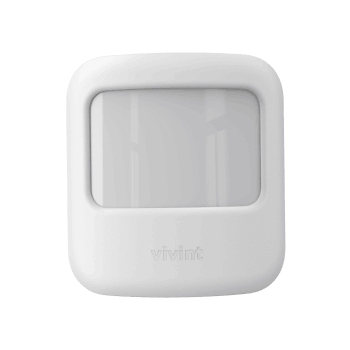
Is your Vivint motion sensor acting up or showing a low battery alert? Changing the battery might be the simple fix you need.
But if you’ve never done it before, the process can seem tricky or confusing. Don’t worry—you’re in the right place. In this guide, you’ll learn exactly how to change your Vivint motion sensor battery quickly and safely. By the end, you’ll feel confident keeping your security system running smoothly without any hassle.
Keep reading to find out how easy it really is!

Credit: www.vivint.com
Signs Of A Dead Battery
Recognizing the signs of a dead battery in your Vivint motion sensor is crucial to maintaining your home security system’s reliability. Ignoring these signs can lead to missed alerts and reduced protection. Let’s look at clear indicators that your motion sensor needs a new battery before it completely fails.
Sensor Alerts And Notifications
Your Vivint system is designed to notify you when a motion sensor’s battery is low. You might receive alerts on your smartphone or through the Vivint control panel. These notifications are your system’s way of asking for attention—don’t ignore them.
Sometimes, the alerts come as intermittent beeps or flashing lights on the sensor itself. Have you ever experienced an unexpected warning and thought it was a glitch? It often signals that the battery is weakening and requires replacement.
Reduced Sensor Performance
A dying battery can cause your motion sensor to work inconsistently. You might notice delayed responses or no detection at all in certain areas. This drop in performance can leave blind spots in your security coverage.
If your sensor triggers false alarms or fails to detect movement reliably, check the battery immediately. Have you checked your sensor’s responsiveness lately? A quick test can save you from security gaps caused by power issues.
Tools Needed For Replacement
Replacing the battery in your Vivint motion sensor requires a few simple tools. Having the right tools ready makes the process quick and safe. This section covers the essential items you need before starting the replacement.
Battery Type Required
The Vivint motion sensor uses a specific battery type. Most models require a CR123A lithium battery. This battery is small, lightweight, and offers long-lasting power. Make sure to buy a fresh, high-quality CR123A battery to ensure your sensor works properly.
Additional Tools
- Small flathead screwdriver – to open the sensor casing carefully.
- Soft cloth – to clean the sensor and avoid damage.
- Gloves – optional, to keep the sensor clean from oils or dirt.
Preparing The Sensor
Begin by turning off the Vivint motion sensor to avoid false alarms. Gently remove it from its mounting to access the battery compartment. Clean the area around the sensor to ensure proper contact and function.
Changing the battery in your Vivint motion sensor is a simple task. Proper preparation ensures a smooth process. Start by gathering all necessary tools. You’ll need a small screwdriver and a new battery. Make sure the new battery is compatible with your Vivint sensor. This preparation step saves time and avoids frustration.Disarming The System
Disarm your Vivint security system first. This prevents false alarms during the battery change. Use your Vivint app or control panel for disarming. Confirm the system is disarmed before continuing.Locating The Sensor
Identify where your Vivint motion sensor is installed. Sensors are typically near doors or high-traffic areas. Check corners or ceilings for the device. Ensure you have easy access to the sensor for battery replacement.
Credit: www.vivint.com
Removing The Old Battery
Removing the old battery from your Vivint motion sensor is simple and quick. Proper removal ensures the sensor keeps working well. This part of the process involves opening the sensor cover and taking out the old battery safely. Follow each step carefully to avoid damage or battery leakage.
Opening The Sensor Cover
Locate the sensor on the wall or ceiling. Hold the sensor firmly and find the small notch or tab on the side. Gently press or slide the tab to unlock the cover. Lift the cover slowly to avoid breaking the plastic. Keep the cover aside on a flat surface to prevent scratches or loss.
Safely Extracting The Battery
Notice the battery inside the sensor compartment. Use your fingers or a small tool to gently lift the battery out. Avoid using sharp objects that may damage the sensor. Place the old battery in a safe container for proper recycling. Do not throw the battery in regular trash to protect the environment.
Installing The New Battery
Installing the new battery in your Vivint motion sensor is a simple task. It ensures your sensor continues working smoothly. Follow the correct process to avoid damage and maintain sensor performance. Handle the battery and sensor carefully for best results.
Inserting The Battery Correctly
Check the battery type before inserting. Match the battery’s positive (+) and negative (-) ends with the sensor’s markings. Place the battery gently inside the compartment. Do not force the battery to avoid damage. Ensure the battery sits flat and secure.
Securing The Sensor Cover
Align the sensor cover with the base carefully. Press the cover firmly until it snaps into place. Make sure there are no gaps or loose edges. A tightly closed cover protects the battery and sensor parts. Test the sensor to confirm it works after closing.
Testing The Sensor
After replacing the battery in your Vivint motion sensor, testing the sensor is a crucial step to ensure it’s working properly. A sensor that isn’t functioning correctly can leave your home vulnerable or trigger false alarms, causing unnecessary stress. Taking a moment to test helps you confirm that your security system is ready to protect your space effectively.
System Re-arming
Once the new battery is installed, you need to re-arm your security system to activate the sensor. This usually involves using your Vivint app or control panel to set the system back to “armed” mode.
Make sure the system status shows “armed” before moving on. If the system doesn’t arm properly, double-check the sensor’s battery placement or connection. Have you ever thought about how a simple missed step here could leave your home unprotected overnight?
Verifying Sensor Functionality
After re-arming, walk in front of the motion sensor to test if it detects movement. You should see a notification or hear an alert depending on your system settings.
If your sensor doesn’t react, try these quick checks:
- Confirm the battery is firmly seated and correctly oriented.
- Look for any obstructions blocking the sensor’s view.
- Restart the sensor by removing and reinserting the battery.
Testing multiple times in different lighting or angles can also help verify consistent detection. What patterns do you notice in your sensor’s responsiveness during testing? This insight can guide you in placing sensors for optimal coverage.
Battery Maintenance Tips
Maintaining the battery of your Vivint motion sensor is key to keeping your security system reliable. Proper care helps avoid sudden sensor failures and unnecessary replacements. Simple habits can keep your sensor powered longer and working well.
Regular Checks
Check the battery level at least once a month. Look for warning signs like slower sensor response or low battery alerts from your Vivint app. Clean the sensor area to prevent dust buildup, which can affect battery contacts. Replace the battery promptly when you see low battery notifications. Keeping a spare battery handy reduces downtime.
Extending Battery Life
- Place sensors away from direct sunlight or heat sources to prevent battery drain.
- Adjust sensor sensitivity to avoid false alarms that waste power.
- Turn off sensors in unused areas during long absences.
- Use high-quality batteries designed for long-lasting performance.
- Ensure batteries fit snugly to avoid poor connections.

Credit: www.youtube.com
Frequently Asked Questions
How Do I Know When Vivint Motion Sensor Battery Is Low?
Vivint motion sensors notify you through the app when the battery is low. You may also notice delayed responses or sensor failures. Regularly check the app to ensure your sensor functions properly and replace the battery promptly when alerted.
What Type Of Battery Does Vivint Motion Sensor Use?
Vivint motion sensors typically use CR123A lithium batteries. These batteries are widely available and provide long-lasting power. Always check your sensor’s manual to confirm the exact battery type before purchasing a replacement.
Is It Hard To Replace Vivint Motion Sensor Battery?
No, replacing the battery is simple and quick. Open the sensor’s cover, remove the old battery, insert a new one, and close the cover. Follow Vivint’s instructions for safe handling and proper installation.
How Often Should I Change Vivint Motion Sensor Battery?
Vivint motion sensor batteries usually last 1 to 2 years. Battery life depends on usage and environmental factors. Monitor your sensor’s performance and replace the battery as soon as you receive a low battery alert.
Conclusion
Changing a Vivint motion sensor battery is simple and quick. Just follow the steps carefully to avoid damage. Keep spare batteries handy to stay prepared. Regular battery checks help keep your system working well. This small task keeps your home safe every day.
Trust the process and act when the sensor alerts you. Staying proactive makes your security system reliable and effective.



