
Have you ever wondered how motion detector lights seem to turn on right when you need them? Whether it’s keeping your home safe or lighting up a dark pathway, these smart lights react instantly to your movement.
But what makes them so quick and reliable? Understanding how motion detector lights work can help you choose the right one and use it to its full potential. Keep reading, and you’ll discover the simple technology behind these clever devices—and how they can make your life easier and safer.

Credit: esysense.com
Basics Of Motion Detector Lights
Motion detector lights provide security and convenience by turning on automatically. They sense movement nearby and activate the light. This simple function helps save energy and improves safety around homes and businesses. Understanding how these lights work begins with the basics of their sensors and detection methods.
Types Of Motion Sensors
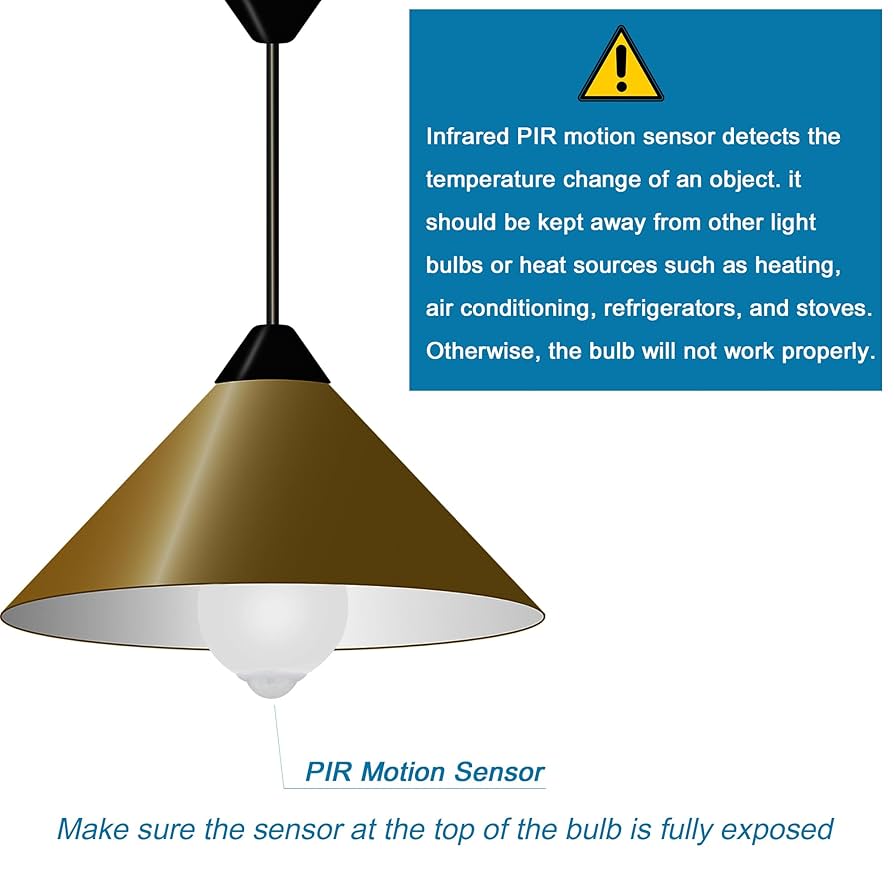
- Passive Infrared (PIR) Sensors:Detect heat emitted by people and animals.
- Ultrasonic Sensors:Use sound waves to detect movement in a space.
- Microwave Sensors:Send microwave pulses and measure reflections from moving objects.
- Dual-Technology Sensors:Combine two types of sensors to reduce false alarms.
How Sensors Detect Movement
Sensors detect changes in their environment to spot motion. PIR sensors notice heat shifts caused by moving bodies. Ultrasonic sensors emit sound waves, then track changes in the reflected waves. Microwave sensors send out microwaves and detect any movement by altered reflections. Dual sensors require both types to trigger the light, increasing accuracy.
Technology Behind Motion Detection
Motion detector lights rely on advanced technology to sense movement and activate lighting. These systems use different types of sensors to detect changes in the environment. Each sensor type has its own way of identifying motion, making motion detector lights effective in various settings.
Infrared Sensors
Infrared sensors detect heat emitted by living beings. When a person or animal moves within range, the sensor picks up the change in infrared radiation. This change triggers the light to turn on. Infrared sensors work best in warm environments and are common in outdoor security lights.
Microwave Sensors
Microwave sensors emit microwave pulses and measure their reflection. Moving objects cause changes in the reflected signal. The sensor detects these changes and activates the light. Microwave sensors cover a larger area and can detect motion through walls or doors.
Ultrasonic Sensors
Ultrasonic sensors send out sound waves at frequencies above human hearing. They listen for echoes bouncing off nearby objects. Movement changes the echo pattern, alerting the sensor. These sensors are sensitive and work well indoors but may be affected by noise.
Dual-technology Sensors
Dual-technology sensors combine two types of detection methods. Usually, they use infrared and microwave sensors together. Both sensors must detect motion to trigger the light. This reduces false alarms and improves accuracy in detecting real movement.
Installation And Placement Tips
Place motion detector lights where they can easily sense movement without obstructions. Position them at a height that covers the desired area for better detection.
Installing motion detector lights can be straightforward, but their effectiveness largely depends on how and where you install them. Proper placement ensures they function optimally, providing security and convenience. Let’s explore some practical tips for installation and placement that can make all the difference in how well your motion detector lights perform.Ideal Locations For Detection
Choosing the right location is key to maximizing the efficiency of your motion detector lights. Place them at entry points like front and back doors, as these are common areas where intrusions could occur. Consider installing them near pathways and driveways to illuminate areas where people frequently walk or drive. Elevate the lights to about 6-10 feet above the ground to capture movement effectively. This height helps to cover a wide area and minimizes blind spots. Remember, the goal is to create a clear path of detection where movement is most likely to occur.Avoiding False Alarms
False alarms can be frustrating and reduce the credibility of your security system. To minimize these, avoid placing lights near objects that might move in the wind, like trees or bushes. Pets can also trigger sensors, so consider your pet’s size and movement when positioning the lights. Adjust the sensitivity settings on your motion detector to balance between detecting human movement and ignoring irrelevant motion. This ensures you’re alerted only to real threats and not to every leaf that blows by.Power Sources And Wiring
Understanding the power source for your motion detector lights is crucial. Hardwired lights provide a stable power supply but may require professional installation if you’re not comfortable with electrical work. Solar-powered options are eco-friendly and easier to install but need direct sunlight to charge efficiently. Battery-operated lights offer flexibility in placement but require regular maintenance to ensure they stay powered. Assess your environment and choose a power source that fits your needs and installation capabilities. Are your current lights providing the security you need, or could a few adjustments enhance their effectiveness? With these tips, you can improve your setup and potentially prevent unwanted incidents.Energy Efficiency And Cost Savings
Motion detector lights offer a smart solution to save energy and reduce costs. They only turn on when movement is detected, cutting down unnecessary electricity use. This makes them an eco-friendly choice for homes and businesses. Using less power means lower electricity bills and a smaller carbon footprint.
Reducing Electricity Usage
Motion detector lights switch off automatically after no movement is found. This limits the time lights stay on, avoiding waste. They replace traditional lights that stay on for hours. This helps save a significant amount of electricity daily. Many users notice a drop in their monthly energy bills.
Smart Lighting Controls
These lights come with adjustable settings for sensitivity and timing. Users can set how long the light stays on after detecting motion. Some models connect with smart home systems for remote control. This allows scheduling and monitoring energy use easily. Smart controls make lighting more efficient and user-friendly.
Enhancing Home Security
Motion detector lights are a powerful tool for boosting your home’s security. They create an immediate response to movement, making your property less appealing to potential intruders. Understanding how these lights enhance security can help you decide where and how to use them effectively around your home.
Deterring Intruders
Motion detector lights activate instantly when they sense movement, startling anyone nearby. This sudden burst of light can scare off intruders before they get too close.
Think about a time when you walked outside at night, and a light suddenly turned on. It made you feel seen and less vulnerable, right? That’s exactly the effect these lights have on trespassers.
Placing motion lights near entry points like doors, windows, and garages creates a visible barrier. Intruders know they risk exposure, making them think twice before attempting a break-in.
Integrating With Security Systems
Motion detector lights don’t just work on their own; they can connect with other security devices. Linking them with alarms or cameras adds layers to your home’s defense.
For example, when a motion light turns on, it can trigger a security camera to start recording. This ensures you capture clear footage of any suspicious activity.
Many smart home systems allow you to control and monitor these lights remotely. You can receive alerts on your phone, giving you peace of mind even when you’re away.

Credit: www.amazon.ca
Smart Features And Connectivity
Modern motion detector lights are no longer just about turning on when movement is detected. Their smart features and connectivity options put you in full control, adding convenience and security to your home. Let’s look at how these advanced capabilities can make your lighting smarter and your life easier.
Mobile App Controls
Many motion detector lights now come with dedicated mobile apps that let you manage your lights from anywhere. You can turn lights on or off, adjust sensitivity, and even check activity logs right on your phone.
This remote access means you’re never left guessing if your lights are working properly. Imagine coming home late at night and switching the lights on before you even step outside. It’s a simple way to boost safety and peace of mind.
Voice Assistant Integration
Connecting your motion detector lights with voice assistants like Alexa or Google Assistant adds another layer of ease. You can control your lights hands-free, which is especially handy when your hands are full or when you’re in a hurry.
Try saying, “Turn on the porch light,” and watch your motion detector light respond instantly. Voice commands can also be combined with routines, so your lights can work together with other smart devices, creating a seamless home environment.
Customizable Settings
Smart motion detector lights often allow you to customize settings based on your specific needs. You can adjust the detection range, light duration, and even set active hours to avoid unnecessary triggering during the day.
For instance, if you have a pet, you can tweak the sensitivity to prevent constant on/off cycles caused by their movement. Customization ensures your lighting system works exactly how you want it, without causing frustration or wasting energy.
Common Issues And Troubleshooting
Motion detector lights are helpful for security and convenience. Sometimes, they stop working well. Problems can come from many causes. Understanding common issues helps fix them fast. Troubleshooting saves time and keeps your lights working properly.
Sensor Sensitivity Problems
Sensors may not detect motion correctly. Too high sensitivity can cause false alarms. Pets, small animals, or moving leaves might trigger the light. Too low sensitivity may miss real movement. Adjust the sensor’s sensitivity setting. Test by walking in front of the sensor. Find a balance that fits your needs.
Lighting Malfunctions
Lights might flicker or not turn on at all. Check the bulb type and wattage. Use bulbs compatible with motion sensors. Loose wiring can cause failures. Inspect wiring connections carefully. Power surges or outages can reset the system. Try turning the light off and on again to reset.
Maintenance Tips
- Keep the sensor lens clean from dirt and dust.
- Trim nearby plants or branches blocking the sensor.
- Replace old or damaged bulbs promptly.
- Check the mounting position to avoid false triggers.
- Test the sensor regularly to ensure proper function.

Credit: callgenesiselectrical.com
Frequently Asked Questions
How Do Motion Detector Lights Sense Movement?
Motion detector lights use infrared sensors to detect body heat and movement. When a person or animal moves within range, the sensor triggers the light to turn on instantly, enhancing security and energy efficiency.
What Types Of Sensors Are In Motion Detector Lights?
Most motion detector lights use Passive Infrared (PIR) sensors. Some models also include microwave or ultrasonic sensors for improved detection accuracy and broader coverage areas.
How Far Can Motion Detector Lights Detect Motion?
Detection range varies by model but typically ranges from 20 to 70 feet. Some advanced lights can sense movement up to 100 feet, depending on sensor quality and installation height.
Can Motion Detector Lights Save Energy?
Yes, they save energy by turning on lights only when motion is detected. This prevents lights from staying on unnecessarily, reducing electricity usage and lowering energy bills.
Conclusion
Motion detector lights sense movement to turn on lights automatically. They use sensors to detect heat or motion nearby. This helps save energy and improves safety around your home. You don’t need to switch lights on or off manually. These lights work well for security and convenience.
Choosing the right sensor and light type matters. Understanding how they function helps you use them better. Motion detector lights make your space safer and easier to navigate. Simple, smart, and useful.



