
Is your dimmable desk lamp flickering or not shining as bright as it used to? Replacing the bulb might be easier than you think.
But if you’re unsure about which bulb to choose or how to handle the dimmer feature, this guide is made just for you. Keep reading, and you’ll learn simple, step-by-step tips to swap out your lamp bulb quickly and safely—bringing back the perfect light for your workspace in no time.
Don’t let a dull lamp slow you down; let’s get your desk glowing again!
Credit: www.amazon.com
Check Bulb Compatibility
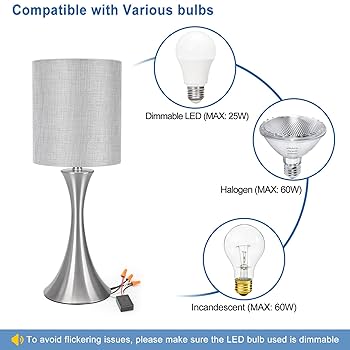
Checking bulb compatibility is vital before replacing a dimmable desk lamp bulb. The right bulb ensures proper function and prevents damage. It also maintains the dimmer’s smooth operation. Understanding what bulb type fits and if it works with your dimmer saves time and money.
Identify Bulb Type
Look at the lamp or old bulb to find the bulb type. Common types include LED, incandescent, halogen, and CFL. The lamp may have a label showing the required bulb type. The bulb base size also matters, such as E26 or GU10. Using the correct type and base ensures the bulb fits and works properly.
Confirm Dimmer Compatibility
Not all bulbs work with dimmers. Check if the bulb packaging states “dimmable.” LED bulbs need special dimmable versions. Using a non-dimmable bulb with a dimmer can cause flickering or damage. Match the bulb’s dimming type with your dimmer switch. Some dimmers only support certain bulb types. This step guarantees smooth dimming and longer bulb life.

Credit: manuals.plus
Gather Necessary Tools
Before you replace your dimmable desk lamp bulb, gathering the right tools is essential. Having everything ready saves time and prevents frustration during the process. It also helps ensure you handle the bulb safely and correctly, avoiding damage or injury.
List Of Tools Needed
- Replacement bulb:Make sure it’s compatible with your dimmable lamp.
- Screwdriver:Usually a Phillips head, to remove any screws holding the lamp cover or shade.
- Gloves:Cotton or latex gloves protect the bulb from oils on your skin.
- Soft cloth or microfiber towel:To clean the lamp and bulb area before installation.
- Voltage tester (optional):To confirm the lamp is not live before handling electrical parts.
When I replaced a bulb in my dimmable desk lamp, not having gloves made the process tricky. The oils from my fingers left smudges, which affected the bulb’s lifespan. Having gloves ready prevents this issue and keeps your new bulb in top shape.
Safety Precautions
Your safety should always come first. Before touching the lamp or bulb, unplug the lamp from the wall socket to avoid any risk of electric shock. Even if the lamp is off, it can still carry current when plugged in.
Use the voltage tester if you’re unsure whether the lamp is completely powered off. Avoid forcing any parts that seem stuck; instead, check for hidden screws or clips. These small steps reduce the risk of injury and damage to your lamp.
Have you ever noticed how easy it is to overlook simple safety steps when you’re in a hurry? Taking a moment to prepare properly can prevent accidents and save you from costly repairs later.
Turn Off Power
Ensure the desk lamp is completely powered off before starting. This prevents electric shock and keeps you safe while changing the bulb.
Turning off the power is the first and most crucial step when replacing a dimmable desk lamp bulb. Safety should always be your priority, and ensuring that no electricity is flowing through the lamp can prevent accidents. Imagine the shock—both literal and figurative—of accidentally touching a live wire. Let’s make sure that doesn’t happen.Unplug The Lamp
Start by unplugging the lamp from the outlet. This simple action cuts off the electricity supply, making it safe to proceed with the bulb replacement. If your lamp is part of a setup with other devices, be mindful of which plug belongs to which gadget. A label on the plug can save you time and confusion.Double Check Power Status
After unplugging, double-check that the lamp is indeed disconnected from any power source. A quick look at the outlet can confirm this. If you have other lamps or devices nearby, make sure they are not connected to the same power strip that might still be on. This double-checking step ensures no residual power is flowing. Have you ever noticed how often we overlook the simplest things? Ensuring the power is off might seem obvious, but it’s a step many skip, leading to unnecessary risks. Always double-check for peace of mind.
Credit: www.familyhandyman.com
Remove Old Bulb
Removing the old bulb from your dimmable desk lamp is a straightforward task, but it requires careful attention to avoid damage or injury. Before you begin, make sure the lamp is unplugged and cool to the touch. Handling the bulb gently will ensure the socket and wiring remain intact for the new bulb.
Access The Bulb
First, clear any obstacles around your desk lamp to give yourself enough space to work comfortably. Some lamps have shades or covers that need to be removed or lifted to reach the bulb. Check if your lamp has clips, screws, or a simple twist mechanism holding the cover in place.
Once the cover is off, you’ll have a clear view of the bulb. Take a moment to observe how the bulb is seated—this helps you understand how to remove it safely. Have you noticed how some bulbs sit tighter than others? That’s normal, but don’t force anything.
Unscrew Or Unclip Bulb
Depending on the bulb type, you will either unscrew it by turning it counterclockwise or unclip it if it has a bayonet base. Hold the bulb gently but firmly to avoid dropping it. If it resists, try wiggling it slightly while turning or unclipping to loosen it.
Keep in mind that some dimmable bulbs are more delicate due to their internal components. If you feel unusual resistance or hear a crack, stop immediately and reassess. Have you ever broken a bulb during removal? Taking it slow can save you from that hassle.
Finally, place the old bulb somewhere safe for disposal or recycling. Remember, proper removal sets the foundation for installing your new, brighter bulb without issues.
Install New Bulb
Installing a new bulb in your dimmable desk lamp requires care and attention. Proper installation ensures the bulb works well and lasts longer. Follow simple steps to insert and secure the bulb correctly. This process keeps your lamp safe and bright.
Insert Bulb Properly
Hold the new bulb by its base to avoid damage. Align the bulb’s base with the socket carefully. Push the bulb gently into the socket without forcing it. Turn the bulb clockwise until it fits snugly. Avoid touching the glass part of halogen bulbs. Oils from your skin can reduce bulb life.
Secure Bulb In Place
Check that the bulb sits firmly in the socket. Wiggle it slightly to confirm it is secure. If your lamp has a cover or shade, replace it carefully. Tighten any screws or fasteners that hold the bulb or shade. A secure bulb reduces flickering and improves lamp safety.
Test The New Bulb
Testing the new bulb is a crucial step after replacement. It confirms that the bulb works well and fits your dimmer setup perfectly. This phase can reveal any issues early, saving you from unnecessary frustration later.
Plug In And Turn On
Start by plugging your desk lamp back into the power outlet. Then, switch the lamp on to see if the new bulb lights up immediately.
If the bulb doesn’t glow, double-check the bulb’s seating in the socket. Sometimes, a loose connection is the culprit. Also, verify that the bulb type matches your lamp’s requirements.
Adjust Dimmer Settings
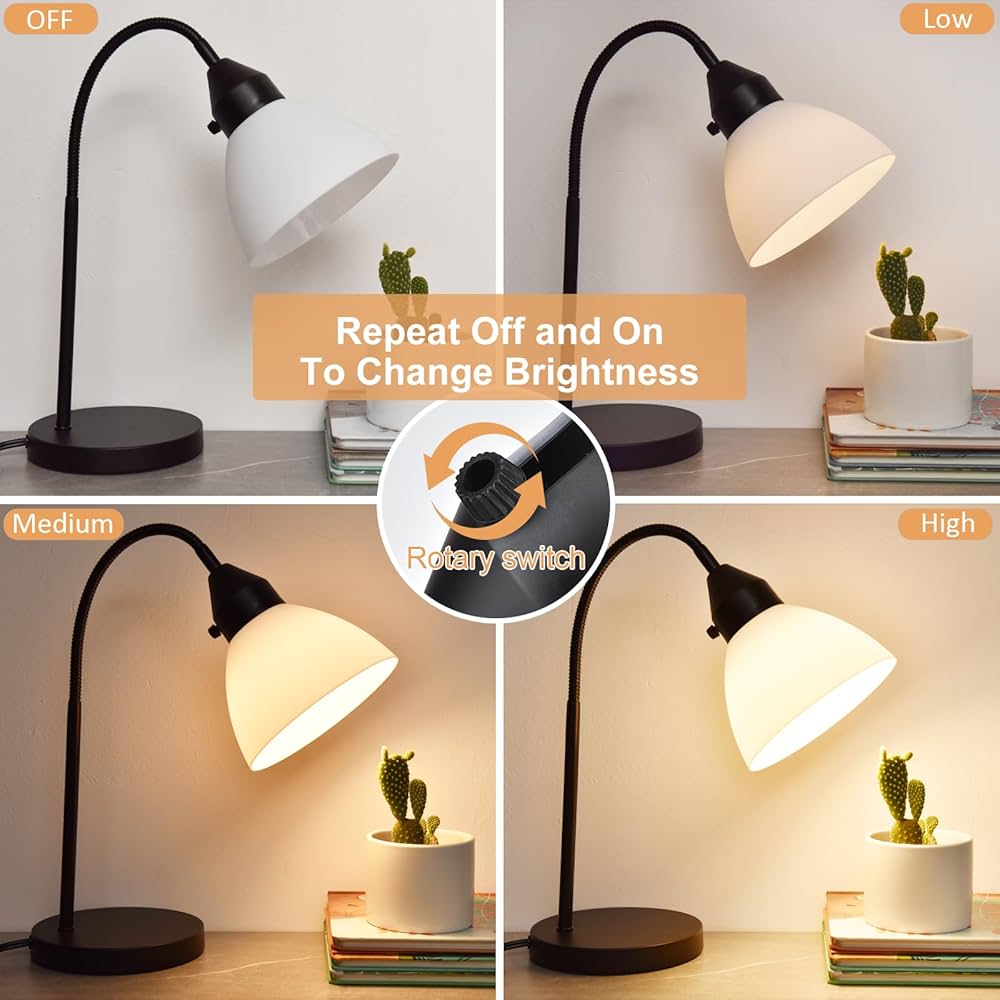
With the lamp on, slowly adjust the dimmer control. Watch how the light intensity changes to make sure the bulb responds smoothly.
If the bulb flickers or doesn’t dim correctly, the bulb might not be fully compatible with the dimmer. Have you noticed any strange buzzing sounds or inconsistent brightness? These signs mean it’s time to reconsider your bulb choice.
Proper testing ensures your desk lamp works efficiently and creates the perfect lighting atmosphere for your workspace.
Troubleshoot Common Issues
Troubleshooting common issues with dimmable desk lamp bulbs can save time and effort. Problems like bulbs not lighting or flickering often have simple fixes. Understanding these issues helps maintain your lamp’s performance and extends bulb life.
Bulb Not Lighting
Check if the bulb is properly screwed in. A loose bulb often causes no light.
Confirm the power source is working. Test the outlet with another device.
Inspect the dimmer switch. Some dimmers need specific bulb types to work.
Try replacing the bulb with a new one. The old bulb may be burnt out.
Flickering Or Dim Problems
Flickering can occur if the bulb is incompatible with the dimmer switch.
Use bulbs labeled as dimmable for best results.
Check the wiring connections. Loose wires cause flickering or dim light.
Clean the bulb socket. Dust or corrosion can disrupt the connection.
Adjust the dimmer knob slowly. Sudden changes can cause flickering.
Frequently Asked Questions
What Type Of Bulb Suits A Dimmable Desk Lamp?
Use LED or incandescent bulbs labeled dimmable. Check the lamp’s specifications for compatible wattage and base type. Using non-dimmable bulbs can damage the lamp or cause flickering. Always choose bulbs designed for dimming to ensure smooth brightness control.
How To Safely Replace A Dimmable Desk Lamp Bulb?
Turn off and unplug the lamp before replacing the bulb. Allow the old bulb to cool down to avoid burns. Gently unscrew the old bulb and replace it with a compatible dimmable one. Avoid touching the bulb glass with bare hands.
Can I Use Led Bulbs In Dimmable Desk Lamps?
Yes, but ensure the LED bulbs are specifically dimmable. Non-dimmable LEDs may flicker or fail prematurely. Dimmable LEDs provide energy efficiency and adjustable brightness, perfect for desk lamps. Always verify compatibility with your lamp’s dimmer switch.
Why Is My Dimmable Desk Lamp Bulb Flickering?
Flickering often occurs due to incompatible bulbs or a faulty dimmer switch. Ensure the bulb is dimmable and matches the lamp’s wattage rating. Loose connections or electrical issues can also cause flickering. Replace bulbs or check wiring if flickering persists.
Conclusion
Replacing a dimmable desk lamp bulb is simple and quick. Choose the right bulb that fits your lamp’s dimmer. Turn off the lamp and let the bulb cool before handling it. Unscrew the old bulb carefully and screw in the new one.
Test the lamp to make sure the dimmer works well. Regularly check your lamp to keep it working smoothly. This small task helps your desk stay bright and comfortable. Now, enjoy your well-lit workspace without any hassle.



