
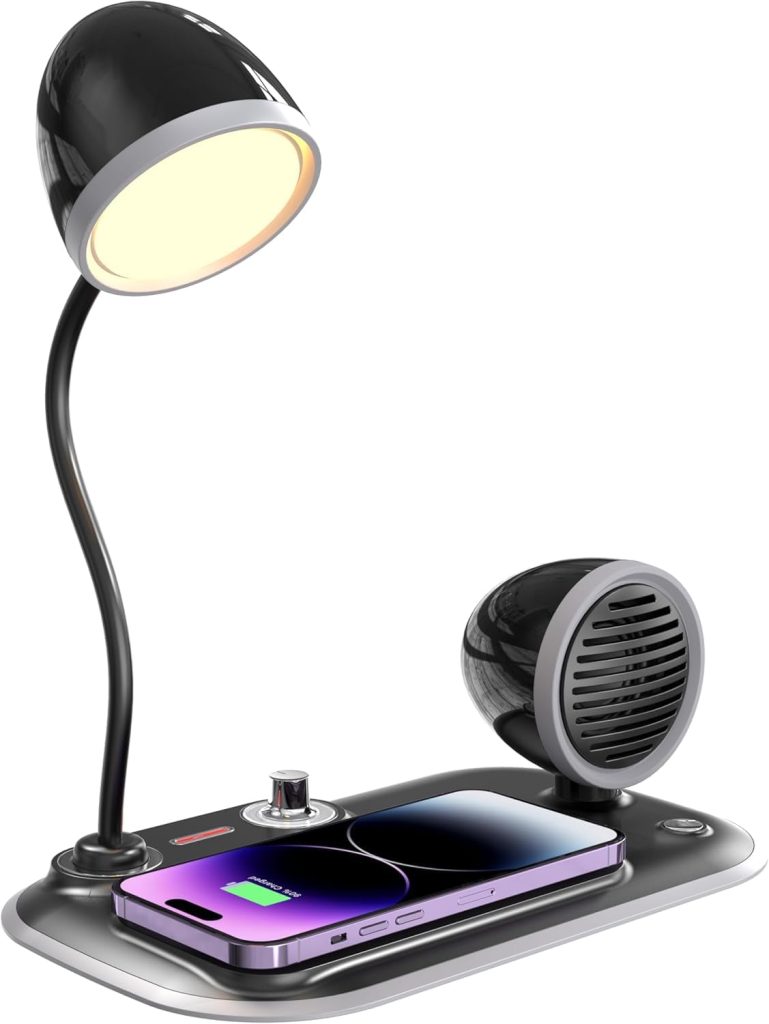
Are you tired of cluttered desks and tangled charging cables? Imagine having a sleek desk lamp that not only lights up your workspace but also charges your phone wirelessly.
The Mainstays LED Wireless Charging Desk Lamp is designed to make your life easier and your desk cleaner. In this guide, you’ll discover how to use this smart lamp to brighten your room and power up your devices effortlessly. Keep reading to unlock the full potential of your new desk companion.

Credit: www.walmart.com
Features Of Mainstays Led Desk Lamp
The Mainstays LED Wireless Charging Desk Lamp offers a blend of modern technology and practical design. It enhances your workspace with efficient lighting and smart features. This lamp is built to improve comfort and convenience during work or study sessions.
Led Lighting Benefits
The lamp uses LED bulbs that save energy and last longer than regular bulbs. LEDs provide bright, clear light without flickering. This helps reduce eye strain during long hours of reading or working. The light is also cool to touch, ensuring safety.
Wireless Charging Pad
It includes a built-in wireless charging pad on the lamp base. You can charge your phone or other compatible devices without cables. Just place your device on the pad, and it starts charging immediately. This feature keeps your desk tidy and organized.
Adjustable Brightness Settings
The desk lamp offers multiple brightness levels to suit different needs. You can easily adjust the light intensity with a touch control. This allows you to create the perfect lighting for reading, writing, or relaxing. Soft light for calm moments, bright light for focused tasks.
Ergonomic Design
The lamp features a flexible arm and head for easy adjustment. You can direct light where you need it the most. Its compact base saves space and keeps your desk clutter-free. The design supports good posture and reduces neck strain during work.
Setting Up The Desk Lamp
Setting up the Mainstays LED wireless charging desk lamp is simple and quick. Proper setup ensures the lamp works efficiently and fits your workspace perfectly. This section guides you through the essential steps for a smooth start.
Unboxing And Assembly
Open the box carefully to avoid damaging any parts. Inside, you will find the lamp base, lamp head, power adapter, and user manual. Lay all pieces on a flat surface for easy access.
Attach the lamp head to the base by aligning the connectors. Press gently until you hear a click, indicating a secure fit. No tools are needed for assembly.
Power Connection
Locate the power adapter and plug it into the lamp’s power port. Connect the other end to a wall outlet. Use only the provided adapter for safe operation.
Check that the power cord is not stretched or tangled. This prevents damage and keeps your desk tidy. The lamp will light up when powered on.
Positioning The Lamp
Place the lamp on a flat, stable surface near your workspace. Ensure the wireless charging pad is easily accessible for your devices. Avoid placing the lamp too close to walls or objects that block light.
Adjust the lamp head angle to direct light where you need it. This improves visibility and reduces eye strain. Test the lamp’s brightness and charging function before finalizing its position.
Using The Wireless Charging Feature
Place your Qi-enabled device on the lamp’s charging pad to start wireless charging instantly. Ensure the device is centered for efficient power transfer. This desk lamp combines lighting and charging for a neat workspace.
Using the wireless charging feature of the Mainstays LED Wireless Charging Desk Lamp is both convenient and efficient. Imagine reducing clutter and tangles of cords while keeping your devices powered throughout the day. This feature effortlessly combines modern technology with practical everyday use, making it a must-have for your desk setup.Compatible Devices
Before using the wireless charging feature, ensure that your device is compatible. Most modern smartphones such as the iPhone series from 8 onwards and many Android devices support wireless charging. Check your device specifications to avoid any charging issues.Charging Placement Tips
Proper placement is key to effective wireless charging. Make sure the phone’s charging coil aligns with the lamp’s charging pad. A slight misalignment can hinder charging efficiency, so take a moment to adjust if necessary. You might notice that removing phone cases can enhance charging speed. If your device isn’t charging, try repositioning it slightly.Charging Indicator Lights
The Mainstays LED Desk Lamp includes charging indicator lights to show you when your device is charging. A solid light typically means charging is in progress, while a blinking light might indicate a problem. Are you attentive to these small signals? They can save you time and ensure your device is ready when you need it. By understanding these simple tips, you can make the most of your Mainstays LED Wireless Charging Desk Lamp. Why struggle with cords when you can embrace this hassle-free charging solution?
Credit: www.walmart.com
Operating The Led Light
Operating the LED light on the Mainstays LED Wireless Charging Desk Lamp is straightforward and designed to fit seamlessly into your daily routine. Understanding how to control the light’s power, brightness, and timer features will help you create the perfect ambiance for work or relaxation. Let’s walk through the simple controls that make this lamp both functional and user-friendly.
Turning On And Off
To turn the lamp on or off, simply tap the touch-sensitive button located on the base or the lamp arm. The response is immediate, so you won’t have to wait or press multiple times. This touch control keeps the design sleek and eliminates the need for bulky switches.
Have you ever struggled with fumbling for a switch in dim light? This lamp’s touch control solves that problem with ease.
Adjusting Brightness Levels
The brightness can be adjusted smoothly by holding the same touch button. Press and hold to cycle through different light intensities until you find the perfect setting. This gives you multiple levels to choose from, whether you need a soft glow or bright task lighting.
Try experimenting with the brightness throughout your day. You might notice how softer light helps you relax, while brighter light boosts focus during work hours.
Using Timer Functions
This lamp includes convenient timer settings to automatically turn off the light after a set period. You can activate the timer by pressing the timer button once, which will turn off the light after 30 minutes. Pressing the button multiple times can extend this to 60 or 90 minutes, depending on your preference.
Setting a timer is perfect for those moments when you want the light on as you wind down but don’t want to worry about switching it off later. It’s a simple way to save energy without extra effort.
Maintenance And Care
Taking care of your Mainstays LED Wireless Charging Desk Lamp is essential to keep it working smoothly and looking great. Regular maintenance can extend its life and ensure you always have reliable light and charging power right at your desk. Let’s break down some simple steps you can take to maintain and care for your lamp effectively.
Cleaning The Lamp
Dust and fingerprints can quickly dull the lamp’s appearance and affect its performance. Use a soft, dry microfiber cloth to wipe the surface gently. Avoid harsh chemicals or abrasive materials that might scratch the finish or damage the LED panel.
If the lamp has stubborn spots, slightly dampen the cloth with water, but never apply liquid directly to the lamp. Pay special attention to the charging pad area—keeping it clean ensures your devices charge efficiently. How often do you clean your desk accessories? Even a quick wipe once a week can make a big difference.
Troubleshooting Common Issues
If the lamp doesn’t turn on or the wireless charging stops working, start by checking the power connection. Sometimes, the cord can become loose or unplugged without you noticing. Also, ensure your device is correctly positioned on the charging pad—misalignment can prevent charging.
Another common issue is flickering or dimming light, which could be caused by a faulty bulb or internal wiring. If you experience this, try unplugging the lamp for a few minutes and then reconnecting it. Persistent problems might mean it’s time to inspect the lamp more closely or seek replacement parts.
Replacing Parts
Parts like LED bulbs or the power adapter might need replacement after extended use. The good news is that Mainstays lamps often use standard components that you can find easily online or at local stores. Before buying, check your lamp’s model number to ensure compatibility.
When replacing parts, always unplug the lamp first to avoid electric shock. If you’re unsure about how to change a part, many online tutorials provide step-by-step guidance. Taking the time to replace worn components can save you money and keep your lamp functioning like new.
Credit: www.walmart.com
Maximizing Productivity With The Lamp
The Mainstays LED Wireless Charging Desk Lamp offers more than just light. It creates a workspace that supports focus and efficiency. Using this lamp smartly can improve your work output and comfort. Bright, clear lighting reduces eye strain and keeps you alert. The built-in wireless charger means fewer cords and more space for your tools. Combine these features to make your desk both practical and neat.
Ideal Lighting For Workspaces
Good lighting helps you see clearly and work longer without fatigue. The Mainstays lamp provides adjustable brightness levels. Choose a setting that suits your task, whether reading or typing. The LED light mimics natural daylight, which is easy on the eyes. Position the lamp to avoid glare or shadows on your work area. This setup keeps your focus sharp and your eyes comfortable.
Combining Lighting And Charging
The wireless charging base is a smart addition to your desk. It powers your phone or wireless earbuds without extra cables. Keep your devices close and ready without disrupting your workspace. This feature reduces clutter and saves time searching for chargers. Place your phone on the pad while working to stay connected and charged.
Energy Efficiency Tips
Save energy by turning off the lamp when not in use. Use the timer feature to set automatic shutoff times. Choose the lowest brightness that still lets you work comfortably. LED lights consume less power than traditional bulbs. These small steps help reduce your electricity bill and your carbon footprint.
Frequently Asked Questions
How Do I Set Up The Mainstays Led Wireless Charging Desk Lamp?
To set up, plug the lamp into a power source using the provided adapter. Place your Qi-enabled device on the lamp’s charging pad. Adjust the lamp angle for optimal lighting. No additional software is needed.
What Devices Are Compatible With This Desk Lamp Charger?
The lamp supports Qi-enabled smartphones and devices like iPhones and Samsung Galaxy models. Check your device’s wireless charging compatibility before use. Non-Qi devices will not charge wirelessly.
How Do I Adjust The Brightness On The Mainstays Lamp?
Touch the lamp’s control panel to cycle through brightness levels. It offers multiple brightness settings for different lighting needs. The lamp remembers your last brightness setting when turned off.
Is The Wireless Charging Safe For My Phone?
Yes, the lamp uses standard Qi wireless charging technology. It prevents overheating and overcharging with built-in safety features. Always use the original charging cable and adapter for best results.
Conclusion
The Mainstays LED Wireless Charging Desk Lamp offers great convenience. It lights your workspace and charges your phone at once. Using it is simple and saves desk space. Adjust the lamp to fit your needs easily. Keep your devices powered without extra cords.
This lamp blends well with any room style. A practical choice for study or work areas. Try it out to enjoy hands-free charging and bright light.



