
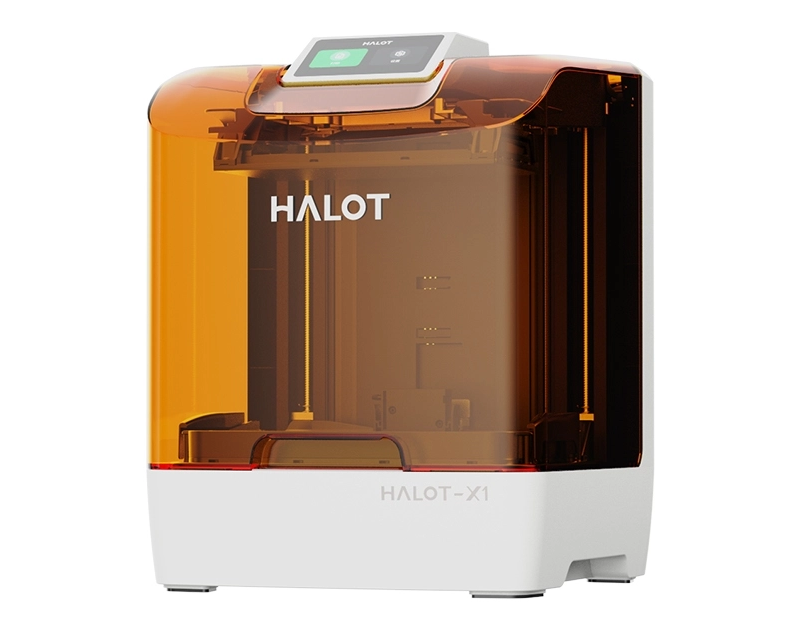
Are you wondering if your 3D printer needs ventilation? It’s a question many users overlook but one that can impact your health and the quality of your prints.
Breathing in fumes from certain printing materials can be harmful, and poor air circulation might cause your workspace to feel stuffy or even damage your equipment. If you want to protect yourself and get the best results from your 3D printer, understanding ventilation is key.
Keep reading to discover why ventilation matters and how you can set it up safely and effectively.

Credit: www.reddit.com
Why Ventilation Matters
Understanding why ventilation is crucial for your 3D printing setup can save you from unexpected health issues and equipment damage. The process of 3D printing releases various emissions that can affect the air quality in your workspace. Without proper ventilation, these pollutants build up, turning your creative zone into a potential hazard.
Emissions From 3d Printing
3D printers, especially those using materials like ABS or PLA, release tiny particles and gases during printing. These include ultrafine particles (UFPs) and volatile organic compounds (VOCs), which you cannot see but can easily inhale. The concentration of these emissions increases in a closed room, making it essential to have good airflow.
Have you noticed any lingering odors or a slight haze around your printer? Those are signs of emissions accumulating. Simple steps like opening a window or using an exhaust fan can drastically reduce these airborne particles.
Health Risks Of Poor Air Quality
Breathing in the emissions from 3D printing over time can cause headaches, dizziness, and irritation of the eyes, nose, and throat. For people with asthma or other respiratory issues, poor air quality can trigger more serious problems. Even if you feel fine now, repeated exposure could affect your lung health in the long run.
Ask yourself: Are you willing to risk your health for convenience? Setting up proper ventilation doesn’t have to be complicated or expensive. A simple air purifier or venting system can protect your well-being and keep your printing environment safe.
Types Of 3d Printers And Ventilation Needs
Understanding the different types of 3D printers helps you decide how to manage ventilation effectively. Each printer type releases different particles and fumes during printing. Knowing these differences allows you to protect your health and maintain a safe workspace.
Fdm Printers
Fused Deposition Modeling (FDM) printers use heated plastic filament to build objects layer by layer. The heating process can release ultrafine particles and volatile organic compounds (VOCs) into the air.
You might notice a faint plastic smell during printing, especially with ABS filament. This odor signals the presence of fumes that may irritate your eyes or respiratory system if not vented properly.
Good ventilation or an enclosure with a filter system is recommended when using FDM printers, particularly in small or poorly ventilated rooms. Have you ever felt dizzy or experienced headaches after long printing sessions? That’s a sign you need better air circulation.
Resin Printers
Resin printers use liquid photopolymer resins cured by UV light to create objects. These resins emit strong fumes during printing, which can cause skin irritation or respiratory issues.
The smell from resin printers is more pungent and noticeable compared to FDM printers. Ventilation is crucial here to avoid breathing in harmful chemicals.
Setting up your resin printer in a well-ventilated area or using an air purifier with activated carbon filters can significantly reduce exposure. Have you checked if your workspace has enough airflow before starting a resin print?
Sls And Other Technologies
Selective Laser Sintering (SLS) uses powdered materials fused by lasers. While it produces fewer fumes, fine powders can become airborne and pose inhalation risks.
Other technologies like Multi Jet Fusion (MJF) or Electron Beam Melting (EBM) also involve powders or metals, which require specialized ventilation and safety measures.
Using enclosed machines with built-in filtration or working inside dedicated ventilation booths helps minimize risks. Do you know what kind of particles your printer releases and how you are protecting yourself from them?
Safe Ventilation Options
Safe ventilation is essential for maintaining a healthy environment while using a 3D printer. Proper airflow reduces harmful fumes and particles released during printing. Choosing the right ventilation method helps protect your lungs and keeps the air clean. Here are some safe options to consider for ventilating your 3D printing area.
Natural Ventilation
Natural ventilation uses open windows and doors to bring fresh air inside. It works best in rooms with good airflow and cross-ventilation. This method is simple and cost-free. Keep windows open during printing to let fumes escape. Use fans near windows to push stale air out. Natural ventilation reduces the buildup of harmful gases. It is an easy way to improve air quality without extra equipment.
Using Exhaust Fans
Exhaust fans remove fumes directly from the printing area. Install fans near the printer or on a window. Fans pull out contaminated air and push it outside. This method is effective at controlling odors and particles. Choose a fan with enough power for your room size. Make sure the exhaust leads outdoors, not into another room. Exhaust fans help keep the air fresh and safe to breathe.
Air Purifiers And Filters
Air purifiers clean the air by trapping dust, fumes, and chemicals. Look for purifiers with HEPA and activated carbon filters. HEPA filters catch tiny particles released during printing. Carbon filters absorb harmful gases and odors. Place the purifier close to your 3D printer for best results. This option works well when outdoor ventilation is limited. Air purifiers improve indoor air quality without moving air outside.

Credit: www.reddit.com
Setting Up A Ventilated Workspace
Setting up a ventilated workspace is crucial for safe 3D printing. Proper ventilation reduces harmful fumes and keeps the air clean. This helps protect your health and improves print quality. Focus on choosing the right location, maintaining airflow, and monitoring air quality for the best results.
Choosing The Right Location
Select a space with good natural ventilation. Rooms with windows or vents work well. Avoid small, closed rooms without airflow. Keep the printer away from areas where people spend long periods. Place it on a stable surface to prevent accidents.
Maintaining Proper Airflow
Use fans or exhaust systems to move air out. Position fans near windows or vents to push fumes outside. Avoid blocking airflow paths with furniture or boxes. Circulate fresh air regularly to prevent buildup of harmful gases. A simple desk fan can help in small spaces.
Monitoring Air Quality
Use an air quality monitor to track fumes and particles. Check for volatile organic compounds (VOCs) and dust levels. Set alerts for unsafe conditions to act quickly. Regularly clean filters and ventilation equipment. Keep a log of air quality to spot trends and issues early.
Additional Safety Measures
Proper ventilation reduces harmful fumes and keeps air fresh during 3D printing. Using filters and fans adds extra protection for safe printing.
Ensuring proper ventilation is crucial when operating a 3D printer, but it’s not the only safety measure you should consider. There are additional steps you can take to enhance safety in your 3D printing workspace. Let’s explore some practical actions you can implement to create a secure environment for both you and your printer.Personal Protective Equipment
Wearing the right personal protective equipment (PPE) can prevent a range of accidents. Safety goggles protect your eyes from harmful particles or unexpected splashes of resin. Gloves can also be essential, especially when handling certain materials that may irritate the skin. Consider a dust mask if you’re working with materials that emit fine particles. Even if the printer is in a well-ventilated area, a mask can provide an additional layer of protection. Remember, your safety comes first, so equip yourself with the necessary gear.Handling Materials Safely
Handling materials with care is key to avoiding mishaps. Always read the material’s safety data sheet (SDS) for specific handling instructions. For instance, some filaments may require storage in a dry environment to maintain their quality. When mixing or changing materials, ensure your workspace is clean and organized. This minimizes the risk of accidental contamination or spills. Keeping materials in labeled containers can also help you quickly identify them and understand their safety requirements.Regular Maintenance And Cleaning
Regular maintenance of your 3D printer ensures it runs smoothly and safely. Dust and debris can accumulate, affecting performance and safety, so make it a habit to clean your printer after use. A simple brush or vacuum can help remove any unwanted particles. Check moving parts for wear and tear, and replace them if necessary. This not only extends the life of your printer but also keeps it operating safely. Scheduled maintenance can prevent unexpected breakdowns and ensure a consistent output quality. By following these additional safety measures, you can create a safer and more efficient 3D printing environment. What steps will you take to enhance safety in your workspace?Common Mistakes To Avoid
Many people overlook key factors when setting up 3D printers. Mistakes related to ventilation can cause health risks and damage to equipment. Avoiding these errors ensures a safer and more efficient printing experience.
Ignoring Ventilation Requirements
Some users believe 3D printers do not need special ventilation. This is risky because printing releases fumes and particles. Poor air flow can cause breathing problems and lingering odors. Always check the printer’s ventilation needs before use. Use exhaust fans or open windows for fresh air.
Overlooking Material Safety Data
Each printing material has different safety guidelines. Ignoring these can expose you to harmful chemicals. For example, ABS emits more toxic fumes than PLA. Reading safety data sheets helps you choose safe materials. Use recommended ventilation for the specific filament type.
Neglecting Workspace Hygiene
Dust and leftover filament bits can build up around the printer. This dirt can block air vents and reduce ventilation efficiency. Clean the workspace regularly to prevent dust accumulation. Proper hygiene supports better air quality and printer performance.

Credit: www.reddit.com
Frequently Asked Questions
Does A 3d Printer Produce Harmful Fumes?
Yes, many 3D printers emit ultrafine particles and volatile organic compounds. Proper ventilation reduces exposure to these potentially harmful fumes.
How Important Is Ventilation For 3d Printing Safety?
Ventilation is crucial to remove toxic particles and gases. It ensures a safer environment for users and prevents respiratory issues.
Can I Use A 3d Printer Indoors Without Ventilation?
Using a 3D printer indoors without ventilation is not recommended. It can lead to poor air quality and health risks over time.
What Ventilation Methods Work Best For 3d Printers?
Using exhaust fans, air purifiers with HEPA filters, or printing in well-ventilated rooms are effective ways to reduce fumes and particles.
Conclusion
3D printers release fumes that can affect air quality. Good ventilation helps keep the air clean and safe. It also reduces smells and heat from the printer. Ventilation protects your health and your home. Small rooms or closed spaces need extra care.
Use fans, open windows, or air filters for best results. Ventilating your 3D printing area is a smart choice. It makes printing safer and more comfortable for everyone. Remember, fresh air helps you enjoy your 3D projects more.



