
Are you tired of your motion sensor light turning on at the wrong times? Maybe it wakes you up in the middle of the night or drains your battery when you don’t need it.
Learning how to disable your motion sensor light can save you frustration and give you full control over your lighting. You’ll discover simple steps to turn off that motion sensor quickly and easily. Keep reading, and you’ll never have to deal with unwanted light again.

Credit: www.youtube.com
Types Of Motion Sensor Lights
Motion sensor lights come in different types, each designed to detect movement using various technologies. Understanding these types helps you choose the right one for your space or troubleshoot issues effectively. Let’s look at the common types you might encounter and how they work.
Infrared Sensors
Infrared sensors detect heat emitted by people or animals. When a warm body moves within the sensor’s range, it triggers the light to turn on. These sensors work best in environments where temperature contrasts are clear, like outdoors at night.
One thing I noticed is that infrared sensors sometimes fail to detect slow movements or people wearing heavy clothing that blocks heat signals. Have you ever wondered why your porch light didn’t activate despite you walking right in front of it? It might be because of this limitation.
Ultrasonic Sensors
Ultrasonic sensors use sound waves to detect motion. They emit high-frequency sound that bounces off objects and returns to the sensor. When the pattern of the returned sound waves changes, the sensor knows something moved.
These sensors can catch movement even in complete darkness, which is a big advantage indoors. However, they might get triggered by vibrations or even small pets, which can be annoying. Would you want your lights turning on just because a breeze moved a curtain?
Dual-technology Sensors
Dual-technology sensors combine infrared and ultrasonic methods to minimize false triggers. Both sensors need to detect movement for the light to activate, making these models more accurate and reliable. This is especially useful if you want to avoid random light flickering caused by environmental factors.
Using dual sensors can save energy and reduce frustration, but they often come at a higher price. If you’re tired of your motion sensor light turning on at odd times, investing in a dual-technology sensor might solve that problem for you.
Reasons To Disable Motion Sensor Lights
Motion sensor lights can be incredibly useful, but there are times when disabling them makes more sense. Understanding the reasons behind turning off these lights can help you decide if this is the right move for your home or business. Whether it’s about avoiding unnecessary interruptions or saving on costs, knowing the key factors can guide you effectively.
False Alarms
One of the biggest annoyances with motion sensor lights is false alarms. These lights can turn on due to passing cars, pets, or even swaying trees. If you’ve ever been startled by lights flashing on for no reason, you know how frustrating this can be.
Repeated false alarms can drain the light’s bulb faster and reduce its overall lifespan. Have you noticed your lights flickering when there’s no one around? This might be why.
Energy Savings
Although motion sensor lights are designed to save energy, sometimes they can work against this goal. Lights triggered by irrelevant movement waste electricity and increase your utility bills. Turning off the sensor can help you control when and how the light operates.
If you prefer to switch lights on manually during specific times, disabling the sensor might actually reduce unnecessary energy use. Are your lights staying on longer than you want? Disabling the sensor could be the solution.
Privacy Concerns
Motion sensor lights can feel intrusive, especially if they illuminate areas where you expect privacy. Lights that turn on automatically might draw unwanted attention or reveal your presence to neighbors or passersby. This can be uncomfortable when you want to enjoy your space quietly.
Disabling the sensor allows you to control lighting without unexpected flashes. Do you ever feel exposed by sudden bright lights shining into your windows? Taking charge of your lighting setup can help protect your privacy.
Tools Needed For Disabling
A screwdriver and a ladder are essential for reaching and opening the motion sensor light casing. Sometimes, you may need a voltage tester for safety before working on wires. Basic tools help make disabling the sensor simple and safe.
To effectively disable a motion sensor light, having the right tools at your disposal is essential. You wouldn’t want to find yourself halfway through the process only to realize you’re missing a crucial tool. This preparation not only makes the task smoother but also ensures your safety.Basic Tools Checklist
Before you begin, gather all the necessary tools to avoid interruptions. Here’s a basic checklist:- Screwdriver Set:Phillips and flathead screwdrivers are often needed to open light fixtures.
- Voltage Tester:A must-have to ensure the power is off before you start working.
- Wire Strippers:In case you need to deal with any wiring adjustments.
- Multimeter:To check for electrical continuity and ensure everything is safe.
Safety Gear
Your safety should always come first. Even simple tasks can pose risks if proper precautions aren’t taken. Here’s what you need:- Insulated Gloves:Protect your hands from electric shocks.
- Safety Goggles:Prevent any debris or small particles from getting into your eyes.
- Non-slip Shoes:Ensure you have a firm grip, especially if you’re working on a ladder.
Step-by-step Disabling Process
Disabling a motion sensor light is simple with clear steps. Follow the instructions below for an effective process. This guide helps you stop unwanted activations and regain control of your lighting.
Locate The Sensor
Find the motion sensor on your light fixture. It usually looks like a small round or square lens. Check near the bulb or on the side of the fixture. Knowing its exact position is key to disabling it.
Power Off The Light
Turn off the light to work safely. Switch off the power at the main breaker or remove the light bulb. This prevents electric shock and makes adjustments easier. Safety first.
Adjust Sensor Settings
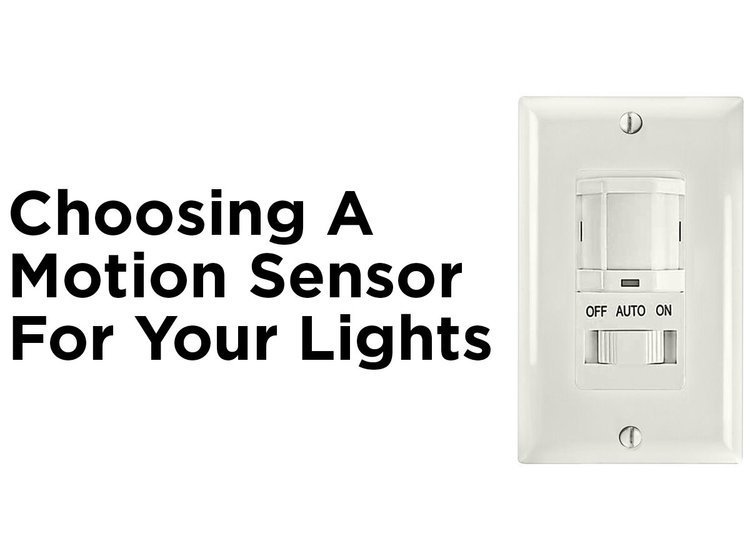
Look for dials or buttons on the sensor. You can often reduce sensitivity or set it to “off.” Adjust these controls to stop the sensor from detecting motion. Read the manual if available for exact instructions.
Disconnect Or Cover The Sensor
If settings do not work, disconnect the sensor from the power source. You may need to open the fixture carefully. Alternatively, cover the sensor with opaque tape or a small cap. This blocks motion detection without electrical changes.
Alternative Solutions
If you’re not ready to completely disable your motion sensor light, there are smarter ways to tailor its behavior to fit your needs. Alternative solutions let you keep the benefits of motion-activated lighting while reducing unwanted triggers or annoyances.
These options give you more control without cutting off your light’s functionality entirely. Sometimes, a simple tweak is all it takes to make the sensor work better for you.
Adjusting Sensitivity
Most motion sensors let you adjust how sensitive they are to movement. Lowering the sensitivity means the light won’t turn on for every small motion, like a passing car or a waving tree branch.
Try dialing it down bit by bit until the light only reacts to what really matters—like a person walking up to your door. This way, you avoid constant flickering without losing the security benefits.
Changing Timer Settings
Timer settings control how long the light stays on after detecting motion. If your light stays lit longer than you want, reducing the timer can prevent unnecessary energy use and irritation.
On the flip side, increasing the timer might be helpful if you find the light switches off too quickly. Experiment with shorter or longer durations to find the sweet spot that matches your lifestyle.
Using Smart Controls
Smart lighting systems often come with apps or voice control, letting you manage your motion sensor light remotely. You can set schedules, adjust sensitivity, or turn off the sensor temporarily without touching the fixture.
Imagine coming home late and using your phone to activate the light before you even step outside—convenient and secure. Smart controls also allow you to integrate the light with other home automation features for customized behavior.
Credit: blog.1000bulbs.com
Troubleshooting Common Issues
Troubleshooting common issues helps fix motion sensor lights quickly. These lights may not always behave as expected. Simple checks can save time and effort. Understanding problems lets you manage settings better. Here are some common issues and their fixes.
Light Still Activates
The light may turn on even after disabling the sensor. Check if the sensor switch is fully off. Sometimes, a timer setting keeps the light active. Look for a manual override feature on the device. Dirt or debris on the sensor lens can cause false triggers. Clean the lens gently with a soft cloth. Ensure no nearby movement causes activation, like pets or plants.
Sensor Malfunctions
Faulty sensors cause erratic or no response. Test the sensor by waving your hand in front of it. No reaction means the sensor might be broken. Check for loose wiring inside the unit. Moisture or extreme weather can damage sensors. Replace the sensor if it shows consistent failure. Reset the device by turning off power for a few minutes.
Power Supply Problems
Power issues often cause the light to misbehave. Verify the light is properly plugged in or wired. Check the circuit breaker or fuse box for tripped switches. Use a voltage tester to confirm power at the fixture. Loose connections can interrupt the power flow. Secure all wiring and terminals tightly. Replace faulty power cords or adapters as needed.
Safety Tips When Handling Sensors
Handling motion sensor lights requires care to avoid accidents and damage. Safety is key when disabling or adjusting these devices. Follow these tips to protect yourself and your equipment.
Electrical Precautions
Always turn off the power at the circuit breaker before touching any wiring. Use a voltage tester to confirm no electricity flows to the sensor. Wear insulated gloves to reduce shock risk. Avoid working in wet or damp areas. Keep tools dry and use insulated handles. Never bypass safety devices or fuses. If unsure, consult a licensed electrician for help.
Proper Installation Practices
Mount sensors securely to avoid falling or damage. Ensure wires connect tightly and correctly to prevent shorts. Position sensors away from direct sunlight or heat sources to avoid false triggers. Follow the manufacturer’s instructions closely for setup. Use weatherproof covers if installing outdoors. Test the sensor after installation to confirm proper function. Check local electrical codes for compliance and safety standards.

Credit: www.avatarcontrols.com
Frequently Asked Questions
How Do I Disable A Motion Sensor Light?
To disable a motion sensor light, locate the sensor’s settings or switch. Turn off the sensor mode or power. Some models have a manual override to keep the light on or off.
Can I Turn Off Motion Sensor Light Temporarily?
Yes, many motion sensor lights have a temporary off mode. Use the switch or settings to disable the sensor for a short time. This allows normal light operation without motion activation.
What Tools Are Needed To Disable Motion Sensor Lights?
Typically, no special tools are required. You just need access to the sensor’s control panel or switch. For hardwired units, a screwdriver may be needed to access wiring or settings.
Will Disabling The Sensor Affect The Light’s Power Usage?
Disabling the motion sensor usually increases power use. The light may stay on continuously, using more electricity. Consider using a timer or manual switch to save energy.
Conclusion
Disabling a motion sensor light is simple and quick. Just follow the steps carefully. Turning off the sensor can save energy and stop unwanted light. You can always turn it back on later. This guide helps you control your lights better.
No need to worry about confusing settings. Take control of your lighting today.



