
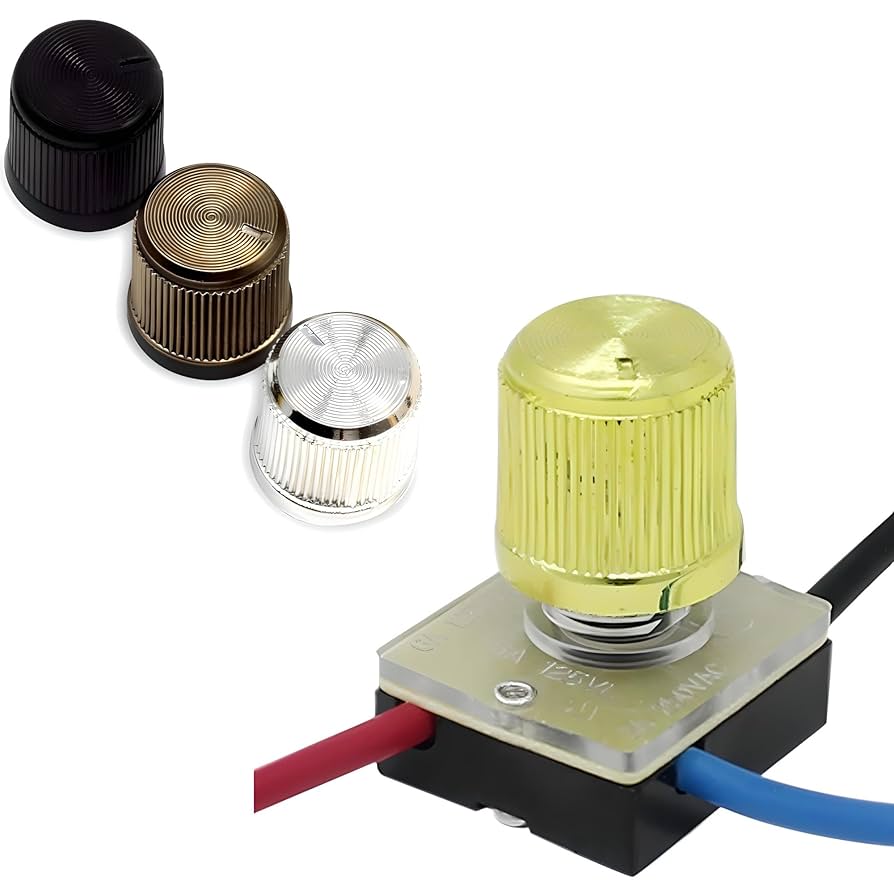
Is your desk lamp switch not working, leaving you in the dark at the worst possible time? You don’t have to replace the whole lamp or call a costly electrician just yet.
Fixing your desk lamp switch yourself is easier than you think. In this guide, you’ll discover simple steps to bring your lamp back to life quickly and safely. Keep reading, and by the end, you’ll have the confidence to tackle this common problem and save both time and money.

Credit: m.youtube.com
Tools And Materials Needed
Repairing a desk lamp switch requires some basic tools and materials. Having the right items ready makes the process easier and faster. This section lists everything needed to fix the switch safely and effectively.
Essential Tools For Repairing A Desk Lamp Switch
- Screwdriver set (flathead and Phillips)
- Wire strippers
- Multimeter for testing electrical connections
- Needle-nose pliers
- Soldering iron and solder (if needed)
- Electrical tape or heat shrink tubing
- Small flashlight (to see inside tight spaces)
Materials Needed For Desk Lamp Switch Repair
- Replacement switch compatible with your lamp
- Extra electrical wire (in case of damaged wires)
- Contact cleaner spray (for cleaning switch contacts)
- Safety gloves to protect hands
- Plastic container to hold small screws and parts
Identifying The Problem
Identifying the problem with a desk lamp switch is the first step to repair it. Understanding the issue helps avoid unnecessary work and saves time. A careful check can reveal if the switch is broken, dirty, or has a loose connection. This section explains how to spot common switch problems and the safety steps to follow before starting any repair.
Common Switch Issues
- The switch does not turn the lamp on or off.
- The lamp flickers or works only when the switch is in a certain position.
- The switch feels loose or stuck when pressed or turned.
- There is a burning smell or visible damage near the switch.
- The lamp only works after moving or tapping the switch.
These issues often point to worn-out contacts, dirt inside the switch, or broken parts. Sometimes, the wiring connected to the switch may be loose or damaged.
Safety Precautions
- Always unplug the lamp before checking the switch.
- Do not touch the switch or wires with wet hands.
- Use a voltage tester to ensure no power is running through the lamp.
- Work in a dry, well-lit area to avoid accidents.
- Wear safety gloves if possible to protect from electric shocks.
Following these precautions reduces the risk of injury during the repair process. Safety is essential before handling any electrical parts.
Disassembling The Lamp
Disassembling the lamp requires patience and care. Begin by unplugging the lamp and removing the lampshade. Use a screwdriver to gently open the lamp base, exposing the wiring and switch. Carefully inspect for any loose connections or damage to the switch.
Disassembling a desk lamp can seem daunting. But with patience, it’s manageable. This guide will walk you through the steps. Start by gathering tools and ensuring safety. You’ll soon have your lamp switch fixed.Unplugging And Preparing
Safety comes first in any repair task. Unplug the lamp from the socket. This prevents any electrical mishaps. Clear your workspace from clutter. You need space to lay out parts. Gather necessary tools like screwdrivers. Keep them within reach for efficiency. Have a small container ready. It will hold screws and small parts. This prevents losing them during disassembly.Removing The Switch Cover
Locate the switch on your lamp. It’s often under a plastic or metal cover. Use a screwdriver to remove screws holding the cover. Turn them counterclockwise to loosen. Place screws in your container for safekeeping. Gently lift the cover off the lamp. Be careful not to force it. You should now see the switch mechanism. Inspect the area for any visible damage. This helps in identifying issues later.Cleaning The Switch
Cleaning the switch of your desk lamp is a crucial step in restoring its functionality. Dust, dirt, and grime can build up over time, causing the switch to stick or fail altogether. Taking time to clean it properly can save you from buying a new lamp or calling a repair service.
Removing Dirt And Debris
Start by unplugging the lamp to avoid any electrical hazards. Use a soft brush or a can of compressed air to gently remove loose dirt and debris around the switch. You might be surprised how much dust settles in tiny crevices that you can’t see at first glance.
If the switch is removable, carefully take it out according to the lamp’s manual. Wipe the switch surface and surrounding area with a dry cloth or a slightly dampened one if necessary. Avoid using excessive water, as moisture can damage electrical parts.
Using Contact Cleaner
Contact cleaner is a powerful solution designed specifically for electrical switches and contacts. Spray a small amount directly onto the switch mechanism to dissolve dirt and corrosion that brushing alone can’t remove.
After applying the cleaner, toggle the switch multiple times to help the liquid reach all moving parts. This simple action can revive a switch that feels sticky or unresponsive. Just make sure the switch is dry before plugging your lamp back in.
Have you noticed how a little cleaning can make your old lamp feel brand new again? Sometimes, the fix is easier than you think, just hidden beneath layers of dust and grime.
Testing The Switch Mechanism
Testing the switch mechanism is a crucial step to identify the exact problem with your desk lamp. Sometimes, the issue lies not in the wiring or bulb but in the switch itself. Knowing how to test it properly can save you time and money by avoiding unnecessary replacements.
Manual Operation Check
Start by manually toggling the switch on and off several times. Listen carefully for any unusual sounds like grinding or clicking that feels different from normal. If the switch feels loose, sticky, or unresponsive, it might be damaged.
Try to observe if the lamp flickers or reacts inconsistently when you operate the switch. This simple physical test often reveals if the switch contacts are worn out or dirty. Ask yourself: does the switch feel smooth or does it catch at certain points?
Using A Multimeter
A multimeter is a handy tool that lets you check the electrical continuity of the switch. Set your multimeter to the continuity or resistance setting.
- Disconnect the lamp from power to avoid electric shock.
- Remove the switch from the lamp carefully, exposing its terminals.
- Place the multimeter probes on the switch terminals.
- Toggle the switch on and off while watching the multimeter reading.
If the switch is working correctly, the multimeter should show zero or near-zero resistance when the switch is on, and infinite resistance when off. Any inconsistent or no reading at all indicates a faulty switch. Have you ever thought how simple tools like a multimeter can pinpoint an issue you can’t see?

Credit: www.youtube.com
Fixing Loose Connections
Loose connections often cause desk lamp switches to fail. Fixing these connections restores power flow and makes the lamp work again. Start by carefully checking the switch area for any parts that may be loose or disconnected. This simple fix can save money and extend the lamp’s life.
Tightening Screws
Loose screws can interrupt the electrical path inside the switch. Use a small screwdriver to tighten all screws around the switch. Check both the screws holding the switch in place and those securing the wiring terminals. Tight screws ensure a stable connection and improve switch function.
Reattaching Wires
Wires may come loose from the switch terminals over time. Gently pull on each wire to see if it is firmly attached. If a wire is loose, carefully reattach it by wrapping it around the terminal screw or inserting it into the terminal slot. Make sure the wire is secure before tightening the screw. Proper wire attachment restores electrical contact and switch operation.
Replacing The Switch
Replacing the switch in your desk lamp can breathe new life into a fixture you thought was beyond repair. It’s a straightforward fix that can save you money and reduce waste. Before you start, make sure you have the right replacement switch and some basic tools ready.
Selecting A Compatible Switch
Choosing the correct switch is crucial for safety and functionality. Check your lamp’s model or the old switch for any part numbers or specifications. If you can’t find that, take the old switch to a hardware store to compare size, voltage, and type.
Most desk lamps use either a toggle, rotary, or push-button switch. Matching the electrical rating is essential—using a switch rated for lower voltage can be dangerous. Don’t overlook the physical size either; it must fit snugly in the lamp’s housing.
Installing The New Switch
Start by unplugging the lamp and removing the old switch carefully. Note how the wires are connected—taking a photo can help you remember the setup. Use a screwdriver or pliers to detach the wires from the old switch terminals.
Attach the wires to the new switch in the same configuration as the old one. Secure the switch in the lamp’s casing, ensuring it’s firmly in place to avoid any loose connections. Once installed, plug the lamp in and test the switch to confirm it works smoothly.
Reassembling And Final Testing
After fixing the switch, reassembling the lamp is the next step. It is important to handle each part carefully. Proper reassembly ensures the lamp works safely and correctly. Take your time to avoid damaging any components.
Putting The Lamp Back Together
Start by placing the switch back in its slot. Align wires so they are not pinched or twisted. Secure screws tightly but avoid over-tightening. Reattach any covers or panels that came off. Check that all parts fit snugly without gaps. Use a soft cloth to clean dust before closing the lamp.
Verifying Functionality
Plug the lamp into a power source. Turn the switch on and off several times. Watch for any flickering or unusual sounds. Test the lamp with the bulb it uses daily. Make sure the light stays steady and bright. If the lamp fails, unplug it and check connections again.
Preventive Maintenance Tips
Preventive maintenance helps keep your desk lamp switch working longer. Small actions stop big problems. Regular care saves time and money. It also ensures your lamp stays safe to use.
Keep The Switch Clean And Dry
Dirt and moisture cause switch failure. Wipe the switch with a dry cloth often. Avoid using water or liquid cleaners. Dust and grease can block switch contacts.
Check For Loose Connections
Loose wires create flickering or no power. Gently pull the lamp cord and switch. Feel for any movement or looseness. Tighten connections with a screwdriver if needed.
Avoid Overloading The Lamp
Use bulbs with the right wattage. Too high wattage causes heat and damage. Check the lamp label for the maximum bulb size. Replace bulbs with proper ones only.
Turn Off The Lamp When Not In Use
Switching off extends the switch life. It reduces wear and overheating. Unplug the lamp if you won’t use it for days. This also prevents electrical hazards.
Inspect The Switch Regularly
Look for cracks or discoloration on the switch. Signs of damage mean replacement is needed. Test the switch by turning it on and off. Smooth action means it works well.

Credit: www.amazon.com
Frequently Asked Questions
How Do I Identify A Faulty Desk Lamp Switch?
A faulty desk lamp switch often causes flickering or no light. Check for physical damage or unusual resistance when toggling the switch. Use a multimeter to test for electrical continuity. If the switch fails these tests, it likely needs replacement or repair.
What Tools Are Needed To Repair A Desk Lamp Switch?
To repair a desk lamp switch, you need a screwdriver, wire stripper, multimeter, and replacement switch. A soldering iron may be required for certain switch types. Always unplug the lamp before starting any repair to ensure safety.
Can I Repair A Desk Lamp Switch Without Electrical Experience?
Basic desk lamp switch repairs can be done by beginners. Follow step-by-step guides carefully and ensure the lamp is unplugged. However, for complex electrical issues or wiring, consult a professional to avoid hazards.
How Long Does It Take To Fix A Desk Lamp Switch?
Repairing a desk lamp switch typically takes 15 to 30 minutes. Time varies depending on switch type and your experience level. Proper preparation and safety measures can speed up the process.
Conclusion
Fixing a desk lamp switch saves money and reduces waste. You can do it with simple tools and steps. Take your time and follow safety tips carefully. Working on small repairs builds your confidence. Enjoy the soft light from your working lamp again.
Keep this guide handy for future fixes. Small efforts bring useful results. Try repairing before buying a new lamp. It feels good to fix things yourself.



