
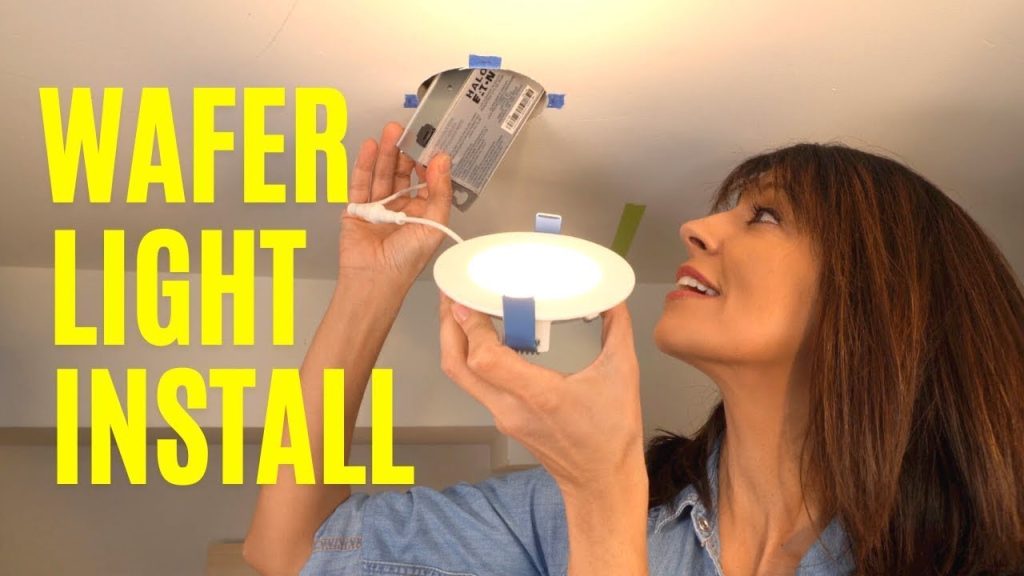
Is your desk lamp flickering or dimming, leaving you struggling to focus? Replacing the wired LED wafer might be the simple fix you need.
You don’t have to be a tech expert or spend a fortune on a new lamp. In this guide, you’ll learn step-by-step how to replace the LED wafer quickly and safely. Imagine restoring bright, clear light to your workspace without hassle.
Keep reading, and you’ll have your lamp shining like new in no time!

Credit: www.amazon.com
Tools And Materials Needed
Before replacing the wired LED wafer in your desk lamp, gather all necessary tools and materials. Having everything ready makes the process smoother and safer. Using the right tools helps avoid damage to the lamp and ensures a proper fix.
Most of these items are common household tools or easy to find online or at a hardware store. Check the lamp’s specifications to choose the correct LED wafer replacement. Using compatible parts guarantees good performance and longevity.
Essential Tools For The Replacement
- Screwdriver set (flathead and Phillips)
- Soldering iron with a fine tip
- Solder wire suitable for electronics
- Wire stripper and cutter
- Multimeter for testing connections
- Heat shrink tubing or electrical tape
- Small pliers or tweezers
Materials Required For The Led Wafer Swap
- Replacement wired LED wafer matching lamp specifications
- Electrical connectors or terminal blocks (optional)
- Cleaning alcohol and cotton swabs
- Protective gloves
- Work mat or surface to keep small parts safe
Safety Precautions
Working with electrical components like a wired LED wafer in your desk lamp demands careful attention to safety. Ignoring basic precautions can lead to electric shocks or damage to the lamp. Are you sure you’ve prepared the workspace and tools to avoid accidents?
Turn Off And Unplug The Lamp
Always disconnect your lamp from the power source before starting any repairs. This simple step eliminates the risk of electric shock while handling internal wiring. I once skipped this and felt a painful zap—don’t make the same mistake.
Use Insulated Tools
Choose tools with insulated handles designed for electrical work. These protect your hands from accidental current flow. Even if you think the lamp is off, insulated tools add an essential layer of safety.
Work In A Dry Environment
Moisture increases the risk of electric shock and can damage electronic parts. Make sure your hands and workspace are completely dry before you begin. Have you checked for any water spills or dampness around your work area?
Handle Components Gently
LED wafers and wiring are delicate. Rough handling can break connections or cause shorts. Take your time and avoid forcing parts into place.
Wear Safety Glasses
Small wires or components can snap or fly off unexpectedly. Protect your eyes with safety glasses to avoid injury. This simple precaution often goes overlooked but can save you from discomfort.
Double-check Connections Before Powering On
Before plugging your lamp back in, inspect all connections carefully. Loose or incorrect wiring can cause sparks or damage. Have you verified every connection to ensure it’s secure and correct?
Removing The Old Led Wafer
Removing the old LED wafer from your desk lamp is a simple task. It requires care to avoid damage to the lamp or yourself. Follow these clear steps to safely take out the old LED component.
Unplugging The Lamp
Always start by unplugging the lamp from the power outlet. This step stops any electrical flow. It keeps you safe from electric shock. Double-check the plug is fully removed.
Accessing The Led Wafer
Find the lamp head where the LED wafer is located. Usually, it is held by small screws or clips. Use a screwdriver or your fingers to open the lamp head carefully. Place screws in a safe spot to avoid losing them.
Gently lift the cover or panel to expose the LED wafer. Avoid forcing the parts. Take your time to prevent breaking any pieces.
Detaching The Wiring
Notice the wires connecting the LED wafer to the lamp. These wires provide power to the LED. Carefully observe how wires are attached before disconnecting them.
Use a small tool, like tweezers, if needed to loosen the connections. Pull the wires gently to detach them. Avoid yanking to stop wire damage.
Keep the wires intact for easy installation of the new LED wafer later.

Credit: www.reddit.com
Choosing The Right Replacement Led Wafer
Choosing the right replacement LED wafer is key to fixing your desk lamp. It ensures the lamp works well and lasts long. Picking the correct LED wafer avoids damage and keeps the light bright. Focus on two main points: the electrical specs and the physical fit.
Checking Voltage And Wattage
Voltage and wattage must match the original LED wafer. Voltage is the power the lamp needs to run safely. Wattage shows how much energy the LED uses.
- Find the voltage on the old LED or lamp label.
- Check the wattage to avoid overloading the lamp.
- Use an LED wafer with the same or very close voltage and wattage.
Using the wrong voltage or wattage can harm the lamp or cause it to fail quickly.
Matching Size And Shape
The new LED wafer must fit perfectly inside your lamp. Size and shape affect how the LED sits and connects.
- Measure the diameter and thickness of the old LED wafer.
- Look at the shape to ensure the new wafer fits the holder.
- Check the position of wires or connectors on the wafer.
A wafer that fits well keeps the lamp stable and working properly. Wrong size or shape can cause poor contact or damage.
Installing The New Led Wafer
Replacing the LED wafer in your desk lamp? Start by installing the new wafer. It’s a simple yet crucial task. Ensure the connections are correct for optimal performance. Follow these steps to get your lamp shining brightly again.
Connecting The Wires
First, identify the wires. Usually, there are two. One is positive, and the other is negative. Carefully connect the positive wire to the positive terminal. Then, do the same for the negative wire. Use wire nuts or electrical tape for secure connections. Double-check everything before proceeding. A loose connection might cause flickering or no light at all.
Securing The Wafer In Place
Align the LED wafer with the lamp’s frame. Ensure it fits snugly. Use screws or clips to secure it. Tighten them gently but firmly. Avoid overtightening to prevent damage. Once secured, test the lamp. Turn it on to ensure proper installation. If it lights up, your task is complete.

Credit: m.youtube.com
Testing The New Led Wafer
Testing the new LED wafer is a vital step after replacement. It ensures the lamp works correctly and safely. Proper testing helps avoid damage and confirms the LED is installed right.
Before powering the lamp, visually check the connections. Look for any loose wires or solder joints. Secure all parts to prevent electrical issues.
Power On The Desk Lamp
Plug in the lamp and switch it on. Observe the LED wafer closely. It should light up evenly and brightly. Flickering or dim light may signal a problem.
Check For Heat Generation
Let the lamp run for a few minutes. Touch the LED wafer carefully to feel heat. It should be warm but not hot. Excess heat can mean improper installation.
Inspect Light Quality And Brightness
- Ensure the light is steady without flickers.
- Check if the brightness matches your expectations.
- Look for color consistency across the wafer.
Good light quality confirms the LED wafer functions well.
Test Lamp Controls
Operate all switches and dimmers on the lamp. The LED should respond smoothly to each control. Any delay or failure needs rechecking connections.
Final Safety Check
Examine the lamp for any unusual sounds or smells. Make sure no wires are exposed. Safety is key before regular use.
Troubleshooting Common Issues
Troubleshooting common problems with a wired LED wafer in a desk lamp helps save time and effort. Many issues have simple fixes. Understanding these problems ensures your lamp works well after replacement.
Check the lamp and LED wafer carefully. Most troubles come from loose connections, faulty parts, or power issues. Follow the tips below to identify and fix common problems quickly.
Led Not Lighting Up
First, confirm the lamp is plugged in and the switch is on. Check the power source for any interruptions. Inspect the LED wafer connections for looseness or damage.
- Make sure the LED wafer wires are securely attached.
- Look for any visible damage on the wafer or wires.
- Test the lamp with another LED wafer if possible.
If the LED still does not light, the wafer might be defective and need replacement.
Flickering Light
Flickering often means a loose connection or poor contact. Start by tightening all wire connections on the wafer and lamp.
- Clean the contact points to remove dust or corrosion.
- Check for damaged wires or solder joints.
- Replace the LED wafer if flickering continues.
Also, check the lamp’s power source for consistent voltage. Unstable power can cause flickering.
Overheating Problems
Overheating can damage the LED wafer and reduce its lifespan. Ensure the lamp has proper ventilation and is not covered.
- Use LED wafers designed for your lamp model.
- Avoid using higher wattage wafers than recommended.
- Inspect the wiring for any signs of overheating or melting.
- Replace damaged parts immediately.
Regular cleaning and proper installation prevent heat buildup and improve lamp safety.
Maintenance Tips For Desk Lamp Leds
Maintaining the LEDs in your desk lamp extends their life and keeps the light bright. Simple care habits help avoid frequent replacements. Proper maintenance also ensures safety and consistent performance. These tips help you protect the LED wafer and wiring.
Cleaning The Led And Lamp Surface
Dust and dirt reduce light output and cause heat buildup. Clean the LED wafer and lamp surface regularly using a soft, dry cloth. Avoid water or harsh chemicals as they damage electronic parts. Gentle dusting keeps the lamp cool and bright.
Checking For Loose Connections
Loose wiring can cause flickering or failure. Periodically inspect the lamp’s wiring and LED connections. Tighten any loose screws or connectors carefully. Secure wiring prevents electrical shorts and ensures steady light flow.
Avoiding Overheating
LEDs generate less heat than bulbs but still need airflow. Do not cover the lamp or block vents. Keep the lamp in a cool, ventilated area. Overheating shortens LED life and may damage internal parts.
Using The Correct Power Supply
Use only the recommended voltage and current for your desk lamp. Incorrect power can burn out the LED wafer quickly. Check the lamp’s label or manual to confirm power needs. A stable power supply protects the LED and wiring.
Replacing Damaged Parts Promptly
Cracks or corrosion on the LED wafer or wiring reduce performance. Replace damaged parts immediately to avoid further issues. Use compatible replacement parts to maintain lamp safety and function.
Frequently Asked Questions
How Do I Remove The Old Wired Led Wafer Safely?
To remove the old LED wafer safely, unplug the lamp first. Use a screwdriver to open the lamp casing carefully. Gently disconnect the wired LED wafer without damaging the wires or connectors. Handle components with care to avoid electric shock or damage.
What Tools Are Needed To Replace A Wired Led Wafer?
You will need a screwdriver, wire cutters, wire strippers, and possibly a soldering iron. A multimeter helps check connections. Having electrical tape or heat shrink tubing is useful for insulation. These tools ensure a smooth and safe replacement process.
How To Identify The Correct Replacement Led Wafer?
Check the lamp’s model and LED wafer specifications. Match voltage, size, and wire connections exactly. Refer to the lamp manual or manufacturer’s website. Using the correct replacement ensures compatibility and prevents damage to your desk lamp.
Can I Replace The Led Wafer Without Soldering?
Yes, if your LED wafer uses plug-in connectors or wire nuts. Otherwise, soldering may be necessary for secure wiring. Use proper tools and techniques to ensure a safe and reliable electrical connection.
Conclusion
Replacing the wired LED wafer in your desk lamp is simple and quick. Follow the steps carefully to avoid mistakes. Use the right tools and handle parts gently. This fix saves money and extends your lamp’s life. Bright light returns to your workspace easily.
Try it yourself and enjoy a well-lit desk again. Small effort, big difference.



