
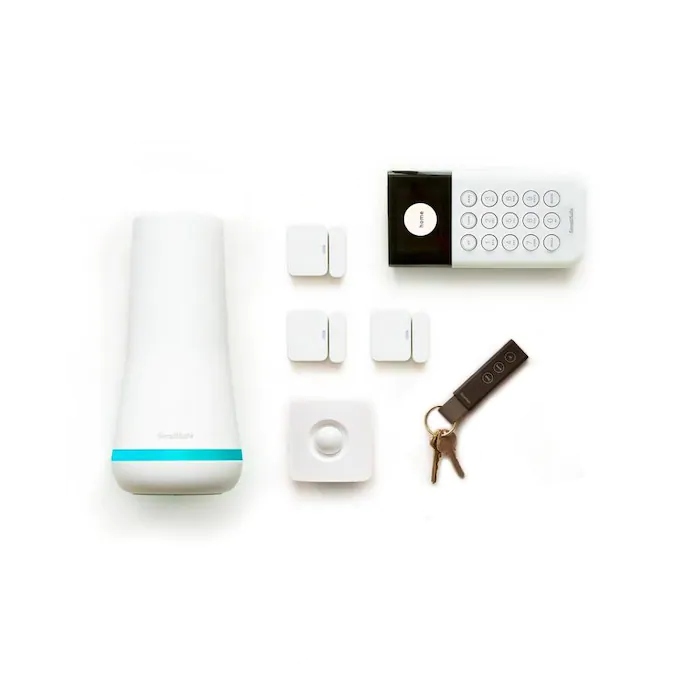
Are you worried that your SimpliSafe motion sensor might not be working properly? You rely on it to keep your home safe, so making sure it’s functioning perfectly is crucial.
Testing your SimpliSafe motion sensor doesn’t have to be complicated or time-consuming. In this guide, you’ll discover simple steps to check your sensor quickly and confidently. Keep reading to learn how to protect your home better and gain peace of mind with just a few easy tests.
Prepare For Testing
Preparing to test your SimpliSafe motion sensor ensures accurate results and smooth operation. This step helps you avoid false alarms and missed detections during the test. Follow these simple preparations to get ready.
Gather Necessary Tools
Collect all tools before starting the test. You will need:
- Your SimpliSafe keypad or app
- A small flashlight for visibility
- A ladder or step stool, if the sensor is high
- A note pad or phone to record results
Having everything ready saves time and keeps the process smooth.
Check Sensor Placement
Look at the motion sensor’s location. Make sure it is:
- Mounted at the right height, usually 6 to 8 feet
- Facing the main area you want to monitor
- Free from obstacles like curtains or furniture
- Not near heat sources or vents that may cause false alarms
Proper placement helps the sensor detect movement accurately.
Ensure System Is Armed
Activate your SimpliSafe system before testing. The system must be:
- Set to “Home” or “Away” mode depending on your test
- Fully connected to the base station
- Ready to send alerts if motion is detected
Arming the system ensures the sensor is active and monitoring.

Credit: www.ebay.com
Perform Motion Detection Test
Performing a motion detection test on your SimpliSafe motion sensor ensures that your security system works exactly as it should. This test helps you confirm that the sensor detects movement accurately and that alerts are sent promptly. It’s a simple yet crucial step to keep your home safe.
Trigger Sensor Movement
Start by walking slowly within the sensor’s detection range. Move in different directions and at varying speeds to check how well it picks up motion. Try standing still for a moment, then making sudden movements—this helps you understand the sensor’s sensitivity.
Observe Sensor Response
Watch for any indicator lights or sounds from the sensor when you move. The SimpliSafe motion sensor usually flashes or beeps to confirm it detected movement. If you don’t see any response, consider repositioning the sensor or checking its battery.
Verify Alert Notifications
Check your phone or security panel for alerts triggered by the motion sensor. You should receive notifications immediately after movement is detected. If alerts are delayed or missing, test your system’s connection and settings to ensure reliable communication.
Test Sensor Battery
Testing a SimpliSafe motion sensor battery is simple and quick. Open the sensor, remove the battery, and use a battery tester or multimeter to check its charge level. Replace the battery if the voltage is low to keep the sensor working properly.
Testing the battery of your SimpliSafe motion sensor is crucial. It ensures the sensor works efficiently, keeping your home secure. Regular checks prevent unexpected failures. Follow these steps to test your sensor’s battery effectively.Access Battery Compartment
Locate the motion sensor on your wall. Gently slide it off its mounting bracket. Look for a small latch or tab. Press it to open the battery compartment. This gives you access to the battery inside.Check Battery Level
Once the compartment is open, observe the battery. Look for any signs of corrosion or leaks. Use a multimeter to measure the battery’s voltage. Compare the reading to the battery’s rated voltage. Low voltage indicates a dying battery.Replace Battery If Needed
If the battery is low, replace it. Remove the old battery carefully. Insert a new battery of the same type. Ensure it is placed correctly, matching the polarity symbols. Close the compartment securely. Test the sensor to confirm it’s working.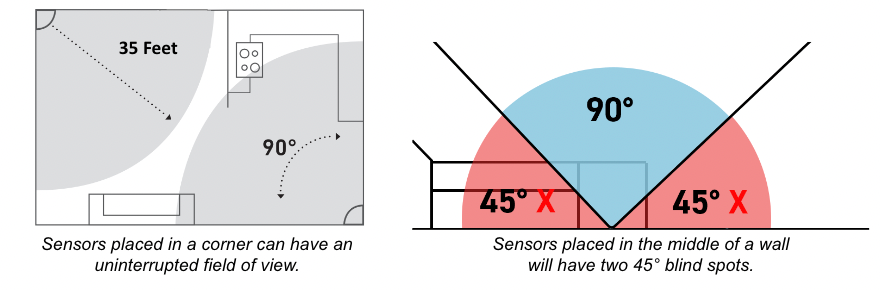
Credit: support.simplisafe.com
Use Simplisafe App For Testing
Testing your SimpliSafe motion sensor through the SimpliSafe app is quick and simple. The app offers built-in tools to check if your sensor works properly. You can monitor sensor status without needing extra devices. This saves time and ensures your system stays secure.
Navigate To Sensor Settings
Open the SimpliSafe app on your phone. Tap the menu icon to access device options. Select the motion sensor you want to test. This opens the sensor settings page. Here you find all controls related to that sensor.
Run Diagnostic Tools
Inside sensor settings, look for the diagnostics or test option. Tap it to start the test process. The app will check the sensor’s signal and motion detection. It might ask you to move in front of the sensor. Follow the instructions for accurate results.
Review Test Results
After the test, the app shows the sensor’s status. It confirms if the sensor detects motion correctly. You also see signal strength and battery level. Use this data to decide if the sensor needs adjustment or replacement. Regular testing keeps your system reliable and ready.
Troubleshoot Common Issues
Troubleshooting your SimpliSafe motion sensor helps keep your home safe. Some issues may stop the sensor from working correctly. Fixing these problems is simple and saves time.
Sensor Not Detecting Motion
Check the sensor’s placement. It should face open areas, not windows or vents.
Clean the sensor lens gently with a soft cloth. Dust can block detection.
Test the sensor by moving slowly in front of it. No response means battery or hardware issues.
- Replace the battery with a new one.
- Ensure the sensor is securely mounted.
- Reset the sensor through the SimpliSafe app.
False Alarms
False alarms can happen from pets or moving objects.
Adjust the sensor’s sensitivity settings in the app to reduce false triggers.
Keep the sensor away from heat sources like heaters or direct sunlight.
Check for any insects or small animals near the sensor.
Connectivity Problems
Connectivity issues can cause the sensor to lose contact with the base station.
Move the sensor closer to the base station for a stronger signal.
Restart your SimpliSafe base station to refresh connections.
- Check your Wi-Fi network for stability.
- Update the firmware through the app.
- Remove and re-add the sensor in the system if needed.
Credit: www.bestproducts.com
Frequently Asked Questions
How Do I Test My Simplisafe Motion Sensor?
To test your SimpliSafe motion sensor, enter the system’s test mode via the app. Walk in front of the sensor and check for alerts. This ensures the sensor detects movement accurately without triggering false alarms.
Can I Test Simplisafe Sensors Without Triggering Alarms?
Yes, use the system’s Test Mode to avoid triggering alarms. This mode pauses alerts while allowing you to check sensor responsiveness safely and effectively.
How Often Should I Test Simplisafe Motion Sensors?
Test your SimpliSafe motion sensors every 3 to 6 months. Regular testing ensures they work properly and keeps your home security system reliable.
What Indicates A Faulty Simplisafe Motion Sensor?
If the sensor misses movement or shows low battery alerts, it may be faulty. Regular testing helps identify these issues early for timely replacement or repair.
Conclusion
Testing your SimpliSafe motion sensor helps keep your home safe. Regular checks ensure the sensor works well. Move in front of the sensor to see if it detects motion. Replace batteries if the sensor does not respond. Keep your security system reliable with simple tests.
Stay alert and protect your home with ease. Testing takes only a few minutes but gives peace of mind. Make this a habit to avoid surprises later. Your safety depends on a working motion sensor.



