
Are you tired of your motion sensor light switch turning on at the wrong times? Maybe it keeps flickering when you don’t want it to, or it’s just too sensitive for your space.
You’re not alone, and the good news is that turning off a motion sensor light switch is easier than you think. You’ll discover simple steps to regain control over your lighting, so your home feels more comfortable and just the way you want it.
Keep reading to find out how to switch off that motion sensor and enjoy lighting on your terms.
Locate The Motion Sensor Switch
Finding the motion sensor switch is the first step to turning it off. These switches control the light by sensing movement in a room or area. Knowing where to find the switch helps you manage the light easily.
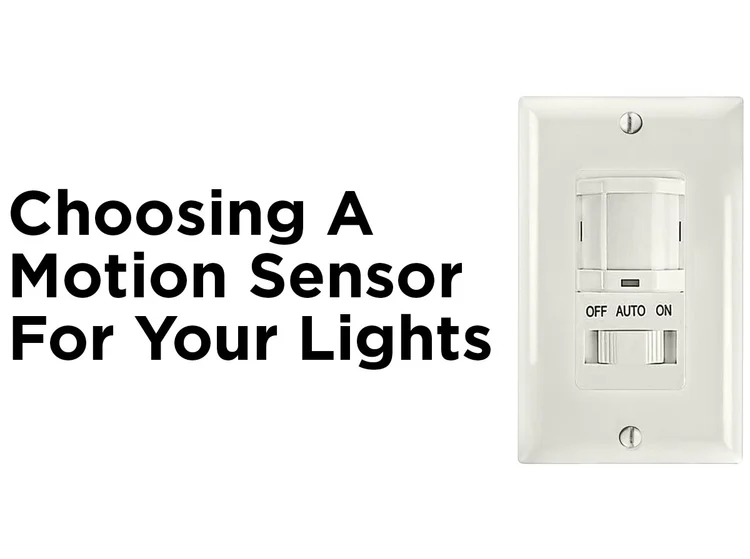
Motion sensor switches often look different from regular switches. They usually have a small sensor window or a light indicator. This design helps them detect motion and control the light automatically.
Check Near The Entrance Or Exit
Motion sensor switches are often installed near doors. This placement allows them to detect anyone entering or leaving. Look around door frames or just inside a room near the entrance.
Look For A Sensor Window
The sensor window is usually a small, clear or frosted panel on the switch. It may be round or square and stands out from a normal switch plate. This window is the part that detects motion.
Scan Areas With High Traffic
Motion sensor switches are common in hallways, garages, and bathrooms. These areas have frequent movement, making sensors useful. Check these spots carefully to locate the switch.
Notice The Switch’s Size And Shape
Many motion sensor switches are larger than regular switches. They may have buttons or dials for settings. This makes them easier to spot on a wall.
Identify The Switch Type
Before you can turn off a motion sensor light switch, you need to know exactly what type of switch you’re dealing with. Identifying the switch type is crucial because it affects how you control or disable the sensor function. Not all motion sensor switches work the same way, so recognizing the model and features helps prevent mistakes and saves time.
Look For Physical Features On The Switch
Start by examining the switch closely. Some motion sensor switches have visible sensors or small windows that detect movement. Others might look like a regular switch but include extra buttons or dials for sensitivity and time settings.
Is there a sensor lens or a small circular area? That’s a clear sign it’s a motion sensor switch. Also, check for labels or brand names that could hint at advanced features.
Check For Additional Controls Or Settings
Motion sensor switches often come with extra controls you won’t find on standard light switches. Look for dials, sliders, or buttons labeled “sensitivity,” “duration,” or “test mode.” These controls let you adjust how the sensor reacts to movement and how long the light stays on.
If you spot these, you’re dealing with a switch that offers manual overrides or customizable options. Knowing this helps you decide whether you can simply adjust the settings or need to fully disconnect the sensor.
Identify The Wiring Setup
Sometimes, the type of wiring can give clues about the switch. Motion sensor switches may require a neutral wire, which standard switches often don’t. You can remove the switch cover and carefully inspect the wires connected to it.
Do you see a white neutral wire connected? This often means your motion sensor switch is more complex and might need extra steps to turn off. Understanding wiring can be tricky but it’s essential if you plan to make any changes yourself.
Read The Model Number Or Manufacturer’s Info
If you find a model number or brand name on the switch, take a moment to search it online. Manufacturer websites or product manuals often have detailed information on how the switch works and how to disable the motion sensor function.
This step saved me once when I was stuck with a switch that didn’t respond to usual methods. The manual showed a hidden setting I never noticed before. Have you tried searching your switch’s model before?
Adjust The Sensor Settings
Adjusting the sensor settings helps control how the motion sensor light switch works. It lets you customize the light’s response to movement. You can reduce false triggers or turn off the sensor temporarily. This makes the light switch more convenient and energy-efficient.
Turn Off Sensitivity
Lowering the sensitivity stops the sensor from reacting to small movements. It helps avoid the light turning on too often. Usually, a small dial or button on the switch adjusts this setting. Turn it toward the “low” side to reduce sensitivity.
Some models show sensitivity levels like high, medium, and low. Pick the lowest setting for less motion detection. This setting is useful in busy areas or places with pets.
Disable The Motion Detection
Disabling motion detection turns off the sensor completely. The light will only work like a normal switch. Find a switch or button labeled “off,” “manual,” or “disable” on the device.
For some sensors, you may need to press and hold a button for a few seconds. This changes the mode from automatic to manual. Check the instruction manual for exact steps.
Disabling motion detection helps during long periods without movement. It prevents the light from switching on unexpectedly. You can always turn the sensor back on by reversing these steps.
Switch Off Power At Circuit Breaker
Switching off power at the circuit breaker is the safest way to disable a motion sensor light switch before any maintenance or troubleshooting. It completely cuts the electrical current, preventing shocks or accidental activation. This step is crucial if you want to avoid risks and protect both yourself and your device.
Locate The Correct Circuit Breaker
First, find your home’s electrical panel. It’s usually in the basement, garage, or a utility room. Look for labels that indicate which breaker controls the area where your motion sensor light is installed.
If the breakers aren’t labeled, you can test by turning off one breaker at a time and checking if the light goes off. This might take a few tries, but it ensures you hit the right switch without cutting power to the entire house.
Turn Off The Breaker Safely
Once you identify the correct breaker, flip it to the OFF position. Use a flashlight if the area gets dark after power is cut. Stand back and double-check that the motion sensor light no longer receives power.
Never touch the switch or wiring while the breaker is still on. Safety depends on this simple but essential step. It’s better to be cautious than sorry.
Confirm Power Is Off Before Proceeding
After turning off the breaker, test the light switch to confirm there’s no power. Try switching the motion sensor light on and off; it should remain unlit. You can also use a voltage tester if you have one to be absolutely sure.
Have you ever skipped this step and faced a shocking surprise? Taking this precaution saves you from potential harm and equipment damage.
Remove Or Bypass The Sensor
Motion sensor light switches add convenience and energy efficiency to homes. Sometimes, they might not work as expected. You may need to remove or bypass the sensor. This can help regain control over your lighting. There are a few options to consider. Each option has its own benefits and steps.
Manual Override
Manual override is a simple solution. Many motion sensors have this feature. It allows you to turn lights on and off manually. Find the switch on the sensor. Flip it to the manual position. This will disable the motion detection. Now you control the light like a standard switch.
Some sensors require a specific sequence. For example, flipping the switch twice quickly. Check the sensor’s manual for instructions. Manual override is easy and often reversible. It provides flexibility without removing the sensor.
Replace With Standard Switch
Replacing a motion sensor with a standard switch is straightforward. First, ensure safety by turning off the power. Use a voltage tester to confirm the power is off. Unscrew the motion sensor switch from the wall.
Disconnect the wires carefully. Take note of their original positions. Connect the wires to the new standard switch. Follow the instructions provided with the switch. Secure the switch into the wall. Turn the power back on. Test the new switch to ensure it works properly.

Credit: www.avatarcontrols.com
Test The Light Switch
Testing the motion sensor light switch is a key step after turning it off. It confirms the light switch no longer reacts to movement. Testing helps avoid surprises when the switch stays off as needed. This step is simple and quick, ensuring your changes work properly.
Check The Sensor’s Response
Wave your hand in front of the sensor. Watch if the light turns on. No movement should trigger the light after turning off the switch. If the light stays off, the switch is successfully disabled.
Observe The Light Behavior
Stay still and wait for a few minutes. The light should remain off without any motion. This ensures the sensor does not activate unexpectedly. Keep an eye on the light during this time for any changes.
Test Different Angles And Distances
Move around the sensor at various angles. Try different distances from the sensor. This confirms the light switch is fully off in all scenarios. The sensor should not detect motion at any position.
Use A Timer For Long Testing
Set a timer for 10 to 15 minutes. Monitor the light during this period. The light should remain off without movement. This test ensures the sensor stays off for extended times.
Safety Tips And Precautions
Turning off a motion sensor light switch requires care. Safety is the top priority to avoid accidents and damage. Follow these tips to protect yourself and your home during the process.
Turn Off Power At The Circuit Breaker
Always cut the power before touching the switch. Locate the correct circuit breaker and switch it off. This prevents electric shock and ensures safety.
Use Insulated Tools
Choose tools with insulated handles to reduce shock risk. This simple step protects you while working on electrical parts.
Wear Protective Gear
Wear rubber-soled shoes and gloves. These items provide extra protection from electrical hazards.
Check For Voltage
Use a voltage tester to confirm the power is off. Never assume the switch is safe to handle without testing.
Work In A Dry Environment
Make sure the area is dry before starting. Water and electricity are a dangerous mix.
Read The Manufacturer’s Instructions
Follow the guidelines provided with your motion sensor switch. They offer specific safety advice and steps.
Keep Children And Pets Away
Ensure kids and pets are not nearby during the work. This avoids distractions and accidents.

Credit: howlandhammer.com

Credit: www.avatarcontrols.com
Frequently Asked Questions
How Do I Disable A Motion Sensor Light Switch?
To disable a motion sensor light switch, locate the switch’s settings. Turn the sensor off by adjusting the switch or using a manual override if available.
Can I Turn Off A Motion Sensor Light Temporarily?
Yes, most motion sensor switches have a manual override or an off mode. Use it to temporarily disable the sensor without unplugging.
Why Won’t My Motion Sensor Light Switch Turn Off?
It may be due to incorrect settings, sensor sensitivity, or wiring issues. Check the manual and adjust the settings or consult an electrician.
Is It Safe To Turn Off A Motion Sensor Light Switch?
Yes, turning off a motion sensor light switch is safe. Ensure the power is off before adjusting or replacing the switch to avoid electric shock.
Conclusion
Turning off a motion sensor light switch is simple and quick. Follow the steps carefully to avoid any mistakes. You can control the light to save energy and reduce disturbance. Always make sure to switch off the power before working on the switch.
If you feel unsure, ask a professional for help. Enjoy the convenience of your motion sensor light when you want it on, and turn it off easily when you don’t. Small actions like this make your home smarter and safer.



