
Are your motion sensor lights turning on at the wrong times? It can be frustrating when they keep flashing on and off, wasting energy and disturbing your peace.
You might want to turn them off, but don’t know how. This guide will show you simple, clear steps to take control of your motion sensor lights. By the end, you’ll know exactly how to switch them off and save yourself from unwanted interruptions.
Keep reading to make your lighting work the way you want.
Types Of Motion Sensor Lights
Motion sensor lights come in different types. Each type serves a specific purpose. Knowing the types helps in turning them off easily. Here are the main types of motion sensor lights.
Indoor Sensors
Indoor sensors detect movement inside buildings. They save energy by lighting rooms only when needed. Common spots include hallways, closets, and basements. These sensors often have adjustable settings for sensitivity and time delay. Turning off indoor sensors usually means switching off the power or adjusting the sensor settings directly.
Outdoor Sensors
Outdoor sensors work in yards, driveways, and entryways. They provide security and convenience by activating lights only when motion is detected. These sensors are built to resist weather conditions. Most outdoor sensors have manual switches or remote controls for turning off. Some models allow adjustments for motion range and light duration.
Smart Motion Lights
Smart motion lights connect to home networks. They can be controlled via apps on phones or voice assistants. This type offers more control and customization. Turning off smart lights often involves app commands or voice instructions. They may also include schedules and geofencing to automate light behavior.

Credit: www.amazon.ca
Why Turn Off Motion Sensor Lights
Motion sensor lights are designed to enhance security and convenience by automatically turning on when movement is detected. However, there are several good reasons why you might want to turn them off at certain times. Understanding these reasons can help you make better decisions about when and how to use your motion sensor lights effectively.
Energy Savings
Keeping motion sensor lights on constantly can sometimes waste more energy than you realize. If your lights turn on frequently due to passing cars or animals, they might be running longer than necessary. Turning them off when you don’t need them can help lower your electricity bill and reduce unnecessary power consumption.
Have you noticed your energy bill spike during months when you rely heavily on outdoor lighting? Adjusting your motion sensors to turn off during low-traffic times can make a noticeable difference.
Reducing Light Pollution
Excessive outdoor lighting contributes to light pollution, which disrupts local ecosystems and affects your neighbors’ night sky views. Motion sensor lights that stay on too often add to this problem, especially in quiet residential areas. Turning off these lights when they’re not needed helps protect the environment and preserves natural darkness.
Imagine looking up at a clear, starry night without the glare of unnecessary lights. Wouldn’t that be a welcome change right outside your door?
Preventing False Alarms
Motion sensors can trigger lights to turn on for harmless movements like wind-blown leaves or small animals. This can become irritating and reduce the effectiveness of your security system. Turning off the motion sensor lights temporarily can prevent these false alarms and help you focus on real security concerns.
Have you ever been startled by your lights flashing on for no apparent reason? Managing when the sensors are active can give you peace of mind and avoid unnecessary disturbances.
Basic Methods To Disable Motion Sensors
Adjusting the sensor’s sensitivity or switching it to manual mode can stop motion lights from turning on. Covering or disconnecting the sensor also disables the motion detection feature effectively.
Motion sensor lights are great for security and energy efficiency. Sometimes, you might want to turn them off. Maybe for maintenance or to save energy during the day. Here are some basic methods to disable motion sensors.Using The Control Panel
Some motion sensor lights have a control panel. This panel lets you adjust settings. Find the control panel on the sensor unit. Look for a switch or button to turn off the motion detection. This is the easiest way to disable the sensor.Adjusting Sensor Settings
Check your sensor’s settings. You might find a sensitivity dial. Lowering the sensitivity can effectively disable the sensor. Some sensors have a time delay setting. Set this to the longest duration to keep the light off.Manual Switch Override
Look for a manual switch connected to your light. Flip the switch to override the motion sensor. This will keep your lights on or off. This method is quick and simple. It’s perfect for temporary needs. Using these methods, you can manage your motion sensor lights effectively.Advanced Options For Disabling Sensors
Advanced options let you fully control motion sensor lights. These choices suit those who want more than simple on/off switches. They provide ways to stop the sensor from detecting motion. This helps avoid unwanted light activation. The following methods explain how to disable sensors safely and effectively.
Disconnecting The Sensor
Disconnecting the sensor stops it from receiving power. This prevents the light from turning on due to motion. Locate the sensor’s wiring inside the light fixture or control box. Turn off the power supply before handling any wires. Carefully unplug or cut the wires connecting the sensor. Use wire nuts or electrical tape to cover exposed wires. This method keeps the light working but disables motion detection.
Removing The Sensor
Removing the sensor eliminates motion detection entirely. Find the screws or clips holding the sensor in place. Unscrew or unclip the sensor from the light unit. Gently pull the sensor away from the fixture. Check the wiring to ensure no damage occurs. Cover or seal the opening left by the sensor. This option is ideal for permanent sensor removal without affecting the light itself.
Using Smart Home Apps
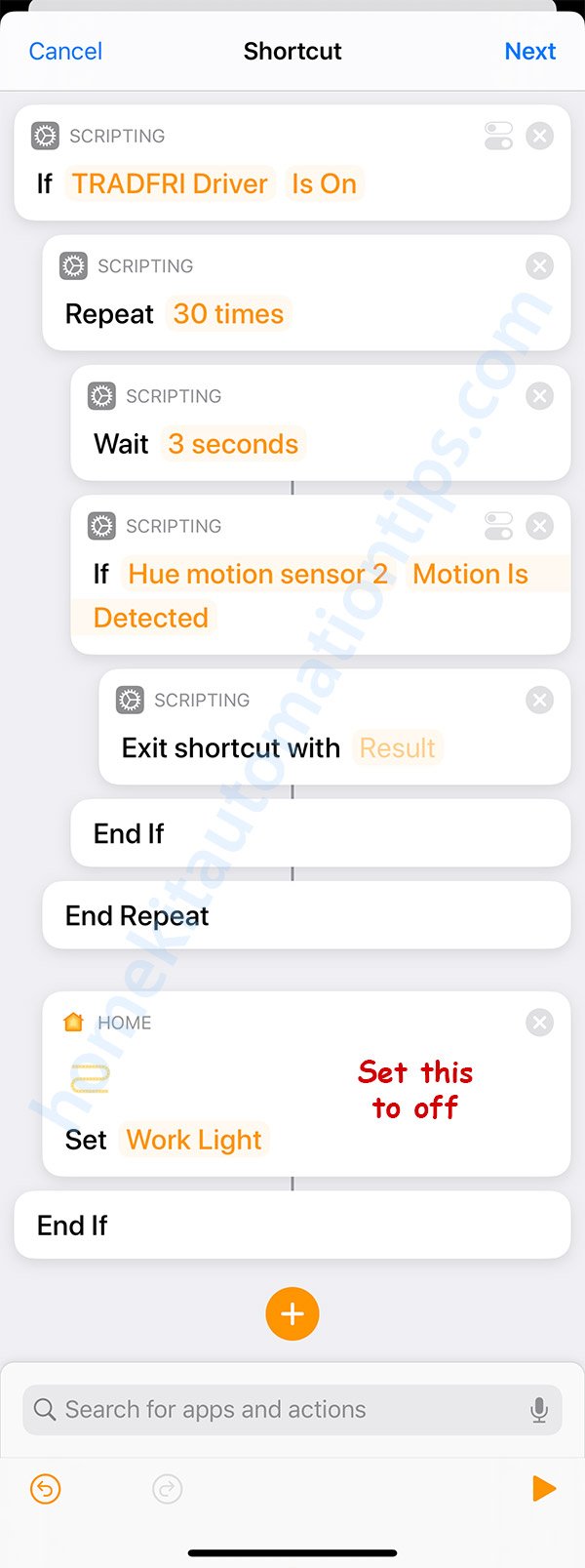
Smart home apps control sensor lights remotely. Many smart lights let you disable motion detection through the app. Open the app linked to your motion sensor lights. Look for sensor or motion settings within the app menu. Toggle off or adjust sensitivity to stop light activation. Some apps allow scheduling or setting “quiet hours.” This method offers easy, wireless control without physical changes.
Troubleshooting Common Issues
Motion sensor lights are designed to make your life easier, but sometimes they don’t behave as expected. Troubleshooting common issues can save you time and frustration. Understanding the typical problems helps you fix them quickly and keep your lights working smoothly.
Sensor Not Turning Off
If your motion sensor light stays on indefinitely, it might be due to a dirty sensor lens. Dirt, dust, or spider webs can block the sensor’s view, making it think there’s constant movement.
Try gently cleaning the sensor with a soft cloth. Also, check if there’s something close by triggering the sensor, like a moving tree branch or passing car.
Have you checked the timer settings? Sometimes the timer is set for a very long duration, causing the light to stay on longer than you expect.
Lights Staying On
Lights staying on even when no motion is detected can be frustrating. This problem often happens because of electrical issues or wiring errors.
Inspect the wiring for loose connections or damaged cables. Faulty wiring can cause the sensor to malfunction and keep the light on.
Another common cause is interference from other light sources. Are there bright streetlights or car headlights shining into the sensor? These can confuse the sensor and keep it active.
Sensor Sensitivity Problems
Sometimes the sensor is too sensitive, turning the light on at the slightest movement, or not sensitive enough, missing actual motion.
Adjust the sensitivity dial on your motion sensor. This small tweak can drastically improve performance.
If you live in a windy area, the sensor might pick up moving leaves or animals. Try repositioning the sensor or changing the detection angle to reduce false triggers.
Have you considered the environment around your sensor? Temperature changes and reflective surfaces can also impact sensitivity and cause erratic behavior.

Credit: manuals.plus
Tips To Optimize Motion Sensor Usage
Optimizing your motion sensor lights can save energy and reduce annoyance from unexpected triggers. Small adjustments can make a big difference in how well your sensors work for you. Let’s look at key tips to fine-tune their performance for your specific needs.
Adjusting Sensitivity Levels
Most motion sensors allow you to adjust how sensitive they are to movement. If your light turns on too often, lowering the sensitivity can prevent it from reacting to small animals or distant cars. Conversely, if it doesn’t activate when you want, increasing sensitivity helps catch even subtle motions.
Think about your environment—are there trees or bushes nearby that sway in the wind? These can cause false triggers if sensitivity is too high. Try testing different levels during different times of day to find the sweet spot.
Setting Timer Durations
Timer duration controls how long the light stays on after it detects motion. Setting it too long wastes electricity, while too short might leave you in the dark. Find a balance that fits your routine, such as a shorter time for quick trips outside or longer for gatherings.
Try adjusting the timer based on when you expect activity. For example, a longer duration at night can enhance security, while a shorter setting during daylight hours conserves power.
Strategic Sensor Placement
Where you put your motion sensor impacts its effectiveness. Position sensors so they cover paths or entry points without being triggered by irrelevant movements. Avoid placing them near heat sources like vents or direct sunlight, which can cause false alarms.
Consider angles and height—mounting sensors too high or low can limit their detection range. Sometimes moving a sensor just a few feet can greatly improve its accuracy and reduce unwanted activations.
Credit: homekitautomationtips.com
Frequently Asked Questions
How Do I Disable Motion Sensor Lights Temporarily?
To disable motion sensor lights temporarily, locate the sensor’s switch or control panel. Switch it to the “off” or “manual” mode. This stops motion detection without disconnecting power. Remember to switch it back when needed to restore automatic lighting.
Can I Turn Off Motion Sensor Lights Without Unplugging?
Yes, most motion sensor lights have an on/off switch or settings panel. Adjust the sensor sensitivity or disable motion detection through these controls. This avoids unplugging and preserves power to the fixture while turning off the sensor function.
Why Won’t My Motion Sensor Light Turn Off?
If your motion sensor light stays on, it may be detecting continuous movement or heat. Check for nearby heat sources or objects triggering the sensor. Adjust the sensor sensitivity or reset the device to fix this issue.
How To Turn Off Motion Sensor Lights At Night?
Some motion sensor lights have a daylight sensor or timer settings. Use these features to disable the sensor during specific hours or low light. Alternatively, manually switch the sensor off during nighttime to prevent activation.
Conclusion
Turning off motion sensor lights is simple and quick. Just follow the steps carefully. Adjust settings or switch off the power as needed. This helps save energy and avoid unwanted lighting. Understanding your light’s controls makes the process easier. You can control when and how lights turn on.
This small change improves your home’s comfort and security. Try it today to enjoy peace and convenience. No complicated tools or skills required. Just a little effort for better lighting control.



