
Have you ever wondered why websites ask for permission to access your motion sensors in Chrome? You might be surprised to learn how much information these sensors can reveal about your movements and habits.
But should you really allow websites to use this data? Making the right choice can protect your privacy and keep your browsing experience safe. Keep reading to discover what motion sensors are, how they work in Chrome, and whether granting access is a smart move for you.

Credit: www.snopes.com
Motion Sensors In Browsers
Motion sensors in browsers offer new ways to interact with websites and apps. These sensors detect movements or changes in device orientation. They provide data that websites can use to enhance user experience. Understanding how motion sensors work helps decide whether to allow them in Chrome.
What Are Motion Sensors
Motion sensors detect device movement or position changes. Common types include accelerometers and gyroscopes. Accelerometers measure linear movement, such as shaking or tilting. Gyroscopes detect rotation or twisting motions. Together, they give detailed motion data. This data can improve gaming, navigation, and fitness apps.
How Chrome Uses Motion Sensors
Chrome accesses motion sensor data through JavaScript APIs. Websites use this data to react to device movements in real-time. For example:
- Games that respond to tilting or shaking
- Fitness trackers counting steps or activity
- Navigation tools adjusting based on device orientation
- Interactive animations that move with device motion
Chrome asks permission before sharing sensor data. This protects user privacy. Users can allow or block access based on trust and needs.
Privacy Risks Of Motion Sensors
Motion sensors in Chrome offer convenience but carry privacy risks. These sensors collect data about device movement and orientation. Such data can reveal personal habits and locations. Understanding these risks helps users decide on allowing motion sensors.
Data Collection Concerns
Motion sensors gather detailed movement information. This data may include device tilt, rotation, and acceleration. Websites can use this data to learn about user activities. Continuous data collection raises worries about user privacy.
Potential For Tracking
Motion data can help track users across websites. Combined with other data, it creates a unique device fingerprint. This fingerprint can identify users even without cookies. Persistent tracking reduces user anonymity online.
Security Vulnerabilities
Motion sensors can expose devices to security risks. Malicious sites might exploit sensor data to infer sensitive information. Attackers can use this data to breach device security. Limiting sensor access reduces such vulnerabilities.
Benefits Of Allowing Motion Sensors
Allowing motion sensors in Chrome can improve website interaction and enhance user experience. These sensors help sites respond to device movements, making navigation smoother and more intuitive. They also enable features like screen rotation and motion-based controls.
Allowing motion sensors in Chrome can transform your browsing experience in unexpected ways. These sensors enable websites to interact with your device’s physical movements, creating a dynamic and tailored user experience. But what exactly are the benefits of allowing motion sensors? Let’s dive into the details.Enhanced User Experience
Motion sensors pave the way for a more immersive online interaction. Imagine browsing a website where tilting your device automatically scrolls the page. It’s like your device is reading your mind, responding directly to your motions. This hands-free navigation can make browsing more intuitive and enjoyable, especially when your hands are full or when you’re multitasking.Improved Accessibility
Motion sensors can significantly enhance accessibility for users with physical limitations. For those who find it challenging to tap or swipe, motion-based navigation can be a game-changer. It allows users to engage with content through simple movements, making the web more inclusive. Additionally, think about individuals with repetitive strain injuries. By reducing the need for constant touch interactions, motion sensors can help alleviate discomfort and provide a more comfortable browsing experience.Innovative Web Applications
Motion sensors open the door to a world of innovative web applications that can surprise and delight. Consider gaming websites that use motion to control characters, adding a layer of realism and engagement. Or fitness apps that track your movements in real-time, providing instant feedback on your workout form. These applications aren’t just for entertainment; they can also enhance learning experiences. Educational sites can create interactive lessons where students use motion to solve problems, making learning more engaging and effective. The potential of motion sensors is vast and still largely untapped. By allowing them, you invite a future of endless possibilities into your everyday browsing. Are you ready to experience a more connected and responsive web?
Credit: www.reddit.com
Managing Motion Sensor Permissions
Managing motion sensor permissions in Chrome helps protect your privacy and control how websites interact with your device. Motion sensors detect movements and can share this data with websites. You can allow or block this access based on your needs and trust in the site.
Customizing these settings improves your browsing safety and user experience. Let’s explore how to manage motion sensor permissions effectively.
How To Enable Or Disable Sensors
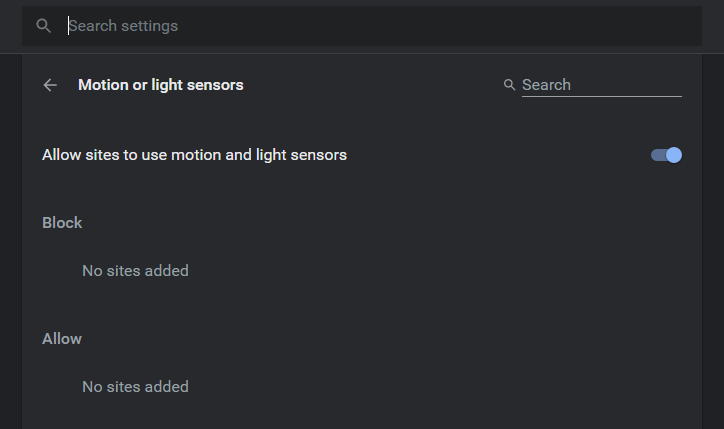
To turn motion sensors on or off in Chrome, open the browser settings. Search for “Motion Sensors” or “Sensors” in the privacy section. You will see options to enable or disable sensor access globally.
Disabling sensors stops all websites from using motion data. Enabling them allows websites to detect device movements, useful for games or fitness apps.
Site-specific Permissions
Chrome lets you control motion sensors on a site-by-site basis. You can allow trusted sites to use sensors while blocking others. Go to Chrome’s site settings and find “Motion Sensors.”
- Click on a website to change its permission.
- Choose “Allow” or “Block” for sensor access.
- Review permissions regularly to keep control.
This approach balances privacy and usability by limiting sensor data sharing to selected sites only.
Using Browser Settings For Control
Browser settings give you full control over sensor permissions. Navigate to Chrome’s settings menu and select “Privacy and security.”
Under “Site Settings,” find “Additional permissions” and then “Motion Sensors.” You can:
- Set default permissions for all websites.
- Manage exceptions for specific sites.
- Reset permissions if needed.
Adjusting these settings lets you protect your data and customize how Chrome handles motion sensors.
Alternatives To Motion Sensors
Allowing motion sensors in Chrome can raise privacy concerns for some users. Alternatives exist for those who want control without sharing sensor data. These options provide ways to interact with websites without relying on motion detection.
Manual Input Options
Manual input lets users control web features without sensors. Typing, clicking, and touch gestures offer simple, direct interaction methods. Forms, buttons, and sliders work well for manual control. This way, users avoid sharing motion data but still enjoy full functionality.
Manual input is reliable and easy to use. It requires no special hardware or permissions. Many websites support keyboard and mouse inputs by default. Users can customize settings to improve accessibility and comfort.
External Devices And Sensors
External devices offer another alternative to built-in motion sensors. USB controllers, gamepads, and specialized hardware can send signals to Chrome. These devices often come with their own privacy settings. They limit data sharing to what the user allows.
Using external sensors can improve accuracy for specific tasks. Fitness trackers or VR controllers work outside of the browser’s sensors. This option suits users who want advanced control without exposing browser sensor data.
Best Practices For Privacy
Protecting your privacy when using motion sensors in Chrome is important. These sensors can share data about your device’s movement and environment. Following best privacy practices helps keep your information safe and under your control.
Regularly Reviewing Permissions
Check the permissions you have granted to websites often. Remove access for sites you no longer trust or use. This limits the chance of unnecessary data collection. You can manage permissions in Chrome’s settings under “Privacy and security.”
Using Privacy-focused Extensions
Install extensions that block trackers and control sensor access. These tools can stop websites from using motion sensors without permission. Choose extensions with good reviews and transparent privacy policies. They add a layer of protection for your browsing data.
Keeping Browser Updated
Always keep Chrome updated to the latest version. Updates fix security issues and improve privacy features. New versions help protect against new threats and bugs. Enable automatic updates to stay safe without extra effort.

Credit: www.youtube.com
Frequently Asked Questions
What Are Motion Sensors In Chrome Browser?
Motion sensors in Chrome detect device movements using accelerometer and gyroscope data. They enable interactive web features like gaming and navigation.
Are Motion Sensors Safe To Enable In Chrome?
Generally, motion sensors are safe but can pose privacy risks if misused. Only allow trusted websites to access sensor data.
How Do Motion Sensors Affect My Browsing Experience?
Motion sensors enhance user experience by enabling motion-based controls and immersive features on supported websites and apps.
Can Motion Sensors Drain My Device Battery?
Yes, continuous use of motion sensors can slightly increase battery consumption, especially on mobile devices.
Conclusion
Allowing motion sensors in Chrome can improve your browsing experience. These sensors help websites respond to your movements and actions. They can make some features more useful and interactive. But, keep privacy and security in mind before enabling them. Only allow trusted sites to access these sensors.
You can always change the settings later if needed. Think about what feels safe and comfortable for you. Your choice helps control how much data you share online. Stay informed and browse with confidence.



