
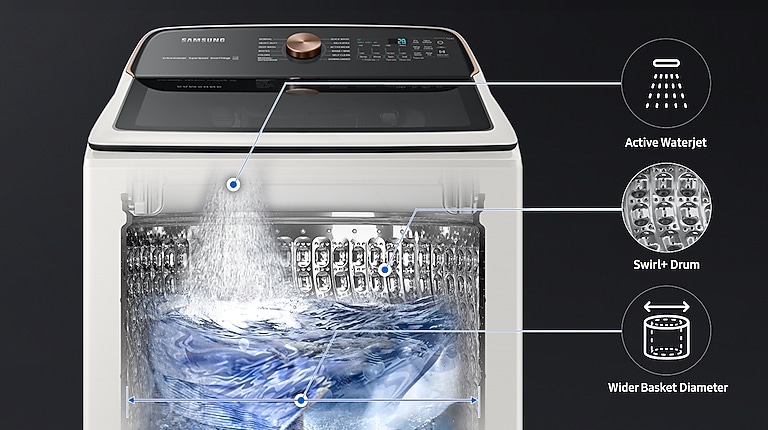
Have you ever wondered what the Bedding Waterproof setting on your Samsung washer actually does? If you’re like most people, you want your bedding to come out fresh, clean, and completely dry without any damage.
This special setting is designed to give your bulky blankets, comforters, and sheets the perfect wash while protecting them from water damage. Understanding how it works can save you time, effort, and even money on replacements. Keep reading to discover why this feature might be exactly what your laundry routine needs.

Credit: www.bellinghamelectric.com
Bedding Waterproof Setting Basics
The Bedding Waterproof Setting Basics help you keep your bulky bedding clean without damaging the fabric or the washer. Bedding items like comforters and mattress pads often have waterproof layers that need gentle handling. This setting is designed specifically to handle these materials with care, ensuring your bedding stays fresh and protected.
Purpose Of The Setting
The main goal is to wash waterproof bedding without causing leaks or damage. Regular cycles can be too harsh and may break down the waterproof layer over time. This setting ensures your bedding stays intact while getting a thorough clean.
Think about your favorite comforter. You want it clean but still soft and waterproof, right? This setting helps maintain that balance.
How It Works
The washer uses a combination of gentle agitation and controlled water levels. This avoids soaking the waterproof layers too much, which could cause leaks or wear.
It also adjusts spin speeds to protect the fabric. Instead of high spins that may strain seams, it uses slower spins to keep everything secure.
By controlling these factors, the washer cleans deeply but gently, extending the life of your bedding.
When To Use Bedding Waterproof
The Bedding Waterproof setting on a Samsung washer helps protect your bedding from water damage. It uses a special cycle designed to handle bulky and absorbent items without soaking them too much. Knowing when to use this setting saves your bedding and improves washing results.
Suitable Bedding Types
- Waterproof mattress protectors
- Water-resistant pillow covers
- Waterproof duvet covers
- Some waterproof mattress pads
- Waterproof baby bedding items
This setting works best with bedding that has a waterproof layer or finish. Avoid using it for delicate fabrics or items without water resistance.
Avoiding Common Mistakes
- Do not wash non-waterproof bedding on this setting.
- Avoid overloading the washer; bulky items need space.
- Check care labels before choosing the waterproof cycle.
- Do not use harsh detergents that can damage waterproof layers.
- Ensure zippers and fasteners are closed to prevent damage.
Using the wrong cycle or overloading can reduce cleaning quality and harm your bedding.
Benefits Of Bedding Waterproof Setting
Bedding Waterproof Setting on Samsung washers protects fabrics from damage caused by excess water. It ensures gentle washing for bed sheets and blankets while keeping them clean and fresh. This setting helps maintain the quality and longevity of your bedding.
The Bedding Waterproof Setting on Samsung washers offers several benefits. It ensures your bedding remains in top condition while enhancing cleaning efficiency. This feature is especially useful for maintaining the quality and longevity of waterproof fabrics.Protecting Fabric
The Bedding Waterproof Setting safeguards delicate fabrics. It uses gentle cycles to prevent wear and tear. This setting is perfect for quilts and mattress protectors. It maintains their waterproof properties over time. By using this setting, you reduce fabric stress and extend lifespan.Enhancing Cleaning Efficiency
This setting improves washing performance. It ensures thorough cleaning of bulky items. The washer adjusts water levels to suit bedding. This leads to better detergent distribution. Proper cleaning prevents allergen build-up. It keeps your bedding fresh and hygienic.Step-by-step Guide To Using The Setting
Using the Bedding Waterproof setting on your Samsung washer can make a big difference in cleaning large bedding items without causing damage or leaks. This setting is specially designed to handle bulky, water-resistant fabrics by optimizing water levels and spin speeds. Here’s how you can get the best results with your bedding wash.
Preparing Your Bedding
Start by checking the care labels on your bedding to confirm they are machine washable. Remove any heavy stains or spots by pre-treating with a gentle detergent. Don’t overload the washer; bedding needs room to move freely for effective cleaning.
Separating your bedding by fabric type and color helps prevent damage and color transfer. If you have multiple items, try washing them one or two pieces at a time. This prevents the washer from becoming unbalanced during the cycle.
Selecting The Setting
Turn on your Samsung washer and navigate to the cycle options. Look for the “Bedding Waterproof” setting, which is usually listed under specialty or bulky items. This cycle adjusts water levels to penetrate thick fabrics without soaking the washer.
Adjust additional settings like water temperature and spin speed if your washer allows. Warm water often works well for bedding, but always follow the care instructions. Selecting a slower spin speed can protect delicate fabrics and reduce wrinkles.
After The Wash
Once the cycle finishes, promptly remove your bedding to avoid musty odors. Check for any residual detergent or spots that may need a quick hand wash. If your bedding still feels damp, consider running a short spin-only cycle.
Dry your bedding according to the care label—some items do better air-dried, while others can go in the dryer. Have you noticed your bedding lasting longer when you follow these washing tips? It’s a simple way to keep your linens fresh and comfortable.
Troubleshooting Tips
Troubleshooting the Bedding Waterproof setting on your Samsung washer can save you time and prevent frustration. This feature is designed to handle heavy bedding items, but sometimes it might not work as expected. Let’s look at common issues you might face and how to fix them quickly.
Setting Not Available
If you don’t see the Bedding Waterproof setting on your washer, check the model you own. Some Samsung washers don’t include this specific cycle. You can find your washer’s cycle list in the user manual or on Samsung’s official website.
Also, ensure your washer’s software is up to date. Occasionally, firmware updates add new features or cycles. Updating your machine might unlock the Bedding Waterproof option.
Cycle Not Completing
When the Bedding Waterproof cycle stops before finishing, it could be due to an unbalanced load. Large bedding items can shift inside the drum, causing the washer to pause or stop.
Try redistributing the bedding evenly and restart the cycle. If the problem persists, check for error codes on the display, which can guide you to specific issues like water supply or drainage problems.
Bedding Still Damp
If your bedding feels damp after the cycle, it might mean the spin speed was too low or the load was too heavy. The Bedding Waterproof setting uses gentle spins to protect fabric, but sometimes that can leave moisture behind.
Consider running an extra spin cycle to remove excess water. Also, avoid overloading your washer; too many heavy blankets or comforters can prevent proper water extraction.
Comparing To Other Washer Settings
Choosing the right washer setting can protect your fabrics and improve cleaning. Samsung washers offer many settings to match different laundry needs. The Bedding Waterproof setting is designed for large, bulky items that need careful washing without water damage. Understanding how this setting compares to others helps you pick the best option for your laundry.
Delicates Vs Bedding Waterproof
The Delicates setting uses gentle washing motions and low spin speeds. It protects fragile fabrics like silk and lace from damage. This setting uses less water and shorter cycles to avoid wear and tear.
The Bedding Waterproof setting handles thicker, heavier items like comforters and mattress covers. It uses more water and a slower spin to keep waterproof layers safe. The cycle is longer to clean deep inside bulky bedding without harming materials.
Normal Vs Bedding Waterproof
The Normal setting is for everyday clothes and sturdy fabrics. It uses faster spins and stronger agitation for thorough cleaning. This setting is shorter and uses moderate water levels.
The Bedding Waterproof setting differs by focusing on gentle care for large, water-resistant bedding. It avoids harsh agitation and high spin speeds that can damage waterproof coatings. This setting also uses extra water to rinse thoroughly and remove detergent from thick fabrics.
Maintenance For Optimal Performance
Maintaining your Samsung washer’s bedding waterproof setting ensures it works well for a long time. Regular care keeps the washer efficient and protects your bedding from damage. Simple tasks help avoid costly repairs and improve washing results.
Cleaning The Washer
Cleaning the washer prevents mold and bad smells. Run a cleaning cycle monthly using a washer cleaner or white vinegar. Wipe the door seal and detergent drawer to remove dirt and residue. Keep the drum dry after use to stop mildew growth.
Checking For Wear And Tear
Check hoses and seals regularly for cracks or leaks. Replace worn parts quickly to avoid water damage. Inspect the drum for sharp objects that can damage bedding. Tighten loose screws and clean filters to maintain smooth operation.
Credit: www.samsung.com
Credit: www.samsung.com
Frequently Asked Questions
What Does The Bedding Waterproof Setting Do On Samsung Washers?
The Bedding Waterproof Setting protects bedding from water damage during washing. It adjusts water levels and cycle time for heavy, bulky items. This setting ensures thorough cleaning while preventing water leakage and fabric damage, ideal for comforters, duvets, and mattress covers.
When Should I Use The Bedding Waterproof Setting?
Use this setting when washing thick bedding like quilts, duvets, or waterproof mattress protectors. It handles heavy fabrics with extra water and gentle agitation. This prevents damage and ensures deep cleaning without soaking or overloading the washer.
Can The Bedding Waterproof Setting Save Energy And Water?
Yes, it optimizes water use and cycle duration specifically for bulky bedding. This reduces unnecessary water consumption and energy usage. The setting balances cleaning efficiency with resource savings, making it eco-friendly for large, waterproof bedding items.
Is The Bedding Waterproof Setting Safe For All Bedding Types?
It is safe for most thick, waterproof bedding but check manufacturer care labels first. Avoid this setting for delicate or lightweight fabrics, as it may be too harsh. Always follow the washer and bedding instructions for best results.
Conclusion
The Bedding Waterproof setting helps protect your washer from water spills. It uses extra care to keep water inside the drum. This setting is perfect for washing thick blankets or bed sheets. It reduces the chance of leaks and keeps your laundry area dry.
Use this setting to clean bedding safely and effectively. Understanding this feature can save you time and hassle. Try it to see how it works for your heavy laundry loads. Simple, safe, and designed for big bedding items.



