
Are you tired of your motion sensor light turning on at the wrong moments? Maybe it’s waking you up at night or triggering every time a car passes by.
Knowing how to deactivate your motion sensor light can save you from constant annoyance and help you take control of your space. You’ll learn simple, clear steps to turn off your motion sensor light quickly and safely. Keep reading, and you’ll never have to worry about unexpected lights again.
Credit: mrelectric.com
Types Of Motion Sensor Lights
Motion sensor lights come in various types, each using a different technology to detect movement. Understanding these types helps you decide which light fits your needs and how to deactivate it effectively. Let’s look at the main categories and what makes them unique.
Infrared Sensors
Infrared sensors detect heat emitted by living beings. When you walk into their range, the sensor picks up your body heat and triggers the light. These sensors are common in outdoor security lights and are quite energy-efficient.
One time, I installed an infrared sensor light near my garden. It worked well, but I noticed it sometimes turned on because of warm cars passing by. This showed me how sensitive infrared sensors can be to heat sources, not just human movement.
Ultrasonic Sensors
Ultrasonic sensors emit sound waves at frequencies higher than humans can hear. They measure the waves bouncing back to detect movement. Unlike infrared, they don’t rely on heat but on changes in sound wave patterns.
These sensors work well indoors, especially in areas with low temperature variation. However, they can be triggered by non-human movement like curtains fluttering or pets moving around. If you want to deactivate them, you might need to adjust their sensitivity or placement.
Microwave Sensors
Microwave sensors send out microwave pulses and detect reflections from moving objects. They cover a larger area than infrared and ultrasonic sensors and can detect movement through some walls or objects.
I once found a microwave sensor light staying on because it picked up motion inside my house, even though the sensor was outside. This can be tricky because you might not realize what’s triggering the light. Turning these off often means disconnecting power or adjusting the sensor’s range settings.
Credit: homekitautomationtips.com
Common Reasons To Deactivate
Motion sensor lights are designed to enhance security and convenience, but there are times when you might want to deactivate them. Understanding the common reasons for turning these lights off can help you decide the best approach for your situation. Whether it’s about avoiding unnecessary interruptions or saving energy, knowing why you might deactivate your motion sensor light is key.
Avoiding False Alarms
False alarms can be frustrating and disruptive. Motion sensors may trigger lights due to pets, passing cars, or swaying trees. If your sensor frequently activates without real cause, it might be time to deactivate it temporarily or adjust its settings.
Think about your own experience: Have you ever been startled by a light turning on for no apparent reason? That constant flickering can drain your patience and your power bill.
Energy Saving
Motion sensor lights are generally energy-efficient, but they still consume power when activated unnecessarily. Deactivating the sensor during periods of low activity, like when you’re away for an extended time, can reduce energy waste.
Consider how much energy could be saved if the light stayed off when no one is around. This simple action helps lower your electricity costs and your environmental footprint.
Temporary Deactivation
Sometimes, you need the motion sensor light off just for a short while—during a party, while working outside, or when doing maintenance. Temporary deactivation prevents the light from turning on at inconvenient times.
Have you ever been bothered by your motion light flashing on and off while you’re trying to enjoy the outdoors? Switching it off temporarily can give you control without permanently disabling the system.
Preparing To Deactivate
Before you deactivate a motion sensor light, it’s important to prepare properly. Taking the right steps beforehand ensures your safety and makes the process smoother. You’ll want to gather everything needed and understand the precautions to avoid any mishaps.
Safety Precautions
Working with electrical fixtures can be risky if you’re not careful. Always turn off the power supply to the light at the circuit breaker before touching any wires or components. This simple step can prevent electric shocks or damage to your home’s electrical system.
Wear insulated gloves to protect your hands and use a non-conductive ladder if the light is installed high up. Check that the area is dry; moisture increases the risk of electrical accidents. Have a flashlight handy in case you need to work in low light after shutting off the power.
Ask yourself: Have you double-checked that the power is off? Taking a moment here can save you from serious injury.
Tools Needed
Gathering the right tools before starting saves time and avoids frustration. You’ll typically need:
- A screwdriver (usually Phillips or flat-head depending on the screws)
- A voltage tester to confirm power is off
- Wire cutters or strippers if you plan to disconnect wiring
- Electrical tape for safely covering exposed wires
Having these tools ready means you won’t have to stop mid-task to search for something. It also helps you stay focused and efficient during the deactivation process.
Think about your last DIY project—did missing a tool cause delays or extra trips? Preparing well prevents those little annoyances.

Credit: manuals.plus
Manual Deactivation Steps
Deactivating a motion sensor light manually can be simple and quick. It helps control when the light is on or off. You can do this without special tools or skills. Follow these easy steps to turn off your motion sensor light.
Using The On/off Switch
Most motion sensor lights have a basic on/off switch. This switch lets you turn off the light completely. Find the switch on the light fixture or nearby wall. Flip it to the off position. This stops the light from activating, even when motion is detected.
Adjusting Sensor Settings
Many sensors allow you to adjust sensitivity and timing. Look for small knobs or buttons on the sensor unit. Adjust the sensitivity to a lower level or turn it to the “off” setting. You can also change how long the light stays on after motion stops. Setting the timer to the shortest time helps reduce unwanted lighting.
Removing The Sensor
If you want to disable the sensor completely, remove it from the fixture. Use a screwdriver to loosen screws holding the sensor. Carefully detach the sensor from the light unit. This will stop the sensor from detecting any movement. You can replace the sensor later if needed.
Advanced Deactivation Methods
Adjust the sensor’s sensitivity or angle to stop unwanted activation. Disconnect power or remove batteries for a complete shutdown. Some models include a manual off switch for easy deactivation.
Deactivating a motion sensor light can sometimes feel like you’re trying to outsmart a particularly stubborn appliance. If you’ve tried the basic methods and still can’t get that light to stop turning on at the slightest breeze, it’s time to explore some advanced deactivation techniques. These methods can help you regain control over your lighting, adding a layer of convenience and peace to your home environment. Let’s dive into some practical and hands-on methods that can make a real difference.Disabling Via Circuit Breaker
This method is straightforward and effective. Locate your home’s electrical panel, which is typically found in a garage, basement, or utility room. Identify the breaker associated with your motion sensor light and switch it off. Turning off the circuit breaker cuts power to the motion sensor light completely. This is a surefire way to ensure it doesn’t turn on unintentionally. Just remember, this also means the light won’t work at all until you turn the breaker back on.Unplugging The Unit
If your motion sensor light is plugged into an outlet, simply unplugging it can be the easiest solution. This method is particularly useful for indoor lights or those installed with a plug-in option. Unplugging the unit ensures that the light is entirely deactivated without having to mess with wiring or settings. It’s a temporary fix, but perfect if you need the light off for a short period.Using Smart Home Controls
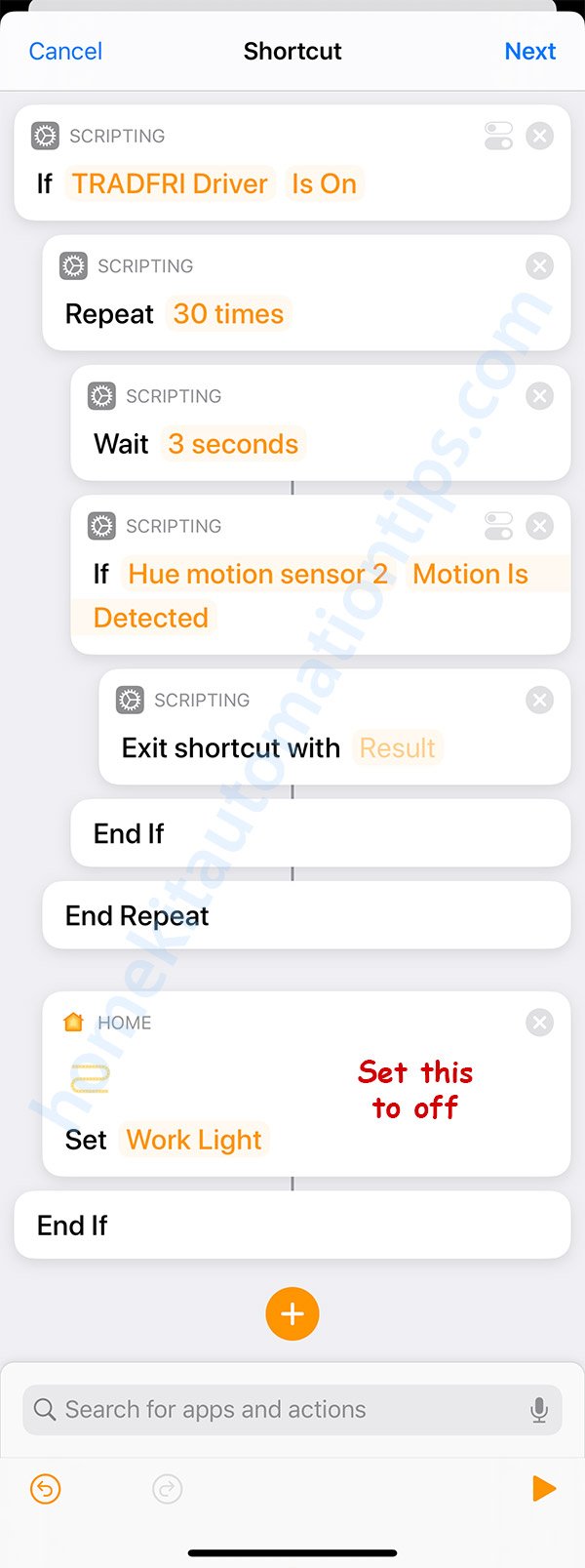
Do you have a smart home system? If so, you can integrate your motion sensor lights into this system for remote control. Use your smartphone or voice commands to deactivate the lights when needed. This method allows for flexible control, especially if you’re away from home. You can schedule when the lights turn on and off, ensuring they don’t activate at unwanted times. It’s a modern solution for those who love tech-savvy convenience. Could one of these methods solve your motion sensor light dilemma? Implementing these techniques can offer a quick fix or a long-term solution, depending on your needs. Why not give them a try and see which works best for you?Troubleshooting Activation Issues
Motion sensor lights may activate unexpectedly or fail to turn off. Troubleshooting activation issues helps identify simple fixes. Check sensor settings and environmental factors to solve problems quickly. Understanding common causes can save time and effort.
Sensor Sensitivity Adjustments
Sensors have sensitivity controls to detect motion. High sensitivity triggers lights at small movements. Low sensitivity might miss larger movements. Adjust the sensitivity dial or switch on the sensor housing. Test different levels to find the best setting for your area.
Checking For Obstructions
Obstructions block the sensor’s view and affect activation. Leaves, dirt, or spider webs can cause false triggers or no response. Clear any debris from the sensor lens and surrounding area. Ensure the sensor faces the correct direction without objects in the way.
Resetting The Sensor
Resetting the sensor can fix glitches or errors. Turn off the power to the light fixture at the breaker or switch. Wait about 30 seconds before turning it back on. This resets the sensor’s internal settings and clears temporary faults. Test the sensor after the reset to check improvement.
When To Seek Professional Help
Knowing when to seek professional help is important for safety and proper repair. Some issues with motion sensor lights require expert skills. Trying to fix complex problems without experience may cause more damage or risk injury.
Professional electricians have the right tools and knowledge. They can diagnose hidden electrical faults quickly. They also ensure the light works safely after repair. Recognizing signs that need expert care helps avoid bigger problems.
Persistent Malfunctions Despite Troubleshooting
If the motion sensor light keeps turning on or off without reason, it signals a deeper issue. Simple fixes like adjusting sensitivity or replacing batteries might not work. Persistent problems need a professional to check wiring and sensors.
Visible Damage To Wiring Or Fixtures
Exposed wires, burn marks, or broken parts require immediate professional attention. Damaged electrical components can cause shocks or fires. Only trained electricians should handle these hazards to prevent accidents.
Complex Installation Or Replacement Needs
Installing or replacing motion sensor lights in difficult locations calls for expert help. Professionals ensure proper fitting and connection to the power supply. This guarantees the light functions correctly and safely.
Unusual Electrical Behavior In Your Home
Flickering lights, tripped breakers, or power outages linked to the motion sensor light are warning signs. These issues suggest electrical faults that need a professional inspection. Ignoring them can lead to serious electrical failures.
Local Code Compliance And Safety Standards
Professional electricians ensure all work meets local codes and safety rules. This protects your home and avoids legal problems. Certified experts keep your electrical system safe and reliable.
Frequently Asked Questions
How Do I Temporarily Deactivate A Motion Sensor Light?
To temporarily deactivate, locate the sensor’s switch or settings. Turn off the sensor or set it to manual mode to stop motion activation.
Can I Disable Motion Sensor Light Without Unplugging It?
Yes, adjust the sensor’s sensitivity or switch it to “off” mode if available. This avoids unplugging and keeps the light functional.
Why Won’t My Motion Sensor Light Turn Off?
Check for continuous movement or obstructions near the sensor. Also, verify the timer settings and sensor sensitivity are properly adjusted.
Is It Safe To Disable Motion Sensor Lights?
Yes, it is safe when done correctly. Ensure you follow the manufacturer’s instructions to avoid electrical hazards or damage.
Conclusion
Deactivating a motion sensor light is simple and quick. You just need to find the sensor and adjust its settings. Turning off the light can save energy and reduce unwanted triggers. Remember to check the user manual for specific instructions.
This small change can make your space more comfortable. Take a few minutes to try it yourself today. It’s an easy way to control your lighting better.



