

Is your motion sensor acting up or not turning on at all? Chances are, it’s time to change the battery.
You might think it’s a tricky task, but replacing your motion sensor battery is simpler than you imagine. In this guide, you’ll discover easy, step-by-step instructions to get your sensor back to working perfectly. Keep reading, and you’ll save time, avoid frustration, and make sure your home stays secure without any hassle.

Credit: www.youtube.com
Signs Your Motion Sensor Needs A New Battery
Recognizing the signs that your motion sensor needs a new battery can save you time and frustration. Batteries don’t last forever, and your sensor will show clear signals when it’s running low. Paying attention to these warning signs helps you maintain security and efficiency without unnecessary replacements.
Reduced Sensitivity
Does your motion sensor seem less responsive to movement? Reduced sensitivity is often the first hint that the battery is weakening. You might notice it misses some motions it used to catch easily, like a pet walking by or someone entering a room quietly.
This happens because the sensor’s power supply can no longer support its full detection range. If you find yourself needing to wave your hand closer or move more deliberately to trigger it, it’s time to check the battery.
Delayed Activation
Have you observed a lag between motion and the sensor’s response? A slow or delayed activation often points to a dying battery. Instead of turning on instantly, the sensor might take a second or two longer to react.
This delay can compromise security, especially in areas where quick detection matters. Don’t ignore this sign—replacing the battery can restore immediate responsiveness.
No Response
When your motion sensor stops responding entirely, a dead battery is a likely culprit. If you’ve ruled out other issues like wiring or device damage, the battery is probably drained.
Before assuming the worst, try swapping in a fresh battery to see if functionality returns. This simple step often solves the problem without needing professional help or expensive replacements.
Tools And Materials Required
Replacing the battery in a motion sensor requires a few simple tools and the right materials. Having everything ready makes the process quick and easy. Knowing the types of batteries and the tools needed helps avoid delays and mistakes.
Types Of Batteries
Most motion sensors use common batteries. The most popular types include:
- AA or AAA alkaline batteries
- 9-volt batteries
- CR123A lithium batteries
- Button cell batteries (like CR2032)
Check your motion sensor’s manual or look inside the battery compartment. This helps identify the exact battery type you need.
Basic Tools Needed
Some tools help open the sensor and replace the battery safely. You may need:
- Small Phillips or flathead screwdriver
- Plastic pry tool or spudger
- Clean cloth to handle parts
- New batteries matching the sensor’s requirements
Having these tools ready ensures a smooth battery change without damage.
Preparing To Replace The Battery
Gather all necessary tools and a new battery before starting. Ensure the motion sensor is turned off to avoid damage or injury. Check the sensor’s model to buy the correct battery type.
Preparing to replace the battery in your motion sensor might feel like a daunting task, but with a few simple preparations, you can ensure a smooth process. A properly functioning sensor is crucial for the security and efficiency of your home. Let’s break down the steps to make this task as easy as possible.Safety Precautions
Before you begin, it’s essential to prioritize safety. Always turn off the power to the device to prevent any electrical mishaps. Use a stable ladder if the sensor is located at a height to avoid any accidents. Ensure that your hands are dry to prevent slipping or causing damage to the sensor. Wearing gloves can provide an added layer of protection against static electricity, which can harm sensitive electronics.Locating The Sensor
Identifying the exact location of your motion sensor is the next step. Sensors are often mounted near entry points like doors and windows, or in high-traffic areas like hallways. If you’re unsure of the location, refer to your home security system’s manual or app, which often provides a layout of all installed devices. Once located, examine the sensor for any screws or clips that might need to be removed to access the battery compartment. Have you ever had trouble finding a hidden sensor? It can be like finding a needle in a haystack. But once you locate it, you’ll feel a sense of accomplishment that makes the task worthwhile. Preparing ahead will not only save you time but also ensure that your motion sensor continues to operate effectively. Are there any other tips you find helpful in your battery replacement process?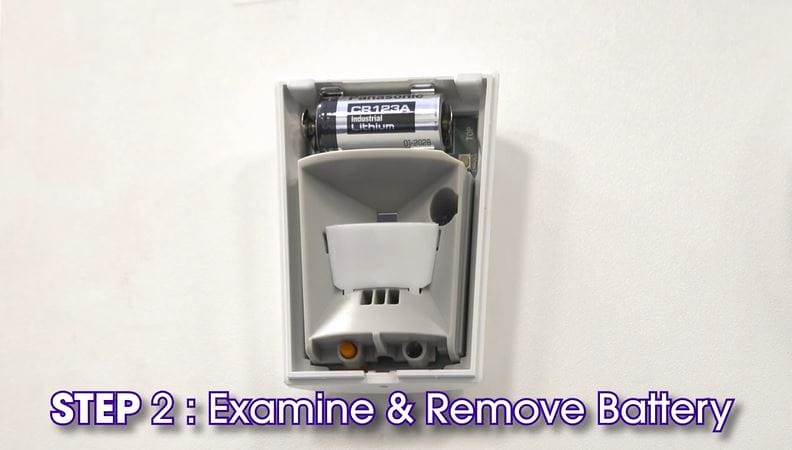
Credit: guardianprotection.com
Step-by-step Battery Replacement
Replacing the battery in a motion sensor is simple and quick. Follow these clear steps to keep your sensor working well. Proper battery care ensures the sensor detects movement accurately. This guide shows how to change the battery safely and easily.
Opening The Sensor Cover
Find the sensor mounted on the wall or ceiling. Look for a small notch or tab on the cover. Use your fingers or a flat tool to gently pry open the cover. Avoid using too much force to prevent damage. Set the cover aside carefully.
Removing The Old Battery
Locate the battery inside the sensor compartment. Note the battery type and position before removal. Use your fingers to lift or slide out the old battery. Dispose of the old battery according to local regulations. Check the compartment for any dirt or corrosion.
Inserting The New Battery
Take the new battery and match its positive and negative ends. Insert the battery into the compartment exactly as the old one was placed. Press gently to ensure a secure fit. Avoid touching the battery terminals with your fingers to prevent corrosion.
Securing The Cover
Align the sensor cover with the base. Press the cover firmly until it snaps back in place. Make sure the cover is tight and secure to protect the battery. Test the sensor by moving in front of it to confirm it works.
Testing The Motion Sensor After Replacement
After replacing the battery in your motion sensor, testing it ensures everything works smoothly. This step confirms your effort didn’t go to waste and your sensor is ready to protect and monitor your space effectively. Let’s look at how you can quickly check and fine-tune your sensor for optimal performance.
Checking Sensor Activation
Start by walking within the sensor’s detection range. Move slowly and then briskly to observe how the sensor responds to different speeds. Does the light or alarm trigger immediately when you enter the zone?
If the sensor doesn’t activate, double-check the battery installation. Sometimes, a loose battery or incorrect placement can prevent proper function. Also, clean the sensor lens gently — dust or smudges can interfere with detection.
Adjusting Sensor Settings
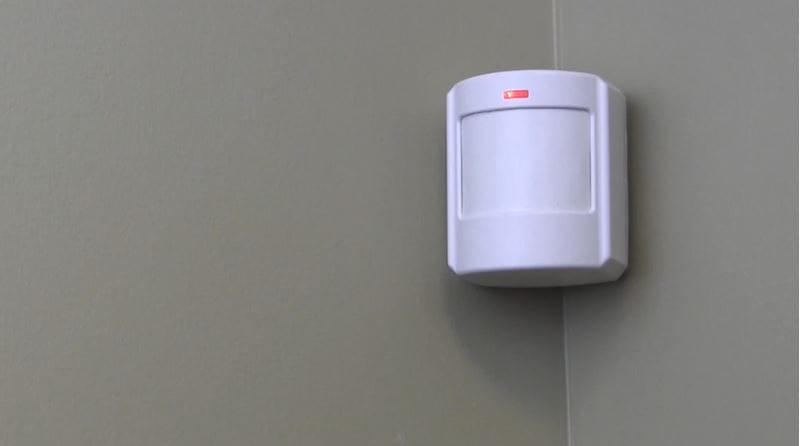
Most motion sensors have settings like sensitivity and timer duration. Use these controls to tailor the sensor’s response to your environment. For example, if your sensor triggers by passing cars outside, lowering sensitivity can help avoid false alarms.
Experiment with different settings by testing activation after each adjustment. This hands-on approach helps you find the perfect balance between responsiveness and false triggers. Have you noticed changes in how your sensor reacts after tweaking the settings? That’s how you know it’s dialed in right.
Credit: guardianprotection.com
Tips For Extending Battery Life
Extending the battery life of your motion sensor helps avoid frequent changes. It keeps your device working smoothly and saves money. Simple habits and smart placement make a big difference. Follow these tips to get the most from your sensor’s battery.
Optimal Sensor Placement
Place the sensor where it detects movement clearly but not too often. Avoid busy areas with constant motion like near vents or fans. Keep it away from direct sunlight or heat sources that drain battery faster. Position the sensor at the correct height for best coverage. This reduces false triggers and saves energy.
Regular Maintenance
Clean the sensor lens regularly to remove dust and dirt. Dirty lenses can cause the sensor to work harder and use more battery. Check for loose wires or connections that may affect performance. Test the sensor periodically to ensure it activates only when needed. These small checks help the battery last longer and keep the sensor reliable.
Frequently Asked Questions
How Do I Know When To Change Motion Sensor Battery?
You should replace the battery when the sensor’s light dims or stops working. Also, check for delayed responses or frequent false alarms as signs of low battery power. Regularly inspect the sensor to ensure optimal performance.
What Type Of Battery Is Best For Motion Sensors?
Most motion sensors use AA, AAA, or 9V batteries. Check the device manual for the recommended battery type. Using the correct battery ensures longer sensor life and consistent performance.
How To Safely Replace A Motion Sensor Battery?
Turn off the device before opening the battery compartment. Remove the old battery carefully and insert the new one following polarity marks. Close the compartment securely and test the sensor to confirm proper operation.
Can I Use Rechargeable Batteries In Motion Sensors?
Yes, rechargeable batteries can be used if they match the sensor’s specifications. However, they may have lower voltage, potentially affecting sensor performance. Always check compatibility before switching to rechargeable batteries.
Conclusion
Changing a motion sensor battery is quick and simple. Just follow the steps carefully for safety. Regular battery checks keep your sensor working well. A fresh battery ensures accurate motion detection every time. Don’t wait for your sensor to stop working.
Keep your home safe and secure with a working sensor. Small effort, big peace of mind. Easy to do, and you save money too. Try it today and see the difference.



