
Have you ever wanted to add a smart security feature to your home or project? Building your own motion detector is easier than you might think—and it gives you full control over how it works.
In this guide, you’ll discover simple steps to create a motion detector from scratch, using easy-to-find parts and clear instructions. Whether you’re a beginner or just looking to learn something new, this article will help you bring your ideas to life quickly and confidently.
Ready to make your space smarter and safer? Let’s get started!
Motion Detector Basics
Understanding the basics of motion detectors is essential if you want to build one yourself. These devices sense movement and trigger a response, such as turning on a light or sounding an alarm. Knowing how they work and the different types available will help you choose the right components for your project.
Types Of Motion Sensors
Motion sensors come in several varieties, each detecting movement differently:
- Passive Infrared (PIR) Sensors:Detect body heat changes in the environment.
- Ultrasonic Sensors:Use sound waves to detect movement by measuring reflected waves.
- Microwave Sensors:Emit microwave pulses and measure their reflection to spot motion.
- Tomographic Sensors:Use radio waves to detect motion through walls or obstacles.
Choosing the right type depends on your project’s environment and how sensitive you want your detector to be.
How Motion Detectors Work
Most motion detectors operate by identifying changes in the environment. For example, PIR sensors pick up infrared radiation changes caused by a moving person.
When motion is detected, the sensor sends a signal to a control unit, which then activates an output device like a light or alarm.
Have you ever wondered how your automatic hallway lights know when you enter? That’s the sensor reacting to your movement instantly.
Common Uses
Motion detectors are widely used in various settings, including:
- Home security systems to detect intruders.
- Automatic lighting to save energy by turning lights on only when someone is present.
- Smart devices that respond to your presence, like automated doors or faucets.
Understanding these applications can inspire you to create a motion detector tailored to your specific needs.

Credit: efcomputer.net.au
Materials Needed
Gathering the right materials is the first step in building a motion detector. Having clear knowledge of what you need saves time and avoids confusion. This section lists all the essential items and tools required. You will also find optional accessories to enhance your project. Each part plays a key role in making the motion detector work efficiently.
Essential Components
- PIR motion sensor module – detects movement
- Microcontroller (like Arduino or Raspberry Pi)
- Resistors and capacitors – for circuit stability
- Breadboard – to build the circuit
- LED or buzzer – for alert signals
- Jumper wires – to connect components
- Power supply or batteries – to power the device
Tools Required
- Soldering iron – for permanent connections
- Wire stripper – to prepare wires
- Multimeter – to test voltage and connections
- Screwdriver set – for assembling parts
- Hot glue gun – to secure components
Optional Accessories
- Enclosure box – to protect the circuit
- LCD display – to show sensor status
- Relay module – to control larger devices
- Wi-Fi or Bluetooth module – for remote alerts
- Solar panel – for eco-friendly power supply
Step-by-step Assembly
Building a motion detector can be an exciting project. It’s a great way to explore electronics and sensors. This guide provides a simple approach to assembling your own motion detector. Follow these steps to create a device that senses movement effectively.
Preparing The Circuit
Start with gathering all necessary components. You’ll need a breadboard, wires, and a PIR sensor. Ensure all your materials are in working condition. Place your breadboard on a flat surface. This will help prevent any loose connections. Organize your components for easy access.
Connecting The Sensor
Carefully attach the PIR sensor to the breadboard. Use jumper wires for connections. Connect the sensor’s power pin to the positive rail. Attach the ground pin to the negative rail. Finally, connect the output pin to an input pin on your microcontroller. Double-check all connections for accuracy.
Testing The Setup
Turn on your power source to test the circuit. Observe the LED or alert system connected. It should react to motion in the sensor’s range. If the setup does not work, inspect the connections. Ensure the sensor is receiving power. Adjust settings if necessary for optimal performance.
Programming The Detector
Programming the motion detector is a key part of building a functional device. It controls how the sensor reacts to movement and when it sends alerts. Writing the code ensures the detector works efficiently and matches your needs.
The code tells the detector what to do when it senses motion. You can adjust settings like how sensitive the sensor is and how it signals detection. Good programming helps avoid false alarms and missed detections.
Basic Code Structure
The code starts with setting up the sensor and output pins. Next, it reads the sensor’s data regularly. If the sensor detects movement, the code triggers an alert, like turning on an LED or sounding a buzzer.
Here is a simple outline of the code:
- Initialize sensor and output pins
- Continuously check for motion
- Activate alert when motion is detected
- Reset alert after a short delay
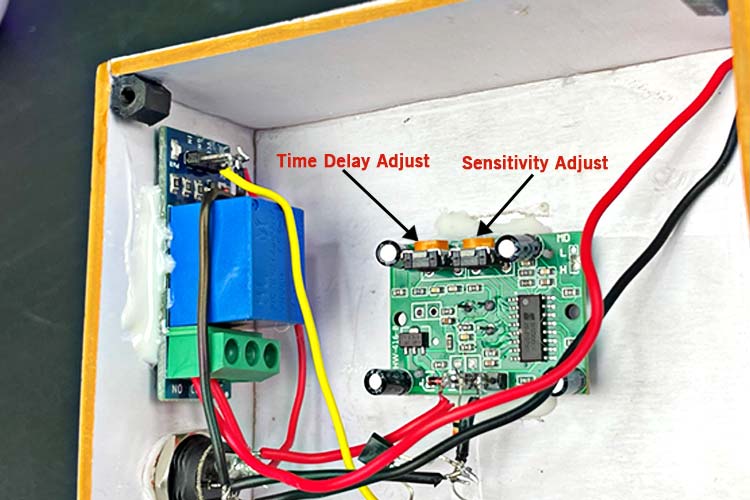
Setting Sensitivity Levels
Sensitivity controls how easily the detector senses movement. Higher sensitivity means the sensor detects smaller motions. Lower sensitivity avoids false alarms from small objects or pets.
You can adjust sensitivity in the code by changing delay times or sensor thresholds. Test different levels to find the best balance for your environment.
- Set lower threshold for high sensitivity
- Increase threshold to reduce false alarms
- Use trial and error to find the right setting
Troubleshooting Tips
If the detector misses motion or alerts too often, check the code and hardware connections. Make sure the sensor pins match the code setup. Verify the power supply is stable.
Common issues include:
- Incorrect pin assignments in the code
- Loose wires or poor sensor contact
- Sensitivity set too high or too low
- Sensor placement causing false triggers
Run simple tests by moving in front of the sensor and watching its response. Adjust the code and sensor position as needed for better results.
Mounting And Placement
Proper mounting and placement are key for an effective motion detector. The right position ensures the sensor covers the desired area without false triggers. Understanding where and how to install the sensor helps maximize its performance and reliability.
Ideal Locations
Choose spots with clear views of entry points like doors and windows. Corners often work well to cover wide areas. Avoid facing the sensor directly at heat sources or moving objects like trees. Indoor sensors suit hallways and rooms where movement is expected. For outdoor use, place the detector under eaves or sheltered areas to protect it from weather.
Adjusting The Sensor Angle
Adjust the sensor to cover the target zone accurately. Tilt it slightly downward to detect people walking nearby. Avoid pointing it at the sky or ground to reduce false alarms. Test the angle by walking through the detection area. Small changes can improve detection and reduce missed activity.
Power Supply Options
Motion detectors can use batteries or wired power. Battery-powered sensors offer easy installation and flexibility. Choose long-lasting batteries to reduce maintenance. Wired sensors need a nearby power outlet but provide constant power. Some models support solar panels for outdoor use. Select a power option that fits your setup and maintenance preferences.

Credit: efcomputer.net.au
Enhancing Your Motion Detector
Enhancing your motion detector can turn a simple sensor into a powerful tool that fits seamlessly into your daily life. Upgrading its features not only boosts its usefulness but also keeps you more connected and secure. Let’s dive into practical ways you can make your motion detector smarter and more reliable.
Adding Alerts And Notifications
Imagine getting a text or an email the moment your motion detector senses movement. Adding alerts means you stay informed no matter where you are. You can set up push notifications on your phone or even configure sound alarms at home.
To add alerts, use a microcontroller like Arduino or Raspberry Pi with Wi-Fi capability. Connect your motion sensor to it and program it to send notifications via services like IFTTT or Pushover. This simple upgrade keeps you alert to unexpected activity without needing to watch the sensor constantly.
Integrating With Home Automation
Does your home already have smart lights, locks, or cameras? Your motion detector can work with them to automate tasks. For example, it can turn on lights when you walk into a room or trigger your security camera to start recording.
Connecting your motion detector to platforms like SmartThings, Home Assistant, or Alexa lets you customize responses. You might set it to open smart blinds at sunrise or activate a smart plug. These integrations make your home more responsive and save you time.
Improving Range And Accuracy
If your motion detector misses movements or triggers false alarms, it may need better range or accuracy. Adjusting the sensor’s angle or height can help, but sometimes upgrading the sensor type is necessary.
Consider using a PIR sensor with a wider detection angle or combining it with ultrasonic sensors for better depth sensing. Adding a lens or reflector can also focus the sensor’s field. Have you tried repositioning your sensor to reduce false alarms from pets or moving curtains? Small tweaks like these can make a big difference.
Safety And Maintenance
Safety and maintenance are crucial when building and using a motion detector. Ignoring these aspects can lead to device failure or even pose risks to you and your surroundings. Taking the right precautions ensures your motion detector works reliably and lasts longer.
Handling Electrical Components Safely
Always disconnect the power source before working on your motion detector. Touching live wires can cause shocks or damage to the components.
Use insulated tools and wear rubber-soled shoes to reduce the risk of electrical accidents. Keep your workspace dry and organized to avoid short circuits or accidental connections.
Have you ever underestimated the danger of a small wire? A tiny mistake can lead to costly repairs or harm. Double-check your wiring before powering up to stay safe.
Regular Checks And Calibration
Motion detectors can lose accuracy over time. Make it a habit to check your device at least once a month.
Test the sensor by moving within its range and observing if it triggers correctly. If the motion detector misses or falsely triggers, recalibrate the sensor following the manufacturer’s instructions or your project notes.
Calibration keeps your device responsive and prevents unnecessary alerts. How often do you think your sensor needs adjustment based on its environment?
Extending Device Lifespan
Keep your motion detector clean and free from dust, which can block the sensor’s view. Use a soft brush or compressed air to gently clean the lens and circuit board.
Store your device in a cool, dry place when not in use to avoid moisture damage. Avoid exposing it to extreme temperatures or direct sunlight for long periods.
Consider adding a protective casing to shield your device from physical damage and environmental factors. Small efforts like these add up and help your motion detector serve you longer.

Credit: www.youtube.com
Frequently Asked Questions
What Components Are Needed To Make A Motion Detector?
You need a PIR sensor, microcontroller, resistors, LEDs, and a power source. These basic parts detect motion by sensing infrared changes. Additional components depend on your project’s complexity and functionality.
How Does A Pir Sensor Detect Motion?
A PIR sensor detects motion by sensing changes in infrared radiation emitted by objects. When a warm object moves, the sensor triggers a signal, indicating movement. This makes PIR sensors ideal for motion detection in security and automation.
Can I Build A Motion Detector Without Programming Skills?
Yes, you can build a basic motion detector using ready-made modules. Many PIR sensor kits come with pre-wired components, requiring minimal or no programming. This allows beginners to create functional detectors easily.
How Do I Power A Homemade Motion Detector?
Most motion detectors use batteries or USB power supplies. Choose a power source based on your design’s voltage and current needs. Ensure stable power to avoid false triggers or sensor malfunction.
Conclusion
Building a motion detector is simple and fun. You can protect your home or create smart projects. Just follow the steps carefully and use the right parts. Testing the device helps ensure it works well. Keep practicing to improve your skills.
Small projects like this teach valuable electronics basics. Start today and enjoy learning something new.



