
Have you ever wanted to add a smart touch to your home or project? Making your own motion sensor is easier than you think.
Imagine a device that detects movement and turns on lights or alarms automatically—saving energy and boosting security. In this guide, you’ll discover simple steps to build a motion sensor with materials you can find easily. By the end, you’ll have a handy gadget you made yourself, ready to impress and protect.
Keep reading, and let’s get started on creating something smart together!

Credit: efcomputer.net.au
Basics Of Motion Sensors
Motion sensors detect movement in a space. They help automate lighting, security, and more. Understanding their basics makes building one easier. Let’s explore what types exist, how they work, and where they are used.
Types Of Motion Sensors
- Passive Infrared (PIR): Detects heat from bodies.
- Ultrasonic: Uses sound waves to sense movement.
- Microwave: Sends microwave pulses and measures reflections.
- Tomographic: Uses radio waves through walls.
- Camera-based: Detects changes in images or video.
How Motion Sensors Work
Most sensors detect changes in energy or waves. PIR sensors sense heat differences in a room. Ultrasonic and microwave sensors emit waves and detect shifts when something moves. The sensor then sends a signal to activate a device.
Common Applications
- Automatic lighting for energy savings.
- Security alarms to detect intruders.
- Smart home devices for convenience.
- Automatic doors in stores and buildings.
- Counting people in a room or area.
Materials And Tools Needed
Gathering the right materials and tools is the first step to building a motion sensor that works reliably. You don’t need to be an expert to collect what’s necessary. With the right components and a few basic tools, you’ll be ready to start assembling your device quickly.
Essential Components
- Passive Infrared Sensor (PIR):This detects motion by sensing changes in infrared radiation.
- Microcontroller:A small board like an Arduino or Raspberry Pi to process signals.
- Resistors and Capacitors:These regulate the electrical flow and stabilize the circuit.
- Breadboard and Jumper Wires:For easy connections without soldering.
- Power Supply:Batteries or USB power source to energize your setup.
- Output Device:Such as an LED, buzzer, or relay to indicate motion detection.
Choosing quality components can make a big difference in your sensor’s accuracy. Have you ever been frustrated by a sensor that gave false alarms? Picking the right PIR sensor can help reduce those moments.
Tools For Assembly
- Soldering Iron and Solder:Useful if you want a permanent, sturdy connection.
- Wire Strippers:To remove insulation without damaging wires.
- Multimeter:To test voltage and ensure your circuit works correctly.
- Screwdrivers:Handy for securing components in place.
- Hot Glue Gun:For fixing parts safely once assembled.
Having these tools on hand will speed up your build and reduce frustration. Sometimes, a simple wire stripper can save you hours of fiddling. What tools do you already have in your toolbox that might come in handy?
Safety Precautions
Working with electrical components always calls for care. Avoid touching live wires while the power is on to prevent shocks. Wear safety glasses if you’re soldering to protect your eyes from splashes or fumes.
Keep your workspace organized to avoid accidents. Unplug your power source when making adjustments. Do you have a well-lit and ventilated area to work in? These small steps can protect you and your project.
Step-by-step Assembly
Creating your own motion sensor can be a rewarding experience. This guide will help you assemble your motion sensor step-by-step. Follow these instructions closely for a successful setup.
Preparing The Circuit
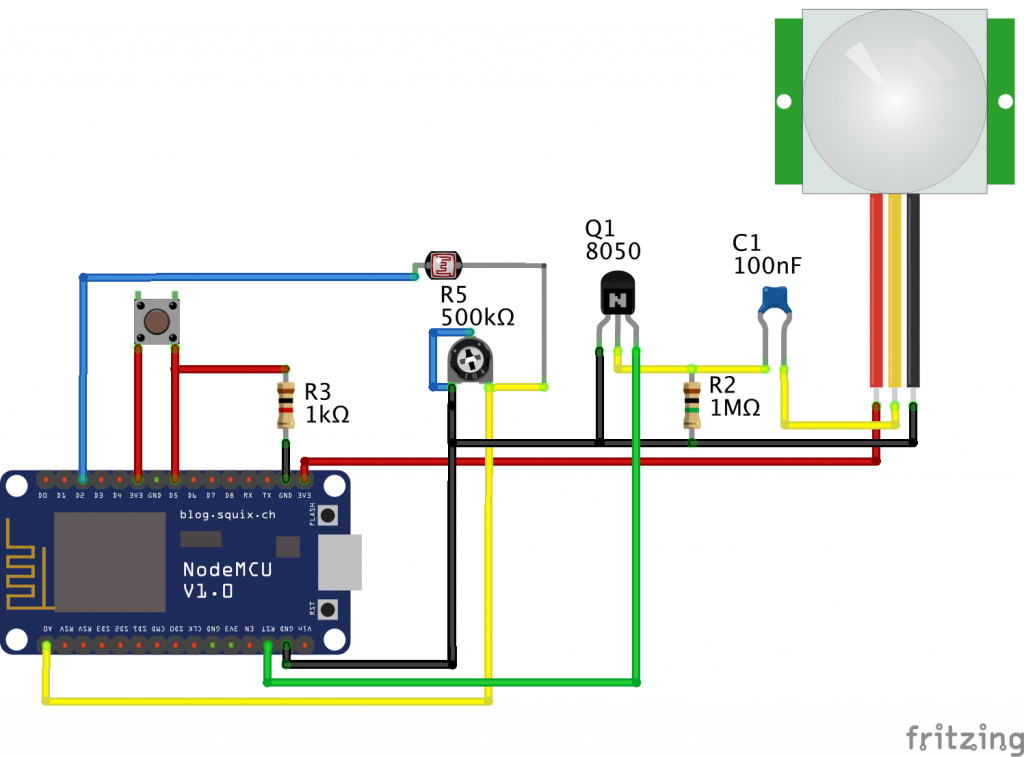
First, gather all necessary components. You will need a breadboard, jumper wires, a resistor, an LED, and a motion sensor module. Ensure your components are compatible. Place the breadboard on a flat surface. Arrange your components in a logical order. This makes the assembly process smoother. Insert the resistor into the breadboard. Connect it to the appropriate rows. This step is crucial for regulating current flow.
Connecting The Sensor
Attach the motion sensor to the breadboard. Use jumper wires for a secure connection. Connect the sensor’s output pin to the breadboard. Ensure the wires are firmly attached. Next, connect the LED. Position it so it lights up easily. Link the LED to the output of the motion sensor. This will allow it to illuminate when motion is detected. Double-check all connections. A loose connection can cause malfunctions.
Testing The Setup
Power your circuit using a battery or power supply. Observe the LED for any activity. Move in front of the sensor. The LED should light up in response. If the LED doesn’t light up, recheck your connections. Ensure the power supply is functioning. Adjust the sensor’s sensitivity if needed. This fine-tuning ensures accurate motion detection. Once satisfied, you can secure your setup. Your motion sensor is now ready for use.

Credit: circuitdigest.com
Programming The Sensor
Programming the motion sensor is where your project truly starts to come alive. This step involves writing code that tells the sensor how to detect movement and respond accordingly. Whether you’re a beginner or have some coding experience, understanding how to program the sensor effectively will make your motion sensor more reliable and tailored to your needs.
Basic Code For Beginners
Start with a simple program that reads the sensor’s output and triggers an action, like turning on an LED. Most motion sensors work with a digital signal, so your code will usually check if the sensor’s output pin goes HIGH or LOW.
Here’s a basic example using Arduino:
const int sensorPin = 2; // Sensor input pin const int ledPin = 13; // Built-in LED pin void setup() { pinMode(sensorPin, INPUT); pinMode(ledPin, OUTPUT); Serial.begin(9600); } void loop() { int sensorValue = digitalRead(sensorPin); if (sensorValue == HIGH) { digitalWrite(ledPin, HIGH); // Turn LED on Serial.println("Motion detected!"); } else { digitalWrite(ledPin, LOW); // Turn LED off } delay(100); // Small delay to stabilize sensor reading } This code helps you see how the sensor responds in real time through the serial monitor. Have you tried tweaking the delay time? It can affect how quickly your sensor reacts.
Adjusting Sensitivity
Sensitivity adjustment depends on the sensor model but often involves tuning variables in your code or physically adjusting the sensor’s potentiometer.
In code, you can experiment with how often you check the sensor or add conditions to ignore brief movements. For example, you might want the sensor to detect motion only if it lasts longer than a specific time:
unsigned long motionStart = 0; unsigned long motionDuration = 2000; // 2 seconds void loop() { int sensorValue = digitalRead(sensorPin); if (sensorValue == HIGH) { if (motionStart == 0) { motionStart = millis(); } else if (millis() - motionStart > motionDuration) { digitalWrite(ledPin, HIGH); Serial.println("Sustained motion detected!"); } } else { motionStart = 0; digitalWrite(ledPin, LOW); } } What level of sensitivity fits your environment? Too sensitive, and you get false alarms; too low, and you might miss important movement.
Troubleshooting Code Issues
Errors in your code can cause the sensor to behave unpredictably. If your sensor never triggers, check your wiring first; then, confirm the sensor pin is set correctly in your code.
Use Serial.print statements to monitor sensor readings and program flow. This helps you identify if the sensor is sending signals or if the problem lies elsewhere.
If the LED stays on constantly, consider adding debounce logic or increasing delay times. You might also need to adjust your sensor’s threshold values or check for hardware defects.
- Verify sensor output voltage levels with a multimeter.
- Make sure your power supply is stable and within sensor specs.
- Test with a simpler code to isolate the problem.
Have you ever solved a tricky bug by just adding a few print statements? It’s a simple trick that saves hours of frustration.
Installing Your Motion Sensor
Installing your motion sensor correctly is key for it to work well. Proper installation helps the sensor detect movement accurately. It also extends the device’s life and saves power. Follow these tips to place and mount your sensor perfectly.
Choosing The Right Location
Select a spot with a clear view of the area you want to monitor. Avoid corners with obstacles blocking the sensor’s path. Keep the sensor away from heat sources like vents or direct sunlight. Place it at a height of about 6 to 8 feet for best coverage. Test the sensor’s detection range before final installation.
Mounting Techniques
Use screws or adhesive pads to fix the sensor firmly. Make sure it does not move or shake. Mount on a flat surface for stable positioning. Adjust the angle to cover the desired zone fully. Check the sensor’s manual for specific mounting instructions.
Power Supply Options
Motion sensors can run on batteries or wired power. Battery power offers easy installation without cables. Choose long-lasting batteries for less frequent changes. Wired power ensures constant energy but needs professional wiring. Use a power adapter matching the sensor’s voltage needs.
Enhancing Your Motion Sensor
Once your basic motion sensor is up and running, enhancing it can take its functionality to the next level. Adding features that alert you instantly, connect seamlessly with your smart home, and improve detection can transform your sensor into a powerful tool. These enhancements not only make your device smarter but also more reliable and user-friendly.
Adding Alerts And Notifications
To stay informed about motion detection in real time, you can add alerts and notifications to your sensor. Setting up a simple buzzer or LED indicator provides immediate visual or audio feedback right at the sensor’s location.
For remote alerts, consider linking your sensor to a smartphone app via Wi-Fi or Bluetooth. This way, you’ll receive push notifications or text messages whenever motion is detected, no matter where you are.
Have you thought about customizing alert patterns? Different sounds or flashing lights can indicate various types of motion events, helping you respond appropriately without confusion.
Integrating With Smart Home Devices
Connecting your motion sensor to smart home hubs like Alexa, Google Home, or SmartThings expands its usefulness significantly. This integration lets you automate actions—turning on lights, activating cameras, or adjusting thermostats whenever motion is sensed.
Using platforms like IFTTT or Home Assistant, you can create complex routines triggered by your sensor. Imagine your porch light turning on automatically at dusk when motion is detected, enhancing security and convenience.
Have you explored how your sensor can work with other devices you already own? The more connected your setup, the smarter your home becomes.
Improving Accuracy And Range
Enhancing your sensor’s accuracy reduces false alarms and improves reliability. Shielding the sensor from pets, sunlight, or moving curtains can help minimize unwanted triggers.
Upgrading components like the PIR sensor or adding lenses designed to widen detection angle can boost the sensor’s range. Adjusting the sensor’s sensitivity settings allows you to fine-tune its performance based on your environment.
Experimenting with placement is often overlooked but crucial. Mounting the sensor at an optimal height and angle can drastically increase its effectiveness. What’s the best spot in your space to catch every movement without missing a beat?
Common Problems And Fixes
Common problems can affect the performance of your motion sensor. Knowing how to fix these issues saves time and effort. Troubleshooting helps keep your sensor reliable and functional.
Sensor Not Detecting Motion
The sensor might fail to detect movement due to poor placement. Avoid placing it behind objects or too high up. Clean the sensor lens to remove dust or dirt. Check the sensor’s range and angle to match the area. Adjust sensitivity settings for better detection.
False Alarms
False alarms can be caused by environmental factors. Moving shadows, pets, or strong sunlight may trigger the sensor. Reduce sensitivity to ignore small movements. Change the sensor’s direction to avoid direct sunlight. Use a sensor with pet immunity if pets are present.
Power And Connectivity Issues
Power problems stop the sensor from working correctly. Check battery levels and replace old batteries. Inspect wiring for loose connections or damage. Ensure the sensor is within range of the control unit. Reset the sensor to fix minor glitches.

Credit: www.youtube.com
Frequently Asked Questions
What Components Are Needed To Make A Motion Sensor?
You need an infrared sensor, microcontroller, resistor, and power supply. These parts detect motion and process signals efficiently. Additional components may include LEDs or buzzers for alerts. Choosing quality parts ensures accurate and reliable motion detection in your homemade sensor.
How Does A Motion Sensor Detect Movement?
Motion sensors detect changes in infrared radiation or sound waves. When an object moves, it alters these signals, triggering the sensor. This change is processed by the microcontroller to activate an alert or device. This process allows the sensor to identify motion accurately.
Can I Make A Motion Sensor Without Coding?
Yes, you can build a basic motion sensor using pre-programmed modules. Devices like PIR sensors often come ready to use. However, custom features require coding to program the microcontroller. Using simple components helps beginners create motion sensors without complex coding.
How Do I Power A Homemade Motion Sensor?
You can power your motion sensor with batteries or a DC power supply. Choose voltage compatible with your microcontroller and sensor specifications. For continuous use, consider rechargeable batteries or USB power adapters. Proper power ensures stable sensor performance and longevity.
Conclusion
Making a motion sensor is simple and fun. You only need a few parts and clear steps. This project helps you learn about electronics and sensors. You can use your motion sensor for lights or alarms. Try building one to see how it works.
Keep practicing to improve your skills. Small projects like this boost your confidence. Enjoy creating and exploring new ideas with sensors!



