
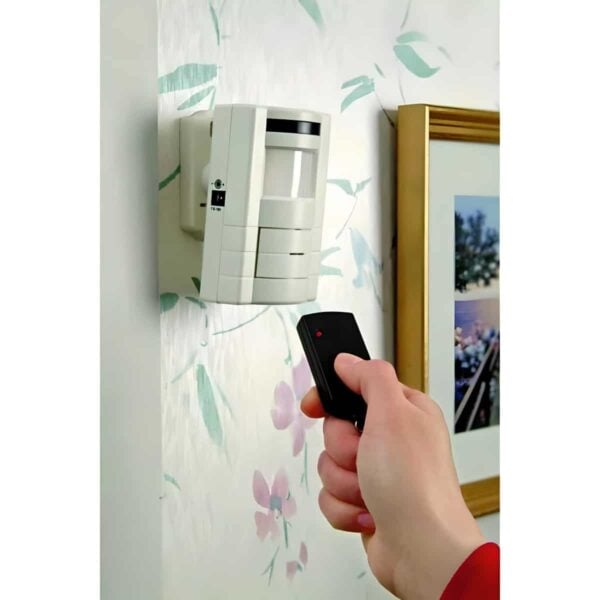
Are you looking to remove your ADT motion sensor from the wall but don’t know where to start? You’re not alone.
Taking down these devices can feel tricky if you’ve never done it before. But don’t worry—this guide will walk you through simple, clear steps to safely and easily remove your ADT motion sensor without damaging your walls or the device.
Keep reading to learn exactly what you need to do, so you can get the job done right the first time.
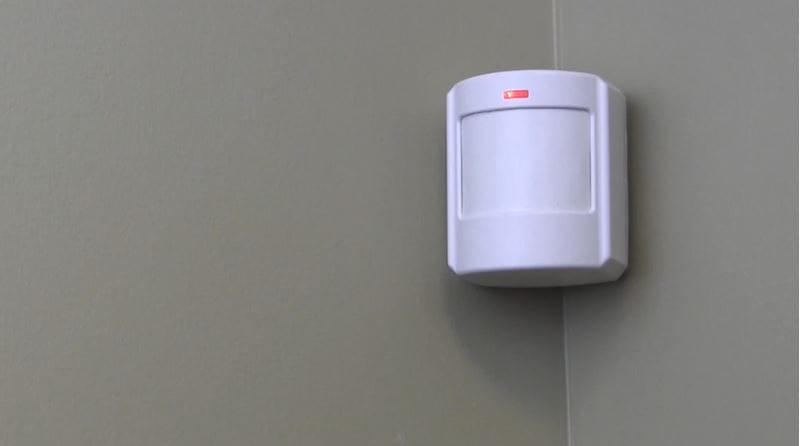
Credit: guardianprotection.com
Tools Needed
Removing an ADT motion sensor from the wall requires a few simple tools. These tools help you work safely and avoid damage to the wall or device. Having the right tools ready makes the task faster and easier. Below are the essential tools you need to gather before starting.
Flathead Screwdriver
A flathead screwdriver helps to pry the sensor off the mounting plate gently. It can also remove screws if the sensor is secured that way. Choose a screwdriver with a handle that fits comfortably in your hand.
Phillips Screwdriver
Many ADT motion sensors use Phillips screws. This screwdriver is necessary to unscrew these fasteners. Use the correct size to avoid stripping the screws.
Plastic Pry Tool
A plastic pry tool prevents scratches and marks on the wall or sensor. It is safer than metal tools for delicate surfaces. This tool helps separate the sensor from the wall cleanly.
Step Ladder
A step ladder provides stable support when the sensor is mounted high on the wall. It helps you reach the device safely without stretching or risking a fall. Make sure the ladder is steady before climbing.
Soft Cloth
Use a soft cloth to clean the area after removing the sensor. It removes dust and debris left on the wall. A clean surface is ready for a new device or repairs.
Safety Precautions
Removing an ADT motion sensor from the wall requires care and attention. Safety precautions protect both you and the device during the process. Taking simple steps reduces risks of damage or injury.
Always prepare your workspace before starting. Clear the area and have the right tools ready. This avoids unnecessary accidents or delays.
Turn Off The Security System
Deactivate the ADT system before removing the sensor. This stops false alarms and electrical shocks. Use the control panel or app to disable the sensor temporarily.
Wear Safety Gear
Use gloves to protect your hands from sharp edges. Safety glasses shield your eyes from dust and debris. These small measures improve safety significantly.
Handle The Sensor Gently
Do not force or pull the sensor too hard. Gentle pressure prevents breaking the device or wall damage. Use a plastic tool to pry it loose if needed.
Avoid Electrical Hazards
Check that no wires are live before touching the sensor. Turn off power to the circuit if possible. Use a voltage tester to confirm no current runs through wires.
Keep Small Parts Safe
Place screws and mounting brackets in a small container. This stops loss and keeps your workspace tidy. Organizing parts helps during reinstallation or disposal.
Locate The Sensor
Locate the Sensor First, find the motion sensor on the wall. It usually looks like a small, rectangular box. Check near windows or doors.
To successfully remove your ADT motion sensor, you must first locate it. Identifying the sensor’s position is crucial for a smooth removal process. Sensors are often placed in strategic spots. Corners of rooms, near doors, or windows. These areas provide optimal coverage for detecting movement.Identify Common Sensor Locations
ADT motion sensors are typically found in corners. This placement allows maximum room coverage. Check corners near entrances or high-traffic areas. They might also be near windows for added security.Examine The Room Layout
Consider the room’s layout. Sensors are placed to detect movement effectively. Look for them on walls facing entry points. They could be above doorways or near windows.Look For Indicator Lights
Many sensors have small indicator lights. These lights might blink or remain steady. Look for these lights to confirm the sensor’s presence. They are usually visible when the sensor is active.Check For Sensor Housings
Sensors are housed in small plastic cases. These cases are mounted on walls. Look for these housings in potential locations. They are usually rectangular and blend with the wall color.Use A Flashlight For Hard-to-see Areas
Some sensors might be in dimly lit spots. A flashlight can help you spot them. Shine the light into corners or shadowed areas. This makes it easier to locate the sensor.Turn Off The System
Before you attempt to remove an ADT motion sensor from your wall, it’s crucial to turn off the system. This step ensures your safety and prevents accidental alarms that could cause unnecessary panic or alerts to your security provider.
Turning off the system might seem simple, but it requires careful attention to detail. Have you ever accidentally set off an alarm while trying to fix something? That’s exactly what you want to avoid here.
Locate Your Control Panel
The control panel is the brain of your ADT security system. It’s usually mounted near your main entrance or in a central spot inside your home.
Check for a touchscreen or keypad where you can input your security code. If you’re unsure where it is, think about where you usually arm or disarm your system.
Disarm The System Using Your Security Code
Entering your security code is the safest way to disarm the system. This prevents triggering the alarm while you’re working on the sensor.
Simply enter your code on the keypad or touchscreen and watch for a confirmation message that the system is off. If you don’t have the code, contact the person who set up the system or ADT customer service.
Use The Adt Mobile App For Remote Disarming
If you have the ADT mobile app, you can turn off your security system remotely. This is especially handy if you’re already near the sensor and want to avoid walking back to the control panel.
Open the app, enter your credentials, and find the option to disarm your system. It’s a quick and modern way to keep control from your phone.
Confirm The System Is Fully Disarmed
After disarming, double-check that the system shows it’s off. Look for a green light or a message on the control panel confirming no active alerts.
This step ensures you won’t accidentally trigger the alarm when removing the motion sensor. It also gives you peace of mind to proceed safely.
Remove The Sensor Cover
Removing the sensor cover is the first important step in detaching your ADT motion sensor from the wall. This cover protects the internal components and needs to be handled carefully to avoid damage. Knowing how to properly remove it can save you time and prevent frustration during the process.
Identify The Sensor Cover Type
Different ADT motion sensors have various cover designs. Some covers snap off easily, while others require you to slide or twist them. Take a close look at your sensor to understand how the cover fits before applying any force.
Gather The Necessary Tools
You might need a small flathead screwdriver or a plastic pry tool to gently lift the cover. Avoid using sharp or metal tools that can scratch or break the plastic. Having the right tools ready makes the removal smoother and safer.
Carefully Pry Off The Cover
Insert the pry tool or screwdriver into the small gap between the cover and the sensor body. Gently twist or lift to release the clips holding the cover in place. If you feel resistance, stop and check for hidden screws or locking tabs to avoid damage.
Check For Hidden Screws
Some models have screws securing the cover that are easy to miss. Look for tiny screws around the edges or under labels. Removing these first will make the cover come off more easily and protect the sensor’s internal parts.
Remove The Cover And Set It Aside Safely
Once the cover is loose, lift it off carefully. Place it somewhere safe to prevent losing it or causing any cracks. This simple step ensures you can reattach the sensor later without hassle.

Credit: howlandhammer.com
Disconnect The Sensor
Disconnecting the ADT motion sensor from the wall is a vital step before removal. It ensures safety and prevents any damage to the device or wiring. This process involves turning off the power, opening the sensor casing, and carefully detaching the wires.
Take your time and follow each part carefully. Doing so protects your home security system and makes the sensor removal smooth.
Turn Off The Power Supply
Locate the circuit breaker for the security system. Switch it off to cut the power supply to the sensor. This action prevents electrical shocks and device damage.
Open The Sensor Cover
Use a small screwdriver to remove screws holding the sensor cover. Gently pry open the casing to access the internal components. Avoid using too much force to prevent breaking the sensor.
Disconnect The Wires
Identify the wires connected to the sensor. Carefully pull out the connectors or unscrew the terminals. Keep the wires separated to avoid short circuits or confusion later.
Detach From The Wall
Detaching an ADT motion sensor from your wall might seem tricky at first, but it’s simpler than you think. Knowing how to carefully remove it can save you from damaging both the sensor and your wall. Let’s focus on the best way to detach it safely and efficiently.
Check For Adhesive Or Screws
Start by examining how the sensor is fixed to the wall. Many ADT sensors use either adhesive strips or screws. Look closely around the edges and backplate for any visible screws or mounting clips.
If you spot screws, you’ll need a screwdriver that fits properly to avoid stripping them. For adhesive, gently try to wiggle the sensor to see if it loosens without force. Have you ever pulled something off a wall and left a big mess? Taking a moment here can prevent that.
Use A Plastic Pry Tool For Adhesive Removal
When adhesive is involved, avoid metal tools as they can damage your wall and the sensor. A plastic pry tool or an old credit card works well to slide between the sensor base and the wall.
Insert the tool slowly and apply gentle pressure to separate the adhesive. If the sensor feels stuck, don’t rush; heat the adhesive slightly with a hairdryer to soften it. Have you tried warming sticky labels before? The same idea applies here.
Unscrew And Remove The Sensor
If screws hold the sensor, unscrew them carefully and keep them safe for reinstallation. Once unscrewed, hold the sensor firmly and pull it away from the wall.
Sometimes wires connect the sensor to your alarm system. Be prepared to disconnect these by pressing the release tabs or gently pulling the connectors. Are you ready to handle small wires without damaging them?
Handle Wiring And Mounting
Handling the wiring and mounting of an ADT motion sensor requires care. This process ensures safety and keeps the sensor working well. Always turn off power before touching wires. Use tools that fit the screws and wires to avoid damage. Pay attention to how the sensor is attached to the wall. A secure mount prevents false alarms and sensor drops.
Disconnecting The Wiring Safely
Switch off the circuit breaker linked to the sensor. Use a voltage tester to confirm no electricity flows. Gently remove the sensor cover to access the wiring. Note the wire colors and connections. Unscrew the wire nuts or connectors slowly. Keep wires apart to avoid shorts.
Removing The Sensor From The Mount
Look for mounting screws or clips holding the sensor. Use a screwdriver to remove screws carefully. Hold the sensor firmly to prevent it from falling. If clips hold the sensor, press or slide them as needed. Remove the sensor from the wall base slowly. Check for any adhesive or residue left on the wall.
Inspecting Wiring And Mount For Damage
Check wires for frays or breaks before reinstalling or replacing. Look at the mounting bracket for cracks or wear. Replace any damaged parts to ensure reliable sensor function. Clean the mounting area to remove dust and dirt. This helps secure the sensor firmly in place.
Test The System After Removal
After removing your ADT motion sensor from the wall, it’s crucial to test the system to ensure everything still functions properly. Skipping this step can leave your home vulnerable or trigger false alarms. Testing helps you verify that the removal didn’t disrupt the security setup or cause unexpected issues.
Check Sensor Status On The Control Panel
Start by checking the control panel or your ADT app. Look for any alerts or error messages related to the sensor you removed. If the system still shows the sensor as active or triggers an alert, it means the system hasn’t fully registered the removal yet.
Run A Walk Test
Perform a walk test to simulate motion detection near the area where the sensor was installed. This helps confirm that other sensors are functioning correctly and no false alarms occur. Walk slowly and observe if the control panel registers any movement or warnings.
Reset Or Update Your Security System
Sometimes, the system requires a reset or update to recognize the sensor removal. Access your system’s settings to refresh the device list or reset the motion detection zones. This step ensures your security system adapts to the change and continues to operate smoothly.
Confirm Communication With Monitoring Service
If your ADT system is professionally monitored, contact the monitoring service or check your account online. Confirm that they are aware of the sensor removal and that your system status is clear. This prevents unnecessary emergency dispatches and keeps your monitoring service informed.
Ask Yourself: Is Your Home Still Secure?
Removing a motion sensor might create a blind spot. Think about whether your current setup still covers all critical areas. Could you install another sensor elsewhere or adjust camera angles to maintain full protection?

Credit: www.reddit.com
Frequently Asked Questions
How Do I Safely Remove An Adt Motion Sensor?
To safely remove an ADT motion sensor, first power off the system. Gently pry the sensor from the wall using a flat tool. Disconnect the wiring carefully to avoid damage. Follow ADT’s instructions for device removal to prevent system errors.
Can I Remove Adt Motion Sensors Without Damaging Walls?
Yes, you can remove ADT motion sensors without damaging walls. Use a plastic pry tool to loosen adhesive mounts gently. Avoid sharp tools that may scratch or chip paint. Take your time to prevent wall damage during sensor removal.
What Tools Are Needed To Remove Adt Motion Sensors?
You need a flat plastic pry tool, screwdriver, and possibly a voltage tester. These help you gently detach the sensor and disconnect wiring safely. Avoid metal tools to prevent wall damage or sensor breakage during removal.
Will Removing Adt Sensors Affect My Security System?
Removing ADT sensors may trigger system alerts or reduce coverage. It’s best to notify ADT before removal. They can guide you on safe disconnection and avoid false alarms or security gaps in your system.
Conclusion
Removing an ADT motion sensor from the wall is simple with the right steps. Start by turning off the power to avoid any issues. Use a screwdriver to carefully take out the screws holding the sensor. Gently pull the sensor away from the wall to disconnect the wires.
Keep all parts safe in case you need them later. Taking your time helps prevent damage. Now, your wall looks clean and ready for any changes. This easy process saves you time and effort.



