
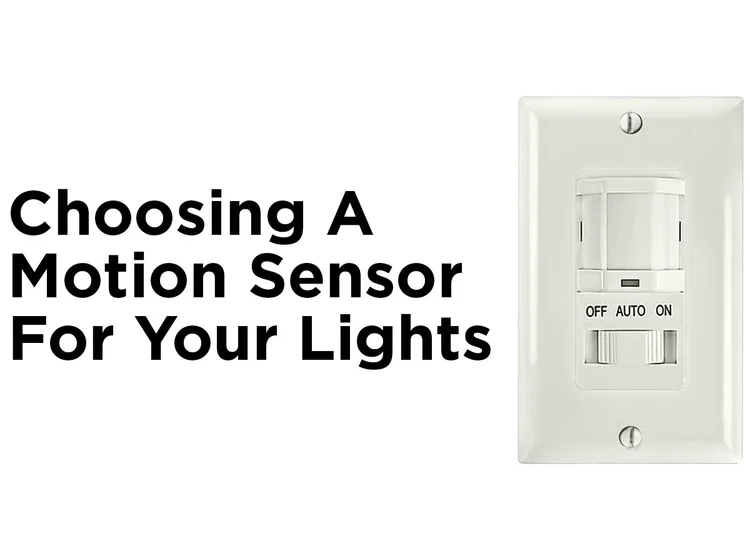
Are you tired of your motion sensor light switch turning on at the wrong times? Maybe it’s too sensitive, or you just want to control your lighting manually for a while.
Whatever the reason, knowing how to turn off your motion sensor light switch can save you frustration and give you peace of mind. You’ll discover simple, step-by-step methods to easily disable the sensor and take back control of your lights.
Keep reading—by the end, you’ll have the confidence to adjust your lighting exactly how you want it.

Credit: howlandhammer.com
Types Of Motion Sensor Switches
Motion sensor light switches come in different types. Each detects motion in a unique way. Knowing the type helps in turning off or adjusting the sensor correctly.
Passive Infrared Sensors
Passive Infrared (PIR) sensors detect heat from moving objects. They sense body heat changes within their range. PIR sensors work well indoors and outdoors. They do not emit any signals but only receive infrared energy. These sensors often have a limited detection area.
Ultrasonic Sensors
Ultrasonic sensors send out sound waves beyond human hearing. They measure the reflection of these waves to detect movement. These sensors cover a wider area than PIR sensors. They work well in rooms with obstacles or low heat differences. Ultrasonic sensors may trigger falsely from pets or air movement.
Dual-technology Sensors
Dual-technology sensors combine PIR and ultrasonic technologies. Both sensors must detect motion to activate the light. This reduces false triggers and improves accuracy. These sensors are more reliable in various environments. They tend to cost more but offer better performance.

Credit: www.avatarcontrols.com
Tools Needed For The Task
Before turning off a motion sensor light switch, gather the right tools. Using proper tools makes the job safer and faster. It helps prevent damage to the switch and electrical parts.
Below is a list of essential tools you need to complete this task effectively.
Basic Hand Tools
- Flathead screwdriver – for removing switch plate covers
- Phillips screwdriver – to unscrew the switch from the wall box
- Voltage tester – to check if the power is off
- Wire strippers – for handling wires if needed
- Needle-nose pliers – to bend or twist wires safely
Safety Equipment
- Insulated gloves – to protect against electric shock
- Safety glasses – to shield eyes from debris
- Non-conductive shoes – to reduce risk of electrical hazards
- Flashlight – for clear visibility in dark areas
Preparing For The Switch Off
Turning off a motion sensor light switch requires locating the main power source first. Always cut power from the breaker before making any adjustments to ensure safety. Then, follow the switch’s instructions to disable the motion sensor feature.
Turning off a motion sensor light switch can seem tricky. To ensure safety, preparation is key. Knowing the right steps helps. It avoids accidents and ensures a smooth process. Start with a few essential tasks before approaching the switch. This makes the task easy and safe.Turn Off Power Supply
Safety is the first priority. Begin by turning off the power supply. Locate your home’s circuit breaker. Identify the switch connected to the light. Switch it to the “off” position. This cuts off the electricity. It prevents electric shocks during the process.Test For Power
After turning off the power, testing is crucial. Flip the motion sensor switch. Ensure the light does not turn on. This confirms the power is off. Use a voltage tester for extra safety. Place it on the switch. Ensure there is no electricity flowing. Double-checking prevents potential hazards.Turning Off The Motion Sensor Light
Turning off a motion sensor light can be simple. It depends on the type of switch and sensor you have. This section explains how to stop the light from activating by motion. You can choose to use the manual override, adjust the sensor settings, or disconnect the sensor entirely.
Using The Manual Override
Many motion sensor lights have a manual override button or switch. This lets you turn the light on or off without motion activating it. Look for a small switch or button on the light switch panel. Press or flip it to switch off the motion sensor temporarily. This is the easiest way to control the light without changing settings.
Adjusting Sensor Settings
Most motion sensors allow you to change settings like sensitivity and time delay. Lowering the sensitivity reduces the chance of the light turning on from small movements. You can also set the light to stay off longer after motion ends. These adjustments help you customize how the sensor reacts. Use the dials or buttons on the sensor unit to make changes.
Disconnecting The Sensor
Disconnecting the sensor stops the motion sensor function completely. This method requires turning off power from the breaker first for safety. Then, remove the sensor wires from the switch or light fixture. Reconnect the light to a regular switch if needed. This option is best if you want to use the light without any motion detection.
Troubleshooting Common Issues
Motion sensor light switches can sometimes behave unexpectedly, making it tricky to turn them off when you want to. Troubleshooting these common issues helps you regain control without needing to call an electrician. Let’s look at typical problems and simple fixes you can try right now.
Light Still Turns On
If your motion sensor light keeps turning on even when no one is around, check the placement of the sensor first. Objects like curtains, plants, or even sunlight can trigger the sensor accidentally. Try adjusting the sensor angle or clearing its view to prevent false activations.
Another cause might be sensitivity settings that are too high. Lowering the sensitivity can reduce unnecessary switching on. Have you noticed if the light activates more during certain times of day? This clue can help you fine-tune the sensor.
Sensor Not Responding
When the sensor doesn’t respond at all, start by inspecting the power supply. Is the switch properly connected and receiving electricity? Sometimes, a loose wire or tripped breaker is the culprit.
If the wiring looks fine, check if dirt or dust is covering the sensor lens. Cleaning it gently with a soft cloth might restore proper function. Also, verify that the sensor’s detection range matches your room’s layout.
Resetting The Switch
Resetting the motion sensor switch often fixes glitches without complex troubleshooting. To reset, turn off the power at your circuit breaker, wait 30 seconds, and then turn it back on. This simple step refreshes the device’s settings.
Some models have a reset button—pressing it can clear any programming errors. Remember to consult your switch’s manual for specific reset instructions. Have you tried this quick reset before reaching for replacement options?
Safety Tips For Working With Electrical Switches
Working with electrical switches needs careful attention to safety. Even simple tasks can cause harm without proper steps. Always prepare well to avoid shocks or damage. Follow clear safety tips before starting any electrical work. These tips help protect you and your home.
Turn Off Power At The Circuit Breaker
Always switch off the power at the main breaker. This stops electricity from flowing to the switch. Use a tester to make sure no power is running. Never rely only on the wall switch position.
Use Proper Tools And Equipment
Use tools with insulated handles to reduce shock risk. Wear rubber-soled shoes and dry gloves. Keep your work area dry and well-lit. Avoid metal ladders or wet surfaces.
Check For Live Wires Before Touching
Test wires with a voltage tester before handling. Confirm all wires are dead to stay safe. If unsure, ask a professional to help.
Follow Manufacturer Instructions
Read the motion sensor switch manual carefully. Follow all steps exactly to avoid mistakes. Use only recommended parts and accessories.
Work In A Clear And Organized Space
Keep your workspace free from clutter. Lay out tools and parts neatly. Clean areas prevent accidents and misplaced components.
Wear Safety Gear
Safety glasses protect eyes from dust and sparks. Gloves shield hands from cuts and shocks. Consider ear protection if noise is loud.

Credit: www.avatarcontrols.com
Frequently Asked Questions
How Do I Disable A Motion Sensor Light Switch?
To disable a motion sensor light switch, locate the switch settings. Turn the sensor sensitivity to zero or off. Alternatively, switch the device to manual mode if available. This stops automatic activation and keeps the light off unless manually turned on.
Can I Turn Off Motion Sensor Lights Temporarily?
Yes, most motion sensor lights have a temporary off feature. Use the switch or remote control to deactivate the sensor. This allows manual control without permanent changes to wiring or settings. Check your model’s instructions for exact steps.
Why Won’t My Motion Sensor Light Switch Turn Off?
If the sensor light stays on, it may be detecting constant movement. Check for heat sources or pets triggering it. Adjust sensitivity or timer settings to fix this. Also, ensure the sensor lens is clean and unobstructed.
Is It Safe To Bypass A Motion Sensor Light Switch?
Bypassing a motion sensor switch can be safe if done correctly. Turn off power before working with wiring. Use proper tools and follow electrical codes. If unsure, hire a licensed electrician to avoid hazards.
Conclusion
Turning off a motion sensor light switch is simple and quick. Just follow the steps carefully. This helps save energy and control your lighting better. You can enjoy light only when you want it. No more surprises from sudden bright lights.
Take your time to adjust the settings to fit your needs. Now, you can manage your home lighting with ease. Try it today and see the difference.



