
Have you ever wondered why your motion sensor light sometimes turns on too quickly, stays lit longer than you want, or doesn’t respond when it should? Understanding the three key settings on your motion sensor light can change how you use it—and make your home safer and more energy-efficient.
You’ll discover exactly what these settings are, how they work, and how to adjust them to fit your needs perfectly. Keep reading, because once you master these simple tweaks, your motion sensor light will work smarter for you every time.
Motion Sensor Light Basics
Understanding the basics of motion sensor lights helps you make the most out of their features. These lights are more than just automatic lamps; they’re designed to enhance security, save energy, and add convenience to your daily routine. Before adjusting any settings, knowing how they work and where they shine best gives you a clear advantage.
How Motion Sensor Lights Work
Motion sensor lights detect movement using infrared technology or microwave sensors. When they sense motion within their range, they trigger the light to turn on immediately.
The sensors are sensitive to heat and movement, meaning they react to people, animals, or vehicles passing by. You can often adjust the detection range and duration to fit your specific needs.
Common Uses And Benefits
Motion sensor lights are widely used for outdoor security, especially near entrances, garages, and pathways. They act as a deterrent against unwanted visitors by lighting up when someone approaches.
Besides security, they save energy by only turning on when needed, which cuts down on your electricity bill. Inside the home, they offer hands-free lighting in places like closets or basements, making your life easier and safer.

Credit: www.youtube.com
Sensitivity Setting
The sensitivity setting on a motion sensor light controls how easily the sensor detects movement. This setting helps you customize the detection range to fit your specific needs. By adjusting sensitivity, you can avoid false triggers or missed activations, making your outdoor lighting more reliable.
Adjusting Detection Range
Sensitivity determines how far the sensor can “see” motion. Increasing sensitivity extends the detection range, allowing the light to respond to movements from a greater distance.
Lowering sensitivity shrinks the detection area, which is useful if you want to limit the sensor to nearby activity only. For example, if your sensor is picking up cars passing on a distant road, reducing sensitivity can prevent unnecessary light activation.
Try testing different levels during nighttime to find the perfect balance for your space.
Impact On Performance
Setting sensitivity too high can cause frequent false alarms, wasting energy and reducing the sensor’s lifespan. On the other hand, setting it too low might leave you in the dark when you need the light most.
Finding the right sensitivity ensures the light activates exactly when you want it to, improving security and convenience. Think about your environment—are there pets, trees, or passing vehicles that might trigger the sensor? Adjusting sensitivity helps you control these factors.
Time Delay Setting
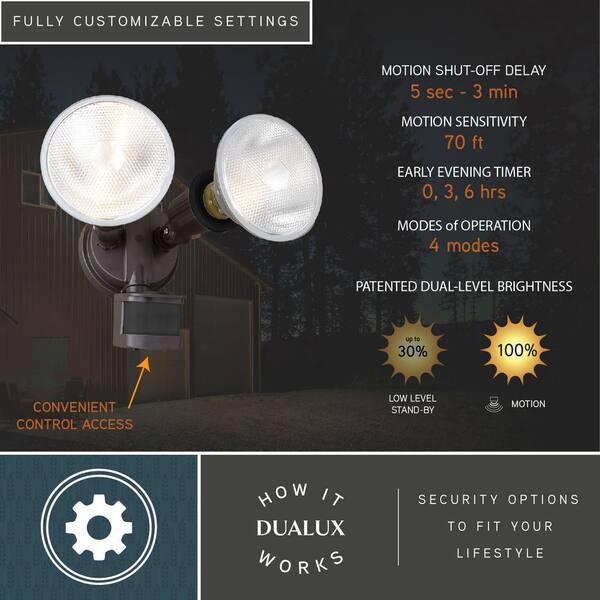
The ‘Time Delay Setting’ on a motion sensor light is crucial. It determines how long the light stays on after motion stops. This setting can impact security and energy use. Understanding how to adjust the time delay is essential for optimal performance.
Setting Light Duration
Adjust the light duration to meet your needs. Some sensors allow durations from a few seconds to several minutes. Short durations save energy. Longer durations enhance security. Choose a setting that balances both.
Balancing Security And Energy Use
Finding the right balance is important. A short delay saves electricity. But it might not be enough for safety. A longer delay uses more energy. Yet, it offers better security. Consider your environment. Choose a setting that fits your needs and priorities.
Credit: www.leoalmanac.org
Light Level Setting
The Light Level Setting on a motion sensor light controls when the light activates based on the surrounding brightness. This setting ensures your light only turns on when it’s actually needed, saving energy and extending the bulb’s life. Understanding how to adjust this feature can make a big difference in your outdoor or indoor lighting setup.
Daylight Vs. Night Activation
Adjusting the light level setting lets you decide if the motion sensor activates during daylight, nighttime, or both. Some sensors allow the light to come on only when it’s dark outside, which is perfect for security and energy saving. Others can be set to activate even in daylight, useful in shaded areas or places with inconsistent lighting.
Think about your own space: do you want the light to turn on during the day when someone passes by, or only after sunset? Changing the light level setting can help you avoid unnecessary power use and false triggers. It’s a small tweak that can make your sensor light smarter.
Optimizing For Different Environments
Different environments call for different light level settings. In a backyard with lots of natural shade, you might want the sensor to activate earlier—before it gets completely dark. In contrast, a well-lit porch might only need the sensor to trigger when it’s fully dark.
Try testing your sensor at various light settings to see what works best. You might find that adjusting the sensitivity to ambient light can reduce false alarms caused by passing cars or streetlights. What kind of space do you want to protect or illuminate, and how can the light level setting meet those needs?
Tips For Setting Up Motion Sensor Lights
Setting up motion sensor lights correctly ensures they work well and save energy. Simple tips can improve their performance and avoid common issues. Proper setup helps lights activate only when needed and lasts longer.
Placement Strategies
Position motion sensor lights where they cover main entry points or pathways. Mount sensors at a height between 6 to 10 feet for best range. Avoid pointing them at moving trees or busy streets. Use angles that focus on areas where people walk. Test the sensor’s field of view before fixing it permanently.
Avoiding False Triggers
False triggers waste energy and reduce the sensor’s reliability. Keep sensors away from heat sources like vents or air conditioners. Avoid pointing sensors toward busy roads or sidewalks with heavy traffic. Adjust sensitivity settings to lower false alarms from small animals or wind. Use shield covers or barriers to block unwanted movements from nearby areas.

Credit: manuals.plus
Frequently Asked Questions
What Are The Three Main Settings On A Motion Sensor Light?
The three main settings are sensitivity, duration, and light level. Sensitivity controls detection range. Duration sets how long the light stays on. Light level adjusts brightness threshold to activate the sensor.
How Does The Sensitivity Setting Affect Motion Detection?
Sensitivity determines how far or small a movement triggers the sensor. Higher sensitivity detects smaller or distant motions. Lower sensitivity reduces false triggers from minor movements like pets or leaves.
What Does The Duration Setting Control On A Motion Sensor Light?
Duration controls how long the light remains on after detecting motion. It can range from a few seconds to several minutes. Adjusting duration saves energy and matches your lighting needs.
Why Is The Light Level Setting Important For Motion Sensors?
Light level setting tells the sensor when to activate based on ambient light. It prevents the light from turning on during daylight. This helps save energy and increases sensor efficiency.
Conclusion
Motion sensor lights have three main settings: sensitivity, time, and light level. Sensitivity controls how far the sensor can detect movement. Time sets how long the light stays on after activation. Light level decides if the light works only in darkness or anytime.
Knowing these settings helps you use the light better. Adjust them to save energy and improve safety. Simple changes make a big difference in your home’s lighting. Understanding these basics keeps your space well-lit and secure.



