
Have you ever wondered how long a motion sensor light stays on after detecting movement? Whether you’re using these lights for security or convenience, knowing their timing can make a big difference.
You might be curious if the light turns off too quickly or stays on longer than you want. You’ll discover exactly how these lights work, what controls their timing, and how you can adjust them to fit your needs perfectly.
Keep reading to make sure your motion sensor lights work just the way you want them to.
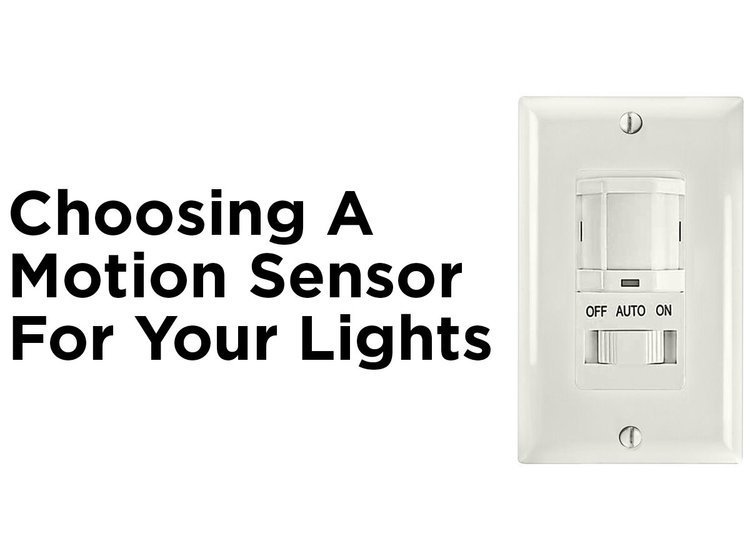
Credit: blog.1000bulbs.com
Motion Sensor Light Basics
Understanding the basics of motion sensor lights helps you make smarter choices for your home or workspace. These lights automatically turn on when they detect movement, offering convenience and enhanced security. But what exactly happens behind the scenes, and what types of motion sensor lights are available? Let’s break it down.
How Motion Sensors Work
Motion sensors detect movement using different technologies. The most common type is the infrared sensor, which senses heat changes caused by a person or animal moving within its range.
Some sensors use microwave signals, bouncing waves off objects to spot motion. When movement is detected, the sensor sends a signal to the light to turn on.
Have you ever wondered why some lights turn on instantly while others delay? This happens because sensors can have adjustable settings that control how sensitive they are and how long the light stays on after detecting motion.
Types Of Motion Sensor Lights
There are several types of motion sensor lights to fit different needs. Here are the main categories:
- Outdoor Floodlights:Bright and wide-reaching, these are perfect for driveways and yards.
- Indoor Security Lights:Often placed in hallways or entryways, they help you navigate safely in the dark.
- Battery-Operated Lights:Portable and easy to install, ideal for closets or garages without wiring.
- Smart Motion Lights:These connect to your phone or home system, offering customizable settings and remote control.
Choosing the right type depends on where you want to install the light and how you plan to use it. What’s your biggest concern—security, energy savings, or convenience?
Factors Affecting Light Duration
The time a motion sensor light stays on varies widely based on several key factors. Understanding these can help you adjust the settings to fit your needs perfectly. Whether you want the light to stay on just long enough to see your path or to remain lit while you work outside, these details matter.
Sensor Sensitivity
Sensor sensitivity controls how easily the light detects movement. If your sensor is too sensitive, the light might turn on frequently, even with small movements like leaves blowing. Too low sensitivity means it might not activate when you really need it.
Adjusting sensitivity can affect how long the light stays on because some sensors reset the timer with each detected motion. Have you noticed your light flickering on and off? It might be a sensitivity issue causing repeated triggers.
Light Settings
Most motion sensor lights let you customize the duration they stay on after detecting movement. This setting can range from a few seconds to several minutes. Check your light’s manual or app to find out how to change this timer.
Some models offer multiple modes, such as dim light until full motion detection or a gradual dimming feature. These settings influence your overall experience and energy use. What’s the sweet spot for your routine—short bursts or longer illumination?
Environmental Influences
Environmental factors like temperature, weather, and obstacles around the sensor can change how long the light stays on. Cold weather may reduce sensor responsiveness, while rain or fog can cause false triggers or shorter activation times.
Objects like trees or walls blocking the sensor’s view might cause it to turn off sooner than expected. Think about your outdoor setup—can you adjust the sensor’s position for better detection and a more consistent light duration?
Adjusting Light On Time
Adjusting the light-on time controls how long the motion sensor light stays active after detecting movement. You can set this time from a few seconds up to several minutes. This feature helps save energy and improves security by keeping the area lit as needed.
Adjusting the light on time for your motion sensor lights can greatly impact their effectiveness and energy efficiency. Whether you want a brief illumination for security purposes or a longer glow for convenience, understanding how to adjust these settings is essential. Let’s explore how you can fine-tune the duration your lights stay on by diving into manual controls, smart features, and common time ranges.Manual Controls
Many motion sensor lights come with manual controls that allow you to set the duration the light stays on after detecting motion. These controls are often located on the light fixture itself, accessible through small dials or switches. Typically, you can choose from a range of preset durations, such as 30 seconds, 1 minute, or even up to 10 minutes. If you’re like me, you might remember a time when you had to adjust these settings on a ladder. It adds a personal touch to your lighting, but it can be a bit of a hassle if you need frequent changes.Smart Features
Modern motion sensor lights increasingly come equipped with smart features, offering more flexibility and control. Using a smartphone app, you can easily adjust the light duration from the comfort of your couch. These smart systems often include additional options, such as integrating with other smart home devices or setting schedules. Imagine having your lights dim gradually instead of shutting off abruptly. It’s a convenient way to cater to your lifestyle and enhance security without needing to fiddle with manual settings.Common Time Ranges
When deciding how long your motion sensor light should stay on, consider common time ranges that fit your specific needs. Shorter time settings, like 30 seconds to 1 minute, are ideal for areas where brief illumination is sufficient, such as pathways or staircases. For broader areas like backyards or driveways, longer durations, up to 5 or even 10 minutes, can provide better visibility and security. Think about your daily routine and how you move through these spaces. What light duration will best support your habits while saving energy? By thoughtfully adjusting your motion sensor light’s settings, you can strike the perfect balance between functionality and efficiency.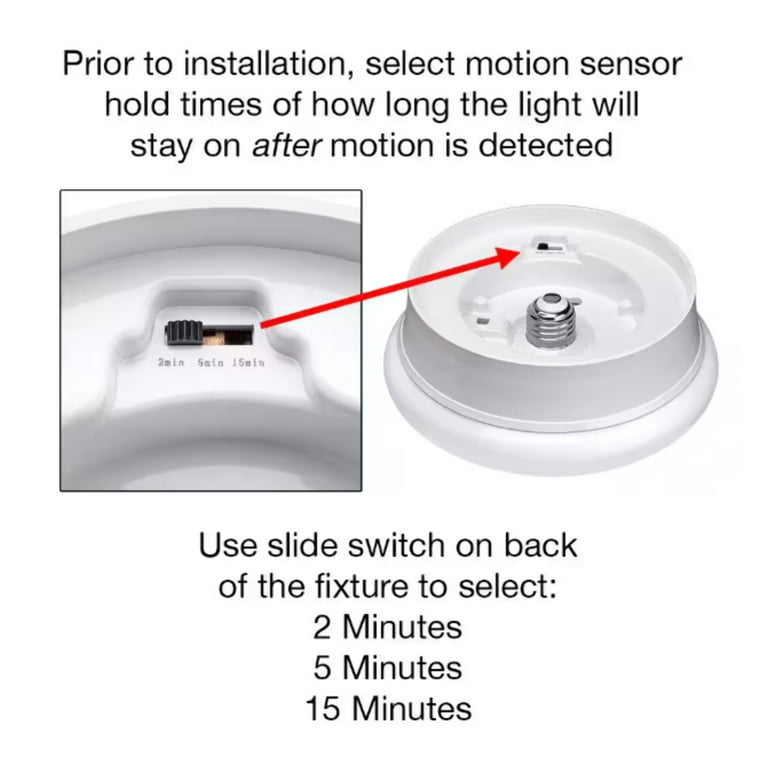
Credit: www.walmart.com
Energy Efficiency And Safety
Energy efficiency and safety are two key reasons why motion sensor lights have become popular for homes and businesses. These lights help you save electricity by turning on only when needed, and they also improve security by illuminating dark areas when motion is detected. Understanding how to optimize their timing can make a big difference in both your power bill and your peace of mind.
Saving Power With Timers
Motion sensor lights usually come with adjustable timers that control how long the light stays on after detecting movement. Setting the timer to a shorter duration can significantly reduce energy usage, especially in areas where motion is brief, like hallways or entryways.
Think about your own home: how often do you find lights staying on longer than necessary? Adjusting the timer to fit your specific needs means you won’t waste power illuminating empty spaces. Some advanced models even allow you to customize the timing based on the time of day, saving even more energy.
Preventing False Activations
False activations happen when motion sensors turn on the light without actual human movement, often triggered by pets, wind, or passing cars. These unnecessary activations not only waste power but can also wear out the bulb faster.
To prevent this, you can adjust the sensor’s sensitivity or position it away from sources that cause false triggers. For example, mounting the sensor higher can avoid pets setting it off, while angling it away from busy roads reduces car-triggered activations.
Have you ever been annoyed by a motion light turning on at odd times? Taking control of your sensor’s settings can cut down these interruptions, helping you save power and keep your lighting system reliable.
Troubleshooting Light Duration Issues
Having trouble with how long your motion sensor light stays on? It’s a common issue that can be frustrating, especially if your light either shuts off too quickly or stays on longer than expected. Understanding the root of these problems can save you time and hassle, helping you get your lighting just right.
Sensor Malfunctions
Sometimes the sensor itself is the culprit. Dust, dirt, or even spider webs can block the sensor, causing it to misread movement or stay activated. Have you checked if the sensor lens is clean lately? A quick wipe with a soft cloth can restore proper function.
Electrical glitches can also cause problems. If your light flickers or won’t turn off, it might be due to a faulty sensor or wiring issue. Testing the sensor in different lighting conditions or consulting the product manual can reveal if a reset or replacement is needed.
Interference Problems
Is your motion sensor light turning on randomly or not turning off as expected? Interference could be the reason. Other light sources, such as car headlights or passing shadows, might trigger the sensor unintentionally.
Think about where you installed your light. Is it near a busy road or a tree with moving branches? Adjusting the sensor’s angle or sensitivity settings can reduce false triggers and extend the light’s on time to suit your needs.
Maintenance Tips
Routine care keeps your motion sensor light working well. Set a reminder to clean the sensor lens every few months—this simple step prevents many issues.
- Check for loose wiring or damaged parts regularly.
- Test the sensor’s sensitivity and adjust according to the environment.
- Replace batteries if your light is battery-powered to avoid unexpected shutdowns.
Have you noticed your light behaving oddly after heavy rain or extreme weather? Moisture can affect the sensor’s electronics, so ensure your fixture is weatherproof and properly sealed.

Credit: www.amazon.com
Frequently Asked Questions
How Long Do Motion Sensor Lights Typically Stay On?
Motion sensor lights usually stay on for 30 seconds to 5 minutes. The duration varies by model and settings. Users can often adjust the timer to fit their needs. This helps save energy while providing sufficient lighting.
Can I Adjust The Time Motion Sensor Lights Stay Lit?
Yes, most motion sensor lights allow timer adjustments. You can set the light to stay on from a few seconds to several minutes. This customization improves convenience and energy efficiency based on your preferences.
What Factors Affect How Long Motion Sensor Lights Stay On?
The light’s timer setting, sensitivity, and ambient light sensor affect its duration. Environmental factors like temperature and object movement also impact how long the light remains on. Proper installation ensures optimal operation and timing.
Do Motion Sensor Lights Turn Off Automatically?
Yes, motion sensor lights turn off automatically after the preset time without motion detection. This feature conserves energy and ensures the light only operates when needed. It enhances security and reduces electricity costs.
Conclusion
Motion sensor lights usually stay on between 15 seconds and 5 minutes. You can adjust the time to fit your needs. These lights save energy by turning off when no motion is detected. They improve safety by lighting dark areas quickly.
Choose a timer setting that matches your space and use. Understanding how long the light stays on helps you use it well. Keep your home secure and energy bills low with the right settings. Simple changes make motion sensor lights work best for you.



